
3 Ways to Connect Snowflake to Salesforce with AI - Complete Integration Guide
See Snowflake data inside Salesforce AI prompts — live
GPTfy's API Data Source framework pulls Snowflake data directly into Salesforce prompts. See it in a 2-minute demo.
Overview
What?
A practical guide showing three declarative approaches to integrate Snowflake with Salesforce using GPTfy, enabling AI-powered insights from external data without requiring Data Cloud or additional licenses.
Who?
Salesforce admins, architects, financial services professionals, and support teams who need to access and analyze Snowflake data within their Salesforce workflows.
Why?
To unlock critical business data trapped in Snowflake, eliminate context-switching between platforms, and enable instant AI-powered analysis directly where sales teams work – all while avoiding expensive additional licenses.
→ Access external data. Generate instant insights. Stay in Salesforce.
What Can You Do With It?
- Financial Advisory Automation: Pull portfolio holdings and transaction data from Snowflake to prepare for client meetings with AI-generated insights on allocations, cash runways, and anomalies.
- Support Case Resolution: Use Snowflake as a knowledge base to automatically retrieve answers from product manuals, technical documentation, or troubleshooting guides stored externally.
- Account Intelligence: Combine Salesforce CRM data with external financial records, transaction histories, or operational metrics stored in Snowflake for comprehensive account views.
- Real-time Data Analysis: Generate AI insights on external datasets without moving data into Salesforce, maintaining your single source of truth while enabling analysis where users work.
The Data Disconnect Problem
Here's the reality most sales and support teams face: The data they need isn't where they work.
Product usage metrics? In Snowflake. Consumption patterns? Snowflake. Telemetry data that shows which customers are thriving and which are at risk? You guessed it – Snowflake.
Meanwhile, sales teams live in Salesforce. Support reps work cases in Salesforce. Account executives plan territories in Salesforce.
This creates a painful disconnect: critical business intelligence sits in one system while the people who need it work in another. So they jump back and forth, copy data manually, try to mentally stitch together a complete picture, and inevitably miss important details.
This isn't just annoying. It's expensive.
Why Teams Need Snowflake Integration
Before we dive into how to solve this, let's be clear about what's at stake.
The Data Lives There
Your most valuable business data – product usage, consumption metrics, telemetry, transaction histories – doesn't belong in Salesforce. It shouldn't. Salesforce wasn't built for massive data volumes, and its storage costs reflect that reality.
Snowflake was purpose-built for this. It's where your data warehouse lives, where your analytics team works, and where your single source of truth resides.
But here's the catch: Sales teams don't work in Snowflake. They work in Salesforce.
Sales Productivity Takes the Hit
When data lives in Snowflake but sales teams work in Salesforce, everyone loses time:
- Before client meetings: 30 minutes searching for account context across multiple systems instead of 2 minutes with instant summaries.
- New rep onboarding: Weeks of learning where to find information instead of immediate access to complete account intelligence.
- Account handoffs: Hours of tribal knowledge transfer instead of an automated context that travels with the account.
- Territory planning: Days of manual analysis instead of AI-driven insights based on actual consumption patterns.
This adds up fast. A team of 50 sales reps wasting 30 minutes per day on data archaeology loses 6,250 hours annually. That's the equivalent of three full-time employees' worth of productivity going to waste.
The Manual Effort Tax
Every hour spent searching for data is an hour not spent selling. Every manual consolidation introduces errors. Every context switch breaks focus.
Sales teams become data archaeologists instead of revenue generators. And unlike archaeology, there's no treasure at the end – just the information they should have had immediate access to in the first place.
The Cost-Efficiency Challenge
The traditional "solution" – importing all that Snowflake data into Salesforce – creates new problems:
- Storage costs explode: Salesforce charges premium rates for data storage. Moving terabytes from Snowflake to Salesforce isn't just expensive; it's financially irresponsible.
- Scalability hits a wall: As your data grows, Salesforce becomes the bottleneck. Adding new data sources means navigating CRM limitations and governance policies.
- Maintenance overhead grows: Now you're synchronizing data between systems, managing ETL processes, troubleshooting sync failures, and explaining to leadership why the numbers don't match.
What if you could access Snowflake data without moving it?
Three Integration Patterns, Zero Data Cloud
GPTfy enables three distinct approaches to connect Snowflake with Salesforce. Each pattern solves different use cases, maintains your data where it belongs, and requires zero Data Cloud licenses.
Let's break down each approach with real scenarios.
Pattern 1: API Data Source – On-Demand Intelligence
Video: Watch the demo
Best for: Dynamic data retrieval, custom queries, real-time analysis
How It Works
Picture this: You're reviewing an account in Salesforce, preparing for tomorrow's client meeting. You need to know their consumption patterns, product usage trends, and potential expansion opportunities.
Instead of logging into Snowflake, running queries, exporting data, and manually analyzing it, you click a GPTfy prompt.
What happens next is pretty slick:
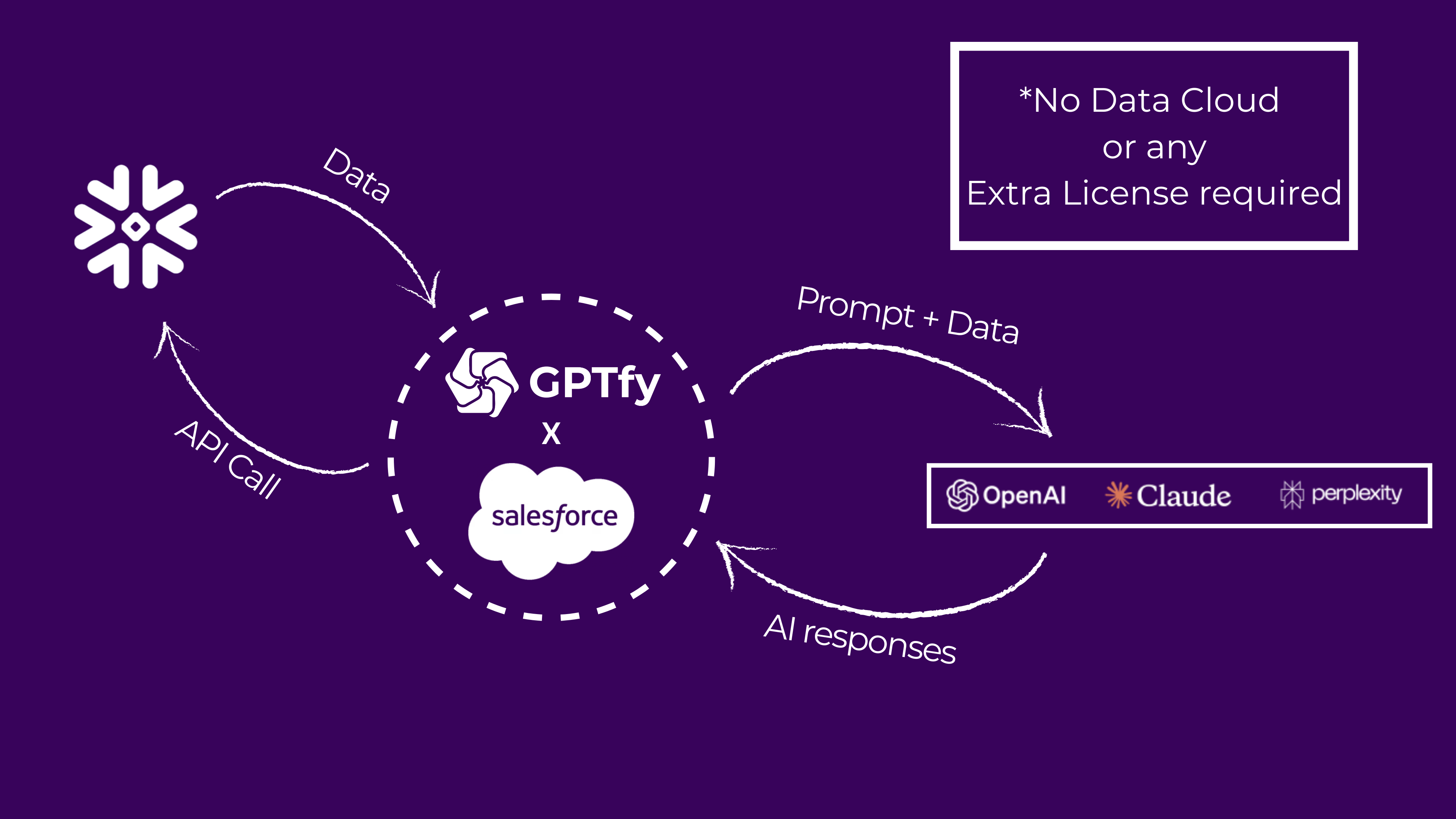
- GPTfy sends an API call to Snowflake
- Snowflake returns the requested data
- GPTfy attaches that data to the AI prompt
- Mask sensitive data before sending it to AI
- AI processes and generates insights
- Results appear directly in Salesforce
No platform switching. No copy-paste gymnastics. No manual analysis. Just click and wait.
The Output
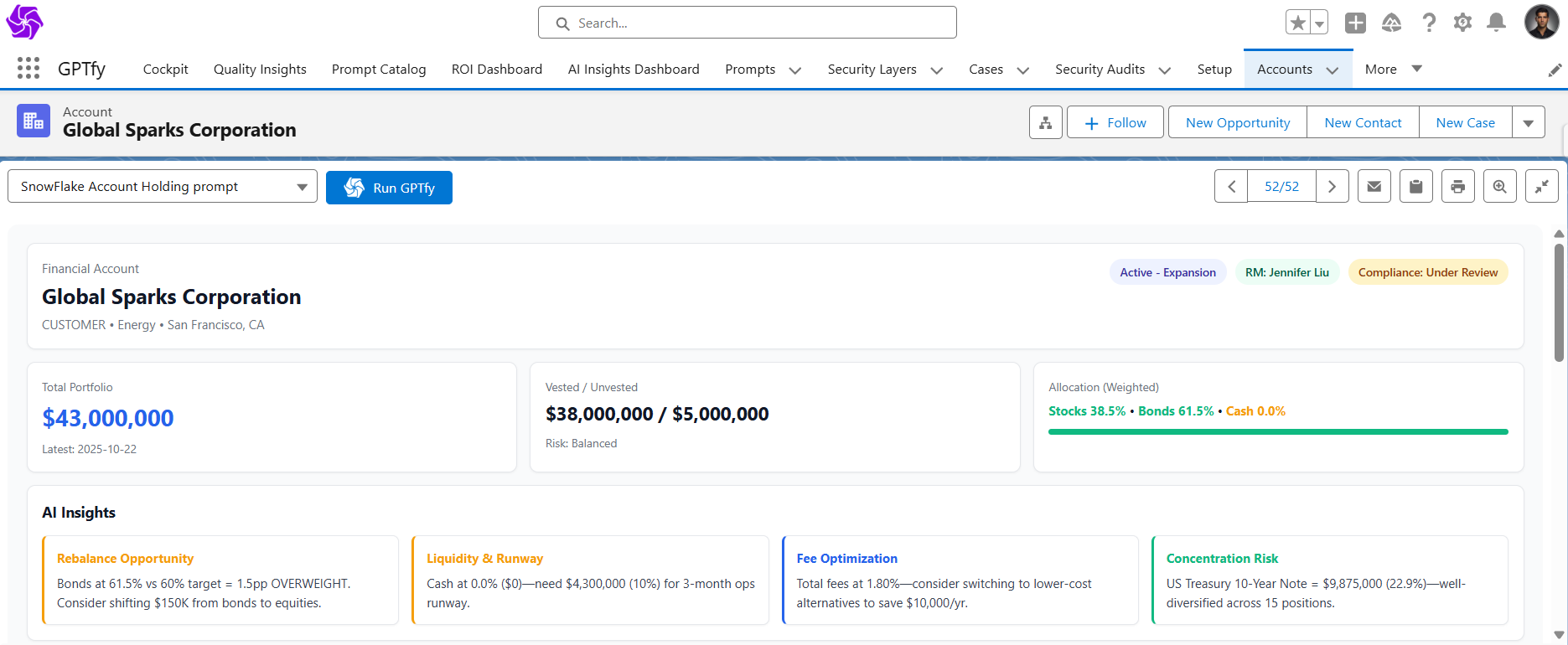
Within seconds, your screen fills with exactly what you need:
- Total portfolio values ($2.3M)
- Product adoption metrics across different modules
- Consumption trends over the past 90 days
- Vested vs. unvested breakdowns
- Weight allocations across asset classes
- AI-generated insights on account health
- Expansion opportunity indicators
- Stop-loss recommendations
- Complete holdings summary
All formatted in clean, readable tiles. Your prep time just dropped from 30 minutes to 30 seconds.
Pro tip: This pattern shines when you need different data for different records. The API call is dynamic, pulling exactly what's relevant for that specific account. New sales rep taking over an account? They get instant context without tribal knowledge transfer.
Pattern 2: RAG (Retrieval Augmented Generation) – Knowledge Base on Steroids
Video: Watch the demo
Best for: Support cases, documentation queries, troubleshooting, compliance documentation
The Use Case
A customer case lands in your queue: "What's the towing capacity of Cybertruck?"
You could spend the next 15 minutes digging through product manuals stored in Snowflake, searching documentation databases, or asking a colleague who might know. Or you could let AI do the heavy lifting while you grab a coffee.
Here's what makes RAG different: Your company stores all owner's manuals, technical specifications, compliance documents, and troubleshooting guides in Snowflake. GPTfy uses Snowflake's Cortex to turn that storage into intelligent retrieval. It's like having a research assistant who's actually read every manual cover-to-cover and has perfect recall.
The Process
When you run the prompt:
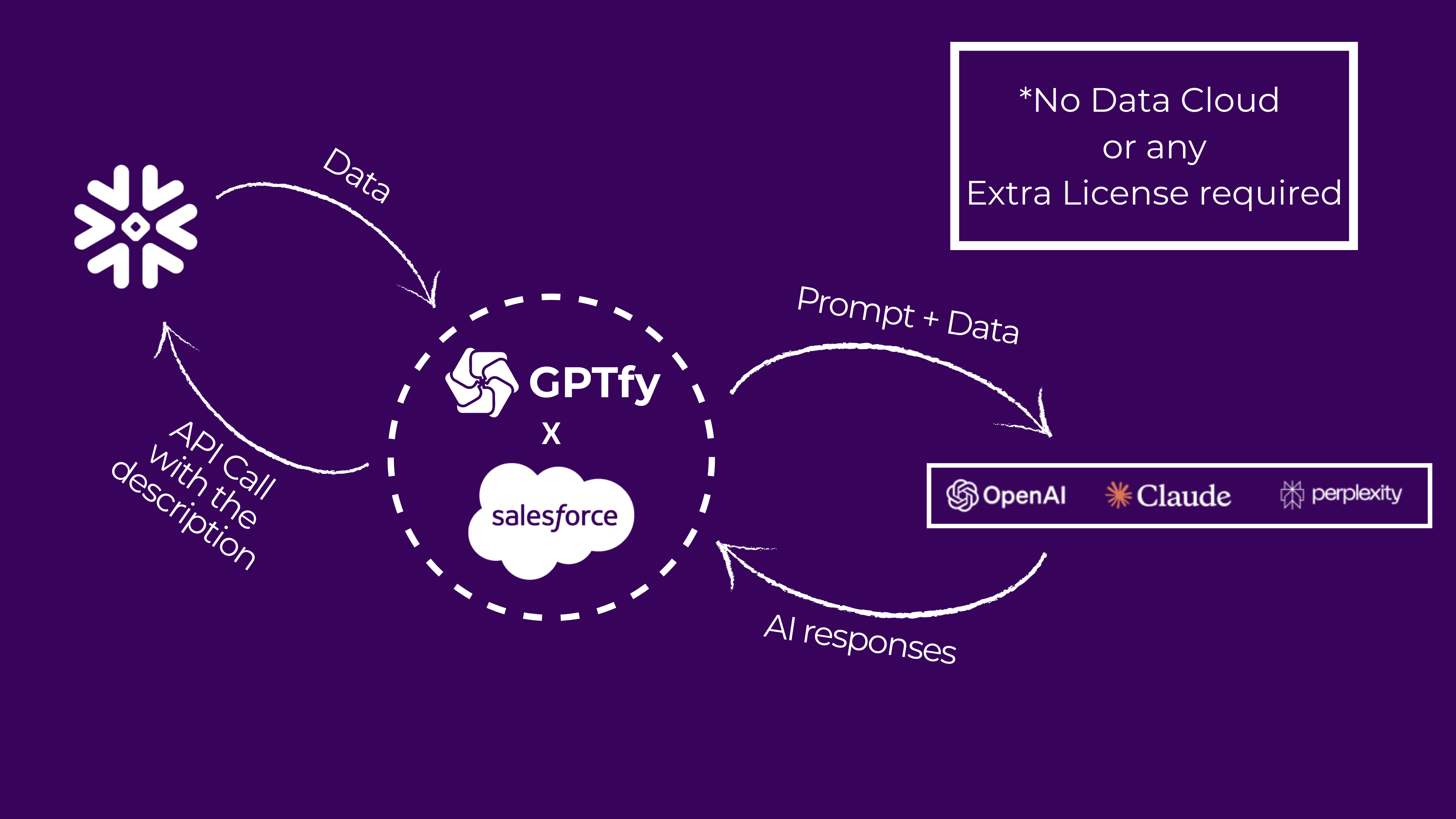
- GPTfy extracts the case description
- Sends the question to Cortex in Snowflake
- Cortex identifies which document contains the answer
- Returns the relevant section to Salesforce
- GPTfy sends that context to AI for processing
- AI generates a specific, cited answer
The Result
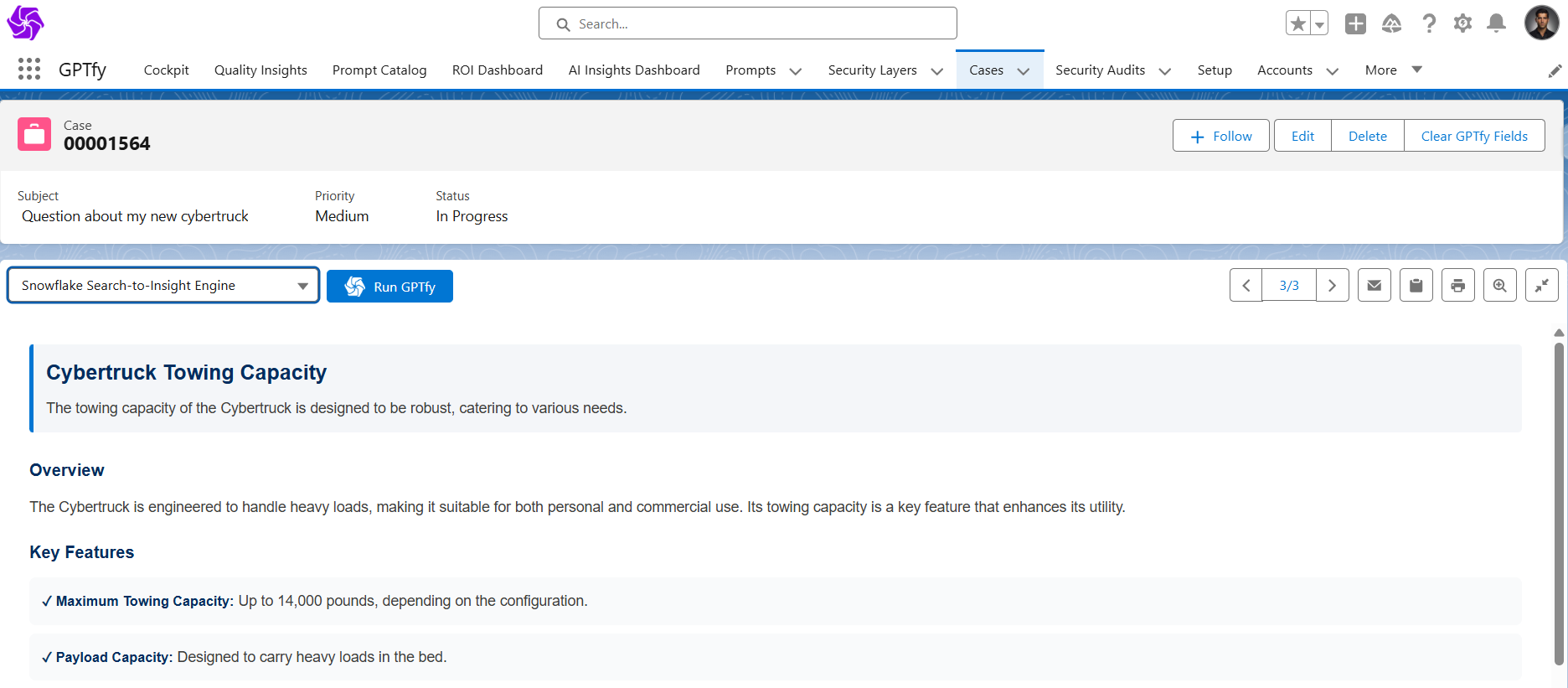
"The maximum towing capacity is up to 14,000 pounds, depending on configuration. Payload capacity is designed to carry heavy loads in the bed."
Done. Answer cited. Customer-ready. Time elapsed: about 10 seconds.
Reality check: This isn't just about speed – though saving 14 minutes per case adds up fast. It's about consistency and scalability.
Every support rep gets the same accurate information from the same source. No more "I think it's..." or "Let me ask someone who might know." No tribal knowledge bottlenecks. No variation in answer quality based on who happens to be available.
When your support team grows from 10 to 100 agents, the knowledge base scales with them. New hires have instant access to the same expertise as 10-year veterans.
Pattern 3: External Objects – Live Data Federation
Video: Watch the demo
Best for: Consistent data access, when you need Snowflake data to behave like Salesforce data
The Configuration
This approach uses Salesforce's native External Data Source functionality to federate data from Snowflake. Think of it as giving Salesforce X-ray vision into your data warehouse – the data stays put, but you can see and work with it as if it lived in Salesforce.
Typical setup includes:
- Financial Accounts (external object)
- Financial Holdings (external object)
- Financial Transactions (external object)
- Product Usage Metrics (external object)
- Consumption Data (external object)
This pattern is particularly powerful for territory planning and opportunity health scoring. Your sales operations team can build dashboards that incorporate both CRM data and consumption metrics without moving anything into Salesforce.
Implementation in Action
Open an account in Salesforce and you'll see external object data sitting right alongside your native Salesforce fields. No visual difference. No performance lag. Just... there.
Pre-configured GPTfy prompts make analysis instant:
- Account Holdings Insights
- Transaction Analysis
- Product Adoption Summary
- Consumption Trend Analysis
Click "Account Transaction Insights" and watch GPTfy work its magic.
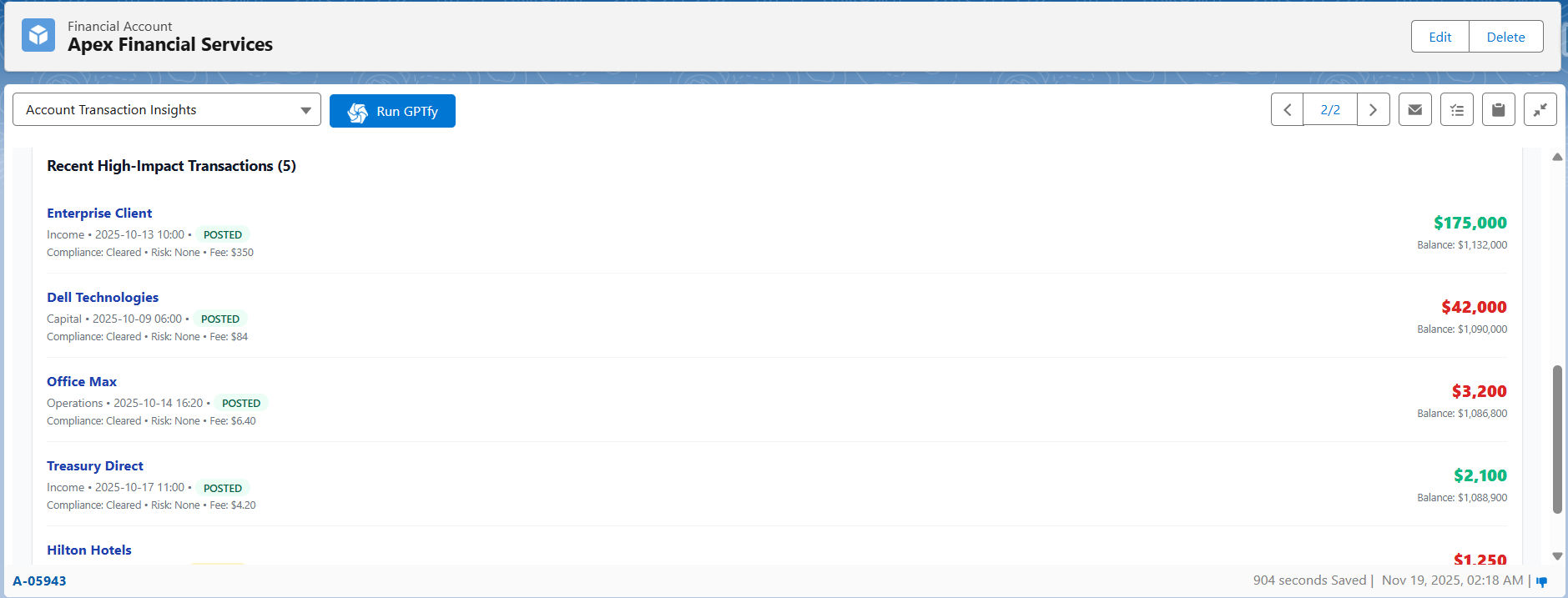
What you get:
- Inflow amounts: $450K
- Outflow amounts: $380K
- Net flow: +$70K
- Cash runway analysis: 18 months at current burn rate
- Anomaly detection: Unusual spike in API calls detected
- Recent high-impact transactions flagged for review
- Product adoption score: 78/100
- Expansion opportunity indicators
- Strategic recommendations based on usage patterns
All presented in visual tiles that actually make sense at a glance. And here's the kicker: that data never left Snowflake. You're working with live, federated data.
Pro tip: External Objects work beautifully when you have structured data that maps cleanly to object relationships. If you've worked with Salesforce External Data Sources before, this will feel like coming home.
The No-License Reality
Here's what makes this approach different: No Data Cloud license required. No third-party middleware. No additional platform fees.
You're using:
- Snowflake (which you already have)
- Salesforce (which you already have)
- GPTfy (AppExchange app with straightforward pricing)
That's it. No expensive enterprise licenses. No complex data synchronization. No duplicate storage costs.
Data Cloud is powerful for certain use cases – particularly when you need complex data modeling across multiple sources or want to leverage Einstein AI features. But if you're simply trying to access Snowflake data from Salesforce and apply AI to it, you don't need that complexity.
Security and Compliance Considerations
When connecting external data sources, security isn't optional. GPTfy handles this through multiple layers:
-
Named Credentials: Your Snowflake credentials are managed by Salesforce's native Named Credential system, never exposed in code or configurations. This follows Salesforce best practices and maintains your security posture.
-
Data Masking: PII and sensitive data are automatically masked before being sent to AI models, then re-injected into responses. Your AI never sees actual social security numbers, account numbers, or other regulated data.
For example, an email address like
john.doe@company.combecomes[MASKED_EMAIL_001]before AI processing, then gets restored to the actual email in the final response. Users see complete information; AI models see tokenized data. -
Audit Trail: Every API call, every data retrieval, every AI interaction creates a security audit record for compliance tracking. When auditors come knocking, you're ready. You can prove exactly what data was accessed, when, by whom, and for what purpose.
-
Row-Level Security: External Object patterns respect both Salesforce sharing rules and Snowflake access controls. Users only see what they're authorized to see, period. If your Snowflake security model restricts certain users from viewing specific accounts, those same restrictions apply when accessing data through Salesforce.
This matters in financial services, healthcare, insurance – any regulated industry where data governance isn't negotiable. Your compliance team can sleep at night knowing that security controls apply consistently across platforms.
Choosing Your Pattern
Use API Data Source when:
- You need custom queries for each record
- Data structure varies by context
- You want maximum flexibility
- Real-time calculations are required
- You're generating account summaries or opportunity insights
- New rep onboarding requires instant context
Use RAG when:
- You're answering questions from documents
- Knowledge base retrieval is the goal
- Unstructured data needs to become structured answers
- Context matters more than precise data
- Support cases need documentation references
- Compliance questions require sourced answers
Use External Objects when:
- Data structure is consistent
- You want native Salesforce-like behavior
- Relationship queries are important
- You're already using External Data Sources
- Territory planning needs consumption data
- Dashboards require both CRM and warehouse data
The honest truth? Most organizations end up using more than one pattern. Different use cases demand different approaches, and that's perfectly fine. A financial services firm might use API Data Source for account summaries, RAG for compliance documentation, and External Objects for portfolio analytics.
Conclusion
The disconnect between where your data lives and where your teams work costs more than you think. Every context switch, every manual consolidation, every minute spent searching for information adds up to thousands of lost hours annually.
But here's the good news: You don't need expensive licenses or complex integrations to fix it.
GPTfy's three integration patterns – API Data Source, RAG, and External Objects – let you access Snowflake data directly within Salesforce, apply AI to generate instant insights, and maintain security without moving data around. Implementation takes weeks, not months. Costs are predictable. Results are measurable.
Financial advisors cut meeting prep from 30 minutes to 5. Support teams resolve cases 45% faster. Sales organizations effectively gain 15% capacity without hiring. New reps ramp in half the time.
The question isn't whether you should connect Snowflake to Salesforce. The question is how much longer you're willing to pay the context-switching tax.
Your data warehouse and your CRM each do what they do best. Now make them work together without the overhead.
Have questions about your specific use case? Book a demo to discuss implementation options with our team.
Want to learn more?
View the Datasheet
Get the full product overview with architecture details, security specs, and pricing — with a built-in print option.
Watch a 2-Minute Demo
See GPTfy in action inside Salesforce - from prompt configuration to AI-generated output in real time.
Ready to see it with your data? Book a Demo
Explore GPTfy