
What Is RAG in Salesforce?
RAG (Retrieval-Augmented Generation) grounds AI answers in the content your team maintains - Salesforce Knowledge, policies, playbooks. Here's what it means in practice, and how GPTfy automates the sync so Salesforce stays the source of truth.
Last updated:
The Operational Problem RAG Creates
Most Salesforce organizations already manage customer-facing answers in Salesforce - FAQs, resolution steps, policies, and playbooks. RAG makes those answers usable inside AI responses. The problem shows up immediately after:
- Knowledge articles change often and need to reflect in downstream RAG systems.
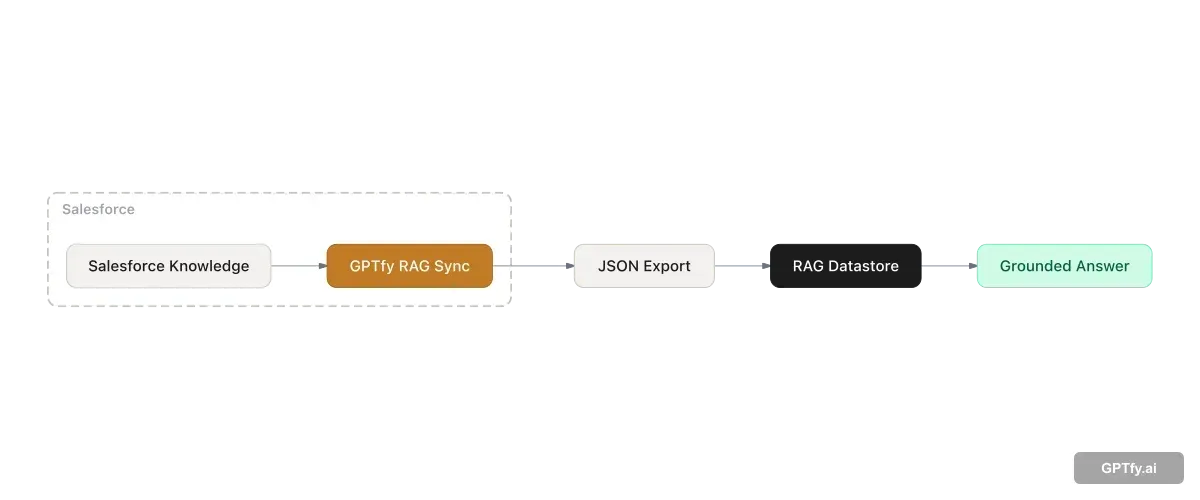
- RAG systems expect content in a specific file format and storage pattern - usually JSON.
- Teams end up doing manual work: export, transform, upload, and trigger datastore import jobs - every time content changes.
In practice, RAG adoption stalls not because RAG is complicated, but because sync is a recurring workflow tax. Teams build the RAG pipeline once and then struggle to keep it current.
RAG, Defined for Salesforce Teams
RAG (Retrieval-Augmented Generation) is an AI pattern where your application retrieves relevant source content and includes it as context for a generated answer. The model doesn't guess - it reads.
In Salesforce, "retrieval" usually maps to a governed content source like Salesforce Knowledge - because it already has business ownership, review workflows, and access permissions. Service Cloud teams use it for case resolution. Sales teams use it for competitive playbooks and objection handling. Healthcare teams use it for clinical protocols.
RAG grounds answers in what your team wrote and approved - not in whatever the model was trained on. For regulated industries , that distinction is the difference between useful AI and compliant AI.
What GPTfy RAG Sync Does
GPTfy RAG Sync automates the extraction of Salesforce records into the file format your RAG datastore expects, so Salesforce stays the source of truth while your downstream RAG stays current.
Without automation, the typical steps are manual export, format conversion, upload, and datastore import - run again every time content changes. With RAG Sync, admins define the configuration once and schedule it. Business users keep working in Salesforce. The pipeline runs in the background.
Teams using RAG Sync alongside the Knowledge Article Management use case can also automate article creation from resolved cases - so the RAG content base grows as your team resolves tickets.
Key Concepts: Embeddings, Vector Search, and Hybrid Search
Understanding RAG in depth means understanding how retrieval actually works. Three concepts underpin every RAG system:
- Embeddings - Numeric representations of text that capture semantic meaning. Instead of matching exact keywords, embeddings let the system find content that means the same thing even when the words differ. A query about “claim rejected” can retrieve an article about “coverage denial” without sharing a single word.
- Vector databases - Databases optimized to store and search embeddings. When a user submits a query, the system converts it to an embedding and compares it against stored embeddings to surface the closest-matching content.
- Hybrid search - A combination of vector (semantic) search and traditional keyword search. Pure vector search is probabilistic and can return inconsistent answers to the same question. Hybrid search adds keyword matching as a constraint, producing more consistent and reliable results - especially important for regulated industries where answer consistency affects compliance and trust.
For Salesforce teams, the practical implication is content readiness. Knowledge articles written for human readers often need optimization before they perform well in RAG. Concise Q&A format, explicit headings, and direct answers outperform long narrative documents. A short validation exercise - testing 20-30 sample questions against your knowledge base before go-live - surfaces gaps early and reduces post-launch fixes.
How to Configure a RAG Sync Record
In Salesforce, open the App Launcher and search for RAG syncs. Create a new record and configure:
- Basic configuration: name, description, file format (JSON), and file name
- AI model configuration: one model action for file upload, one for datastore import
- Data source configuration: object, fields, and a where-clause filter
- Scheduling: a Salesforce CRON expression so updates run automatically
Three actions drive day-to-day operations from the record UI:
- Run Now - generates a new job and produces the latest JSON file on demand
- Schedule - enables automated sync jobs at your chosen cadence
- Edit - expand fields or adjust filters as your content strategy evolves
For teams using Snowflake as an external data source, RAG Sync works alongside GPTfy's Snowflake connector to ground AI answers in warehouse data without pulling it into Salesforce first.
RAG as the Knowledge Layer for Salesforce Agents
Agentic AI systems need grounded knowledge to reason accurately - not just live records, but policies, processes, resolution playbooks, and institutional knowledge. Without RAG, an AI agent answering a question about a product escalation path has only its training data, which produces hallucinated responses.
The gap is especially consequential in regulated industries. A healthcare agent that fabricates a clinical protocol - rather than retrieving the approved one from your Knowledge base - creates compliance exposure, not just inaccuracy. Grounded knowledge isn't a nice-to-have for agentic AI; it's the difference between autonomous action and autonomous risk.
GPTfy's RAG Sync builds and maintains the Salesforce Knowledge base that agents draw from, enabling grounded, accurate agentic behavior rather than confident-sounding guesswork. As agents expand to new workflows, the knowledge layer expands with them - automatically, on schedule, without manual intervention.
Governance Patterns That Keep RAG Accurate
The fastest way to keep RAG accurate is to treat it as an extension of your existing Salesforce content governance - not as a separate system to maintain:
- Use Salesforce Knowledge (or a governed custom object) as the authoritative content source. If content isn't reviewed in Salesforce, it shouldn't be in RAG.
- Extract only the fields you want the model to see. Exclude sensitive fields at the RAG Sync level - they never enter the pipeline.
- Schedule sync jobs to match your content change cadence. Daily is common; high-change content like product pricing may need hourly.
- Apply data masking rules before any content reaches the AI provider - especially relevant for healthcare and financial services teams handling PHI or customer financial data.
Authentication and endpoint security for AI provider callouts use Named Credentials , managed in Salesforce rather than hardcoded in scripts or apps. To keep prompts stable as knowledge evolves, pair RAG with Prompt Builder for prompt commands and grounding rules. The prompt template stays consistent while the retrieved content updates automatically on each sync cycle. For the full GPTfy platform architecture , see the platform datasheet.
Combining RAG with BYOM
RAG controls the content source that grounds AI answers. BYOM (Bring Your Own Model) controls which model generates the answer. A single Prompt Builder prompt can reference a BYOM model for generation and a RAG datastore for retrieval - the two patterns are designed to work together inside GPTfy.
Teams that need grounded, accurate answers from governed knowledge sources use RAG for retrieval and BYOM to select the model best suited for summarization, compliance checking, or domain-specific generation. Neither pattern requires the other, but combining them produces the most accurate and governable AI outputs inside Salesforce.
Key takeaways
RAG is retrieval + generation
Answers are generated using retrieved source content - like Knowledge articles - not only a free-form prompt. The AI cites what your team wrote, not what the model was trained on.
The hard part is keeping content current
Manual exports and uploads don't scale when Knowledge changes daily. A sync job eliminates that recurring overhead.
GPTfy RAG Sync is admin-configured
Pick an object, fields, and filters. Generate JSON. Run now or schedule with a CRON expression. No engineering required for standard use cases.
Salesforce stays the source of truth
Business users keep managing content in Salesforce. Downstream RAG datastores receive scheduled exports automatically - no separate knowledge management system required.
FAQ
No, but it's the most common starting point because Knowledge is already governed and business-owned. RAG Sync can extract any Salesforce object - define the fields and filters that produce useful source content, and the pipeline works the same way.
Yes. RAG Sync is designed so business users keep managing content in Salesforce. Downstream RAG datastores receive scheduled exports in the required format - no separate knowledge management system or manual sync work.
Match your cadence to how frequently articles change. Most teams start daily and increase frequency for high-change content. Configure the CRON schedule on the RAG Sync record - or use Run Now for immediate updates after a significant knowledge base change.
Yes. Start with one object and a small field set - for example, the core Knowledge fields your agents use most. Validate output quality with a few test prompts, then expand fields, filters, and objects as confidence grows.
GPTfy's Security Layer applies your configured field-level masking rules before any data is sent to the RAG datastore or AI provider. Sensitive fields can also be excluded from the RAG Sync field selection entirely, so they never enter the pipeline.
Yes. A single Prompt Builder prompt can reference a BYOM model for the generation step and a RAG datastore for retrieval. BYOM controls which model generates the answer; RAG controls the content source that grounds it. The two patterns are designed to work together inside GPTfy.
Yes. RAG significantly reduces hallucinations by grounding answers in specific retrieved content rather than relying on model training data. Instead of generating from memory, the model reads the retrieved source and summarizes it. Citing the source article in the response also makes it easy for users to verify answers - adding transparency that builds trust over time.
Concise Q&A or FAQ-style content performs best. Articles that directly answer specific questions retrieve more reliably than long narrative documents. Before going live, test 20-30 sample questions against your knowledge base and review whether the right articles surface. Content that consistently fails to retrieve correctly usually needs more specific headings and explicit answers rather than implied ones.
Agentic AI systems need grounded knowledge to reason accurately - without it, agents fabricate answers based on training data rather than your actual policies, processes, and institutional knowledge. RAG provides the knowledge layer that makes agentic behavior trustworthy. GPTfy's RAG Sync keeps that knowledge current automatically, so agents always draw from your latest approved content rather than stale or missing information.
See RAG Sync configured end-to-end
Book a demo and we will walk through a RAG Sync record: object and field selection, JSON export, and a scheduled sync job that keeps your knowledge current - on your data, in your org.
Explore More
RAG in Salesforce
Configure RAG pipelines for grounded answers in Salesforce workflows.
AI for Service
Use AI to summarize cases, route intelligently, and improve resolution workflows in Service Cloud.
Knowledge Article Management
Turn resolved cases into reusable Knowledge articles automatically.
Demo: What Is RAG?
Watch a RAG pipeline configured and running inside a Salesforce workflow.
Demo: Snowflake + RAG
See Snowflake data used as a RAG source for grounded Salesforce AI answers.
BYOM in Salesforce
How to connect any AI model to Salesforce workflows through GPTfy
Named Credentials for AI Security
How GPTfy secures AI API authentication with Salesforce Named Credentials
Data Masking in Salesforce AI
How GPTfy masks PII and PHI before data reaches any AI provider