
What Are Named Credentials in Salesforce AI?
Salesforce's enterprise-grade answer to AI API security - and why Custom Settings, Custom Metadata, and hardcoded keys fail compliance.
Last updated:
The AI Credential Security Problem
Every AI integration on Salesforce requires authentication credentials - API keys or tokens that grant access to AI compute resources. How you store these credentials determines your security posture, compliance eligibility, and operational risk.
The default approaches most teams consider - Custom Settings, Custom Metadata Types, or hardcoded Apex - share a fundamental flaw: credentials are stored in plain text and accessible to any code or administrator in the org. This creates multiple risk vectors:
- Credential extraction: Any Apex code with SOQL access can query and exfiltrate API keys
- Sandbox leakage: Production credentials automatically copy to sandboxes during refresh, exposing them to non-production environments
- Debug log exposure: Values can appear in debug logs when logging is enabled
- Metadata export: Credentials travel with change sets and deployment packages
For enterprises in regulated industries - financial services, healthcare, insurance - these risks translate to compliance violations. SOC 2, HIPAA, PCI-DSS, and FINRA all require strict controls over how authentication secrets are stored and accessed. GPTfy's security layer addresses this by building Named Credential support directly into the platform, with no workarounds required.
Credential Storage Options Compared
Salesforce offers multiple mechanisms for storing data. Not all are appropriate for AI credentials. Here is how the options compare for enterprise security:
Hardcoded in Apex
Risk Level: Critical. API keys embedded as string constants in Apex classes are visible to any developer with "View All Classes" permission. They persist in version control, appear in change sets, and can surface in debug logs. Salesforce explicitly warns against this pattern.
Verdict: Never acceptable for production. Represents a fundamental security violation.
Custom Labels
Risk Level: High. Designed for translatable UI text, not secrets. Values are not encrypted, visible to any administrator in Setup, and included in metadata deployments. Salesforce documentation explicitly states Custom Labels should only be used for non-sensitive text.
Verdict: Explicitly inappropriate for secrets.
Custom Settings
Risk Level: Moderate-to-High. Values are stored in queryable sObjects - any Apex code with SOQL access can retrieve them. While "protected" visibility hides data from subscribers in managed packages, within your org the data remains accessible through API queries. Production values propagate to sandboxes during refresh. Security researchers have documented Custom Settings as a common target for credential extraction attacks.
Verdict: Better than hardcoding but fundamentally insecure for AI credentials.
Custom Metadata Types
Risk Level: Moderate. Within managed packages with "protected" visibility, values are hidden from subscribing orgs. However, unprotected records are queryable by any code. Values travel with metadata deployments and can be extracted during org migrations. Salesforce security community consensus: Custom Metadata Types were designed for application configuration, not secrets.
Verdict: Acceptable only within managed packages with protected visibility. Not recommended for customer-managed AI credentials.
Named Credentials with External Credentials
Risk Level: Enterprise-grade. The only Salesforce-native mechanism providing encryption at rest, server-side credential injection (keys never appear in code or logs), permission-based access control, non-exportability (write-only), and sandbox isolation. Salesforce's official recommendation for all external service integrations.
Verdict: The only option meeting enterprise security requirements.
| Criteria | Custom Settings | Custom Metadata | Named Credentials |
|---|---|---|---|
| Encryption at rest | None | None | Platform encryption |
| Visible in debug logs | Yes | Yes | Never |
| Queryable via SOQL/API | Yes | Yes | No (write-only) |
| Propagates to sandboxes | Yes | Yes | No |
| Permission-based access | Limited | Limited | Full (Permission Sets) |
| Salesforce recommended | No | Partial | Yes |
How GPTfy Implements Zero-Trust BYOK
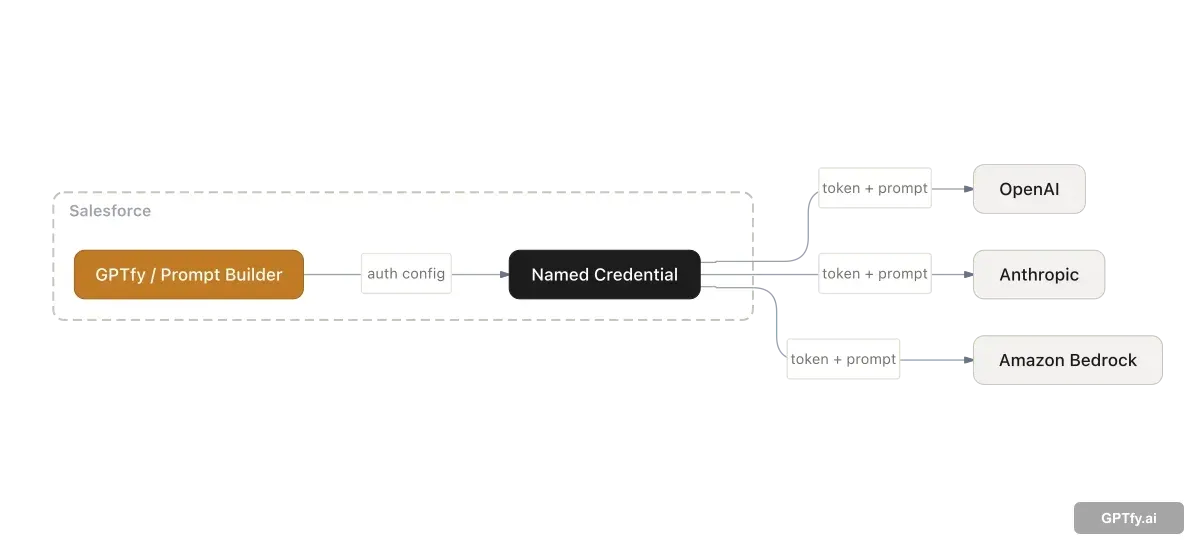
GPTfy's BYOK (Bring Your Own Key) architecture rests on a fundamental principle: your AI credentials never leave your Salesforce environment, and GPTfy never has access to them.
The Architecture Flow
- You provision your AI service (Azure OpenAI, OpenAI, etc.) and obtain your API key directly from the provider
- You configure Named Credentials in your Salesforce org - External Credential for authentication, Named Credential for endpoint binding
- You reference the Named Credential in GPTfy's AI Model record by name only - GPTfy never sees the actual credential value
- At runtime, Salesforce injects credentials server-side when GPTfy initiates the callout using the <code>callout:</code> prefix
GPTfy operates as a credential-agnostic orchestration layer. We know which Named Credential to use, but never what credentials it contains. Your API keys are encrypted at rest using Salesforce's platform encryption, injected at runtime by Salesforce's infrastructure, and never transmitted to GPTfy or any third party.
This architecture is what makes Bring Your Own Model viable for regulated industries. You retain the contractual relationship with your AI provider, GPTfy handles the orchestration, and Named Credentials ensure the authentication chain never exposes your keys.
Key Security Properties
- Namespace isolation: By specifying <code>ccai</code> (GPTfy's namespace) as the allowed callout namespace, you ensure only GPTfy's managed package code can use the credential
- Permission Set gating: Only users explicitly assigned the relevant Permission Set can trigger AI callouts
- Key rotation without code changes: Update the credential in Setup - no deployment, no GPTfy involvement, zero downtime. The audit trail captures every rotation event with timestamp and actor
- Complete audit trail: All credential access and modifications are tracked in Salesforce's Setup Audit Trail
Authentication Protocols Supported
External Credentials support multiple authentication protocols, each suited to different AI provider requirements. Understanding which protocol to use is essential for a successful integration. For teams configuring BYOM in GPTfy , the authentication protocol selection happens at the External Credential level - GPTfy itself remains protocol-agnostic.
OAuth 2.0 Client Credentials
The recommended protocol for most modern AI providers, including OpenAI, Azure OpenAI, and Anthropic. Client Credentials flow is a machine-to-machine protocol where your application authenticates directly with the AI provider using a client ID and secret - no user login required.
In Salesforce, configure an External Credential with Protocol set to "OAuth 2.0" and Flow Type set to "Client Credentials." The client ID and secret are stored encrypted in the External Credential; GPTfy references only the Named Credential endpoint.
OAuth 2.0 JWT Bearer
Used in enterprise integrations where the AI provider requires JWT-signed assertions for authentication - common in regulated environments with strict identity requirements. AWS Bedrock via Amazon Cognito and some Azure enterprise configurations use this pattern.
Salesforce generates and signs the JWT automatically using your configured private key, reducing the risk of key mishandling in application code. This protocol works best for teams with existing PKI infrastructure.
AWS Signature Version 4
Required for direct AWS Bedrock API access and other AWS service integrations. AWS SigV4 signs every request with your AWS access key and secret, providing request-level integrity verification.
When configured as an External Credential, Salesforce computes the SigV4 signature server-side. Your AWS credentials are never exposed in Apex code, HTTP headers visible in logs, or debug output - a critical requirement for AWS security compliance.
Custom (API Key / Bearer Token)
For AI providers that use simple API key or Bearer token authentication (a common pattern for self-hosted or on-premises models), the "Custom" protocol in External Credentials allows you to define custom HTTP headers carrying the credential.
The key is stored encrypted in Salesforce and injected into the <code>Authorization</code> header at runtime. This is the simplest configuration path for providers with non-standard authentication schemes.
Legacy Named Credentials (Deprecated)
Prior to Winter '23, Named Credentials combined endpoint and authentication into a single record, supporting Password, OAuth 2.0, and JWT protocols. While still functional, Salesforce has deprecated this approach and will discontinue it in a future release.
If you are operating on a legacy setup, migrate to External Credentials. GPTfy supports both, but recommends External Credentials for all new configurations.
Compliance and Regulatory Alignment
Named Credentials are not just a convenience - they are a security control required by major compliance frameworks. GPTfy's security and compliance hub documents how Named Credentials map to each framework's specific controls.
SOC 2 Type II
Requires encryption of authentication data at rest and in transit, access controls, audit logging, and separation of duties between credential configuration and code development. Named Credentials satisfy all four requirements through native Salesforce functionality.
HIPAA
Healthcare organizations must ensure credentials accessing PHI-processing systems operate under strict access controls with full audit trails. Named Credentials' permission-based access and Setup Audit Trail integration satisfy these requirements. When combined with GPTfy's data masking , the result is a credential layer and a data layer both meeting HIPAA requirements. See how healthcare organizations use this combination for compliant AI workflows.
GDPR and Data Sovereignty
BYOK architecture ensures the customer - not GPTfy - maintains the contractual relationship with the AI provider. Data processing agreements, data residency commitments, and processor/controller relationships remain between you and your AI provider. GPTfy operates as a technical orchestrator, not a data processor. The privacy compliance demo walks through how this architecture satisfies GDPR Article 28 requirements.
Financial Services (FINRA, SEC, OCC)
Financial institutions benefit from non-exportable credential storage that prevents unauthorized extraction or replication. Combined with GPTfy's four-layer data masking, this creates a defense-in-depth approach to AI integration security that addresses FINRA Rule 4370, SEC Rule 17a-4, and OCC guidance on third-party AI risk.
The SPEC Security datasheet maps each Named Credential security property to the specific control numbers across SOC 2, HIPAA, PCI-DSS, and FINRA frameworks.
Related: Learn more about GPTfy's Zero-Trust Architecture and Data Masking for complete security coverage.
The Security Foundation for Salesforce Agentic AI
Agentic AI systems make autonomous API callouts - potentially hundreds per session, across multiple AI providers. Each callout requires secure, auditable authentication. Named Credentials provide the security architecture that lets agentic AI scale: encrypted credentials, server-side injection, Setup Audit Trail logging for every callout, and permission controls that determine which agents can access which AI providers.
For organizations adopting agentic AI at enterprise scale, this security infrastructure must be in place before trusting agents to operate autonomously. The authentication layer cannot be bolted on after deployment - it needs to be woven into every callout from the start.
GPTfy's BYOK architecture, built on Named Credentials, is designed to meet this requirement. Agents route to any configured AI provider through the same authenticated, logged, permission-gated mechanism - so every autonomous callout is as auditable as a human-triggered one. The security architecture demo shows this authentication flow end-to-end. Learn more about the full security posture in Zero-Trust Architecture .
Enterprise Best Practices
Follow these patterns to maximize security and maintainability:
Separate Credentials by Environment
Create different Named Credentials for sandbox and production (e.g., "OpenAI Sandbox" vs "OpenAI Production"). This prevents accidental production API calls during testing and limits blast radius if a sandbox is compromised.
Use External Credentials for Production
In production orgs, always use External Credentials (the modern approach) rather than Legacy Named Credentials. External Credentials separate the authentication protocol from the credential values, enabling better secret rotation and access control.
Apply Principle of Least Privilege
Only grant External Credential access to Permission Sets that actually need AI capabilities. Do not give all users access to production AI endpoints - restrict to specific roles and integration users.
Monitor Setup Audit Trail
Regularly review changes to Named Credentials and External Credentials. Track who created, modified, or accessed credential configurations. Unexplained changes should trigger security review. GPTfy's audit trails and governance feature extends this visibility beyond credential changes to every AI callout - giving you a complete picture of AI activity in your org.
Rotate Credentials Quarterly
Establish a schedule for API key rotation. With External Credentials, rotation is a UI action - no code changes or deployment required. Document your rotation schedule for auditor review.
Document Your Credential Strategy
Maintain a runbook documenting which Named Credentials exist, which AI providers they connect to, which Permission Sets have access, and the rotation schedule. Your security auditor will request this documentation. The integration approaches guide covers how different Salesforce integration patterns affect credential strategy across multi-model deployments.
How to Store an AI API Key in a Named Credential (Step-by-Step)
Since the Winter/Summer '23 update, a Salesforce credential is split into two objects: the External Credential holds the secret and the authentication logic, and the Named Credential holds the endpoint URL and points to the External Credential. You always build the External Credential first. Here is the full path for an OpenAI or Anthropic key.
- Create the External Credential. Setup → Named Credentials → External Credentials tab → New. Authentication Protocol: Custom (the path for raw API keys / bearer tokens). Save.
- Store the key as an encrypted Authentication Parameter. Add a Permission Set Mapping with Identity Type Named Principal, then an Authentication Parameter (Name: ApiKey, Value: your sk-… key). The value is encrypted at rest and write-only.
- Add the Custom Header that carries the key, so the secret is injected by the platform, not your code:
| Provider | Header Name | Header Value (formula) |
|---|---|---|
| OpenAI | Authorization | {!'Bearer ' & $Credential.AI_Provider_Cred.ApiKey} |
| Anthropic | x-api-key | {!$Credential.AI_Provider_Cred.ApiKey} |
| Anthropic | anthropic-version | 2023-06-01 |
Custom Header values by AI provider
- Create the Named Credential. URL: https://api.openai.com (or https://api.anthropic.com), select the External Credential, uncheck "Generate Authorization Header", check "Allow Formulas in HTTP Header". Save.
- Grant access. Assign the Permission Set to every user (or the integration user) that will run the callout.
- Call it from Apex — the key never appears in code:
HttpRequest req = new HttpRequest();
req.setEndpoint('callout:AI_Provider/v1/chat/completions');
req.setMethod('POST');
req.setHeader('Content-Type', 'application/json');
HttpResponse res = new Http().send(req);
Apex callout that resolves the Named Credential at runtime
`callout:AI_Provider` resolves to the Named Credential URL, and Salesforce injects the Authorization header from the encrypted parameter at runtime. To rotate the key, update the one Authentication Parameter — no deploy, no code change. This is the same encrypted-credential pattern GPTfy uses under its zero-trust BYOK model, so your provider key stays inside your security perimeter.
Key takeaways
Named Credentials are Salesforce's recommended approach
Salesforce explicitly recommends Named Credentials with External Credentials for all external service callouts. Other methods are deprecated or insufficient for production.
Credentials never appear in code, logs, or API responses
Server-side injection means API keys are invisible to developers, never logged, and cannot be extracted via SOQL or metadata export - unlike Custom Settings or Metadata.
Production credentials never leak to sandboxes
Named Credentials do not propagate during sandbox refresh. Custom Settings, Metadata, and hardcoded keys automatically copy to sandboxes, exposing production secrets.
Permission-based access control
Only users with explicitly assigned Permission Sets can trigger callouts. Other storage methods are accessible to any code running in the org.
GPTfy operates as a credential-agnostic orchestrator
GPTfy references your Named Credential by name only. Your API keys never leave your Salesforce environment and are never visible to GPTfy.
See GPTfy use Named Credentials to connect any AI model to Salesforce
Secure AI callouts from Salesforce to OpenAI, Claude, or Gemini, configured in minutes. 2-minute demo.
FAQ
Named Credentials are Salesforce's enterprise-grade mechanism for managing authentication to external services. They store API keys and endpoint URLs in encrypted format, separate from code, and automatically inject credentials into HTTP callouts server-side. Salesforce explicitly recommends Named Credentials over all other credential storage methods.
Named Credentials provide encryption at rest, server-side credential injection (keys never appear in code or logs), permission-based access control, and sandbox isolation. Custom Settings and Metadata store values in plain text, are queryable via SOQL/API, propagate to sandboxes, and are visible to any administrator - making them unsuitable for secrets.
Yes. Salesforce's official developer documentation explicitly recommends Named Credentials with External Credentials for all external service callouts. Salesforce states that legacy approaches are deprecated and that Named Credentials provide 'standard authentication implementation processes in a set of secure and manageable entities.'
GPTfy references your Named Credential by name only. When a prompt executes, GPTfy's code uses the 'callout:' prefix, which tells Salesforce to resolve the credential server-side. Salesforce injects the authentication headers automatically. GPTfy never sees, stores, or processes your actual API key - it only knows which Named Credential to reference.
Named Credentials do NOT propagate to sandboxes during refresh. This is a critical security feature - your production AI credentials stay in production. Other storage methods (Custom Settings, Metadata, hardcoded values) automatically copy to sandboxes, creating security exposure.
No. Named Credentials are write-only. No user - not even System Administrators - can retrieve credential values via API, SOQL, debug logs, or UI. Developers reference the credential by name, and Salesforce handles authentication server-side. This is fundamentally different from Custom Settings or Metadata, where any code with SOQL access can read secrets.
Named Credentials specify the endpoint URL and reference an authentication method. External Credentials (introduced Winter '23) store the actual authentication secrets separately and Named Credentials reference them. This separation enables credential rotation without configuration changes and is Salesforce's recommended approach.
While not explicitly mandated, Named Credentials satisfy the security control requirements of SOC 2, HIPAA, PCI-DSS, and FINRA for credential management: encryption at rest, access controls, audit trails, and separation of duties. Custom Settings and Metadata do not meet these requirements.
Agentic AI systems make autonomous API callouts at scale - potentially hundreds per session across multiple AI providers. Named Credentials ensure every callout is encrypted, permission-gated, and logged in Setup Audit Trail, regardless of whether a human or an agent triggered it. This security infrastructure must be in place before organizations can safely allow agents to operate autonomously at enterprise scale.
See Named Credentials for AI in your org
Book a demo and we'll walk through Named Credential setup for AI providers - configuration, permission-based access, encryption at rest, and how server-side injection keeps credentials out of code and logs.
Explore More
BYOM in Salesforce
Connect any AI model to Salesforce using Named Credentials and admin configuration.
Data Masking
Four layers of protection ensuring sensitive data never reaches AI providers.
Zero-Trust Architecture
How GPTfy keeps raw data inside Salesforce with admin-controlled AI callouts.
Bring Your Own Model
Configure external AI models in GPTfy with full security and governance controls.
Audit Trails and Governance
How GPTfy logs every AI interaction for compliance and audit
Data Masking Guide
How GPTfy masks PII and PHI before data reaches any AI provider
GPTfy Security Layer
How GPTfy keeps Salesforce data safe with AI.