
Mask PII. Audit AI Calls. Trust But Verify.
Field-level masking before every AI call. Pattern detection for 16 of 18 HIPAA identifiers. Full audit trail.
Last updated:
37%year-over-year increase in time organizations spend managing AI-related security risks (OneTrust, 2025)
See GPTfy's security layer mask PII before it leaves Salesforce
Field-level masking, regex PII detection, blocklist controls, and audit trails, built into every prompt call. 2-minute demo.
Without PII Masking, AI Systems Expose Sensitive Data
Security teams face compliance gaps when deploying AI in regulated industries-without field-level masking, every AI prompt exposes PII to third-party models and leaves no audit trail for regulatory review.
contain unredacted PII
Without pattern-based detection, AI prompts leak SSNs, credit cards, emails, and phone numbers to third-party models. Most organizations have no visibility into which sensitive fields are exposed in each callout.
“Liked the easy and click/no-code way to configure GPT LLMs on any Salesforce object and go-live in days.”
- Gurditta Garg, Chief Salesforce Evangelist, Motorola
Build prompts with Prompt Builderfor most AI implementations
Compliance teams cannot answer basic questions: Which prompts contained PHI? What data was sent to which AI model? Who executed prompts containing customer PII? No logs means no GDPR/HIPAA compliance.
“The implementation was smooth and the results exceeded expectations.”
- Rishi Golyan, Salesforce Consultant, Algocirrus
Secure this with compliance reportingdelay AI rollout due to compliance gaps
Without delegated administration, security teams become the bottleneck-they can't empower business units to configure department-specific masking rules while maintaining global policies and audit controls.
“GPTfy accurately understands user input and generates high-quality content in the right format.”
- Ankita Dhamgaya, Director and Founder, AlgoCirrus
Secure this with field-level maskingSecurity Teams, Control AI Data Usage
Field-Level PII Masking Through GPTfy Security Layer Configuration Settings
Mask SSNs, account numbers, and PHI before AI callouts. Originals stay in Salesforce. See the security architecture demo .
Complete Audit Trail Through AI Security Records for Compliance
Every AI execution logs to audit records for GDPR/HIPAA compliance . See how in our privacy compliance walkthrough .
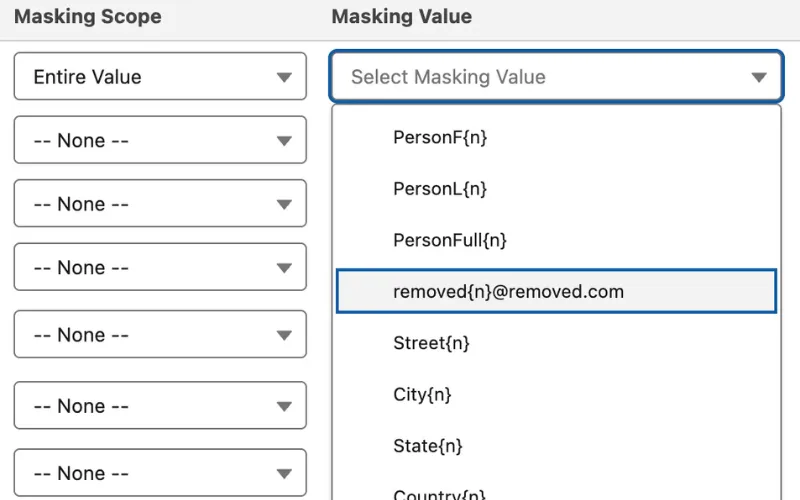
Admins, Configure Security Without Code
Point-Click Field Masking via Security Layer Setup Interface
Choose full redaction, partial masking , or tokenization per field. No code, no developer tickets.
Masking Rules by User Profile Through Salesforce Permission Sets
Different masking per user profile via Salesforce permission sets. See prompt-level security controls in action.
InfoSec, Validate Compliance
Regex Pattern Detection for PII via Configurable Rules
Pre-built regex patterns detect and mask SSNs, credit cards, and emails in free-text fields before every AI callout.
Audit Record Retention Controls Through Data Retention Console
Set retention periods, filter by sensitivity, and schedule automatic purging. Watch the compliance demo .
Why Choose Security Trust Layer
Compliance-Ready Architecture
Built from the ground up to meet stringent financial services, healthcare, and government regulatory requirements for AI systems, with validation by security teams at Fortune 500 companies.
Delegated Administration
Security teams define global policies while enabling business units to configure additional safeguards for their specific data - balancing central control with department-level flexibility.
PII Masking Before AI Calls
Mask sensitive PII/PHI before data reaches AI models. Pattern-based detection strips SSNs, credit cards, emails, and phone numbers before the API call. See the data masking walkthrough.
Powerful Capabilities
Healthcare Patient Context
Mask protected health information while providing AI with enough context to generate compliant care summaries and followup recommendations.
Financial Services Risk Management
Enable AI-assisted risk analysis while redacting account numbers, balances, and other sensitive financial information subject to banking regulations.
Government Services Delivery
Process citizen data for service optimization while meeting stringent data protection requirements for personally identifiable information.
Secure Cross-Border Operations
Maintain GDPR and international data residency compliance by masking EU citizen data before processing under zero-trust architecture , while preserving analytical value.
Key Takeaways
- Field-level PII masking supports full redaction, partial masking, and tokenization, configured per field without code.
- Pre-built regex patterns detect SSNs, credit cards, emails, and phone numbers in free-text fields before every AI callout.
- Delegated administration lets security teams set global policies while departments configure additional masking rules.
- Every AI execution creates an AI_Response__c record with original prompt, masked version, AI response, and timestamp.
- Data retention console configures audit record retention periods, filtering conditions, and automatic purging schedules.
- Masking rules apply universally across Prompt Builder, RAG pipeline, Einstein Chatbot, Experience Cloud, and Flows.
Frequently Asked Questions
GPTfy's Security Layer provides comprehensive compliance through multi-layer data masking, field-level security controls, and 100% audit trail coverage. The system automatically identifies and masks sensitive PII/PHI using pattern-based detection, while maintaining detailed logs of all AI interactions. This ensures compliance with GDPR, HIPAA, and CCPA requirements while preserving data context for quality AI responses. Watch the security architecture demo at /resources/demo/security-architecture for a full walkthrough.
Yes, the Security Layer is designed for declarative configuration without requiring coding. Salesforce Admins can use point-and-click tools to set up field-level security, define masking rules, and configure role-based access controls. The system integrates with existing Salesforce permission sets and profiles, making it easy to align AI security with your current security framework.
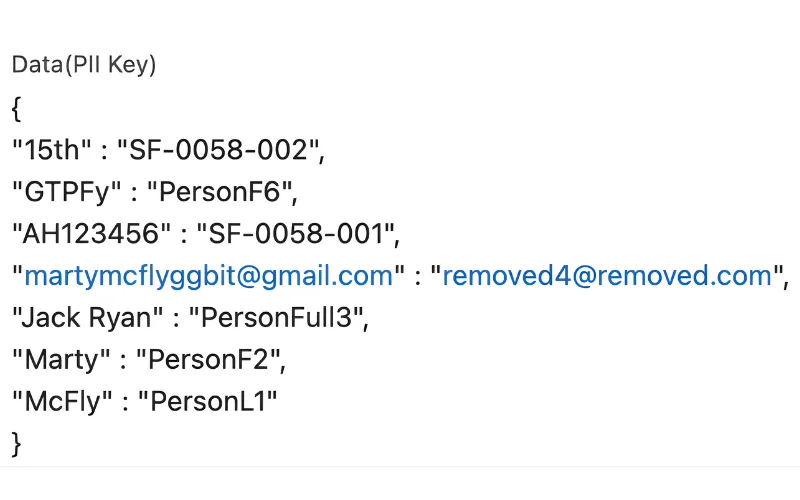
GPTfy's PII masking operates at the Salesforce boundary before any API call to external AI models. Pattern-based detection and configurable regex rules identify SSNs, credit cards, emails, and phone numbers in the prompt text. Sensitive values are replaced with tokens (e.g., [NAME_1], [SSN_1]) before the callout. The AI processes the masked prompt, and GPTfy reverses the masking in the response - so your team sees real data, but the AI model never does. See the privacy compliance walkthrough at /resources/demo/privacy-compliance.
GPTfy's delegated administration model lets security teams define global masking policies while individual business units configure department-specific rules. For example, your finance team can enforce full redaction on account numbers while your HR team applies partial masking on employee IDs. Each department's rules are layered on top of global policies, and all configurations are managed through the Security Layer's declarative interface without code changes.
Every AI prompt execution creates an AI_Response__c record containing the original prompt text, the masked version sent to the AI model, the AI response, the user who initiated the request, and a timestamp. These records are queryable through standard Salesforce reports and can be filtered by user, prompt type, data sensitivity level, or date range. Retention periods are configurable through GPTfy's data retention console to meet GDPR data minimization and HIPAA record-keeping requirements.
The Security Layer is applied universally across every GPTfy feature. Whether data passes through the Prompt Builder, RAG pipeline, Einstein Chatbot enhancement, Experience Cloud AI, or Flow-triggered prompts, PII masking and field-level security are enforced before any API callout. This centralized approach means security teams configure masking rules once, and they apply consistently across all AI interactions within your Salesforce org.
The set of controls that sits between your CRM data and any AI model — applying masking, access rules, and audit logging before a prompt leaves your org. The masked payload (not the original record) is what reaches the model.
No. GPTfy 4-layer masks on the BYOM path. It does not wrap or replace the Einstein Trust Layer, and it does not pass data into the Trust Layer.
Capture the prompt context, apply your configured masking rules, match sensitive fields by field-level and regex rules, mask or tokenize the values, send the sanitized prompt to the model, optionally unmask on return for authorized users, and write a Security Audit Record of what happened.
See PII Masking on Your Data
We'll configure field-level masking for your most sensitive Salesforce fields, then execute an AI prompt showing the original data, masked prompt sent to the AI, and the response - all in 30 minutes with your org.
Explore More Features
Bring Your Own Model
Connect any AI model with PII masking on every callout
GPTfy Agents
Deploy AI agents with built-in security audit trails
Privacy Compliance Demo
See PII masking, audit trails, and GDPR/HIPAA controls in action
About GPTfy
Meet the Salesforce and Oracle veterans building production-ready AI.
Data masking
Mask PII/PHI before it ever reaches an AI model.
AI for Einstein chatbot
A more open alternative for Einstein chatbots.