
What Is BYOM in Salesforce?
BYOM (Bring Your Own Model) means your Salesforce workflows call the AI model you choose - not the one your vendor chose for you. Here's what that means in practice, and how GPTfy implements it using Named Credentials and Salesforce-native configuration.
Last updated:
The Problem BYOM Solves
Salesforce teams want AI in day-to-day workflows. They also want control over which model runs and how it is called. In practice, that usually means:
- You have an approved AI provider - or an internal model - and Salesforce needs to call it.
- Authentication and endpoints must be admin-managed, not hardcoded in apps or scripts.
- Salesforce must stay the system of record, with consistent masking and governance applied before any data leaves the org.
Without BYOM, teams either accept the model their platform ships with, or build custom integrations that sit outside Salesforce governance. BYOM makes the model choice and the integration configurable - without changing how your users work in Salesforce.
BYOM, Defined for Salesforce Teams
BYOM (Bring Your Own Model) means you can connect the AI model you choose - a hosted provider like OpenAI, Claude, or Gemini, or your own model - to Salesforce workflows for prompting, automation, and response generation.
In a Salesforce context, BYOM is less about "which LLM is best" and more about how the model is operationalized:
- How Salesforce authenticates to the model endpoint
- How the request is constructed and what data is included
- How responses are stored, audited, and mapped back into Salesforce objects
For regulated industries - financial services , healthcare , insurance - BYOM is often a compliance requirement. The team needs to approve the model, control the endpoint, and audit every callout. A Salesforce-native BYOM implementation makes all of that possible without building custom middleware.
How GPTfy Implements BYOM
GPTfy implements BYOM through a Salesforce-native configuration flow centered on an AI Model record in the GPTfy Cockpit.
One-time setup per model:
- Open the GPTfy Cockpit and navigate to AI Model.
- Select Create your own and fill in the model tile details (label, icon, sequence, description).
- Open the model tile, go to Connection Details, and configure:
- Platform and AI Technology - provider and platform classification
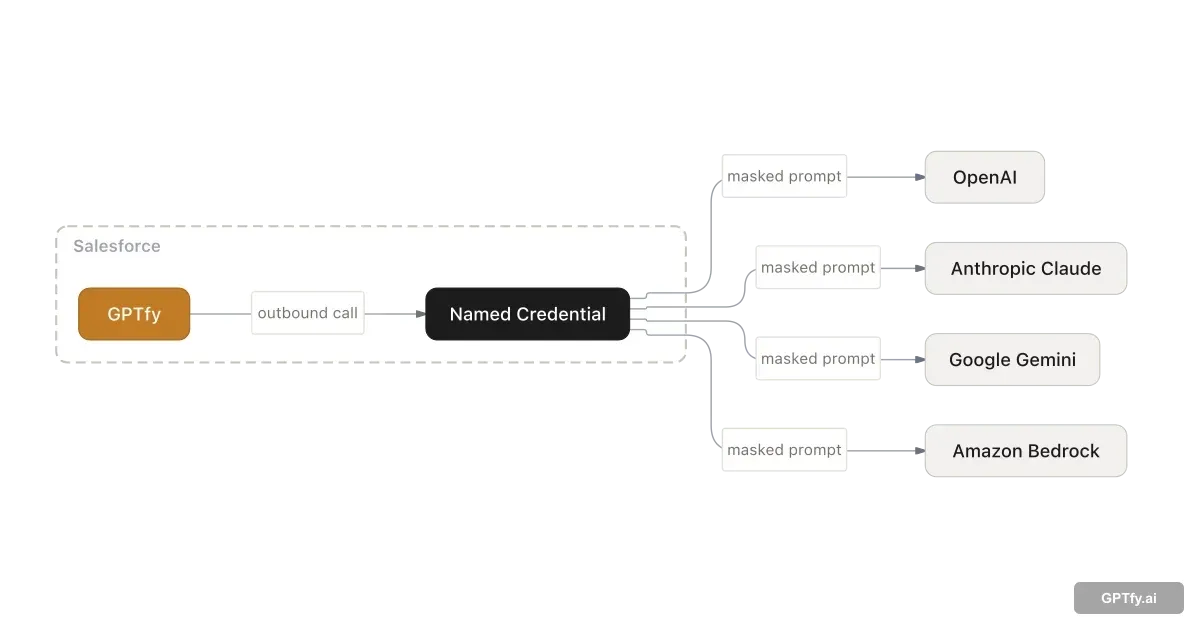
- Named Credential - Salesforce-managed authentication and endpoint access
- Model parameters - Temperature, Top P, Max Tokens
After saving, activate the model. GPTfy validates the configuration and marks it enabled for use in Prompt Builder and automations. Pre-configured connectors are available for OpenAI, Azure OpenAI, Gemini, Claude, DeepSeek, Llama, Grok, and Perplexity - no Apex required for these providers.
Connector and Processing Classes (Advanced)
When you need custom authentication, request shaping, or response post-processing, GPTfy exposes Apex interfaces that make callout logic explicit, reviewable, and auditable in Salesforce code:
- <code>ccai.AIAuthenticationInterface</code> - produces an authenticated <code>HttpRequest</code>
- <code>ccai.AIProcessingInterface</code> - generates the outbound request body and processes the <code>HttpResponse</code>
Example connector class (simplified):
 global class GPTfyopenAIConnector implements ccai.AIAuthenticationInterface {
    global HttpRequest getAuthenticatedRequest(ccai__AI_Connection__c aiModel) {
        HttpRequest req = new HttpRequest();
        req.setEndpoint('callout:GPTfy/api/gptfyall');
        return req;
    }
}
Code example
Example processing class (simplified):
 global class SampleAIProcessingClass implements ccai.AIProcessingInterface {
    global HttpResponse getProcessedResponse(
        ccai__AI_Connection__c aiModel,
        ccai__AI_Prompt__c aiPrompt,
        String promptCommand,
        String extractedData
    ) {
        Map reqBodymap = new Map{
            'prompt' => ('Human: ' + promptCommand + ' ' + extractedData + '\\nAssistant:'),
            'max_tokens_to_sample' => aiModel.ccai__Max_Tokens__c,
            'temperature' => aiModel.ccai__Temperature__c,
            'top_p' => aiModel.ccai__Top_P__c
        };
        HttpRequest req = new HttpRequest();
        req.setMethod('POST');
        req.setHeader('Content-Type', 'application/json');
        req.setBody(JSON.serialize(reqBodymap));
        return (new Http()).send(req);
    }
}
Code example
Apex classes make callout logic reviewable and auditable in Salesforce code - not buried in a third-party integration or external script. Admins still select models through configuration; engineers control how custom providers behave under the hood.
BYOM as the Foundation for Agentic AI
Agentic AI systems need to route tasks to the right model - complex reasoning to frontier models, classification to faster models, compliance-sensitive tasks to models with specific data residency. BYOM gives Salesforce orgs the multi-model flexibility agentic AI architectures require.
Without BYOM, you're locked into one model for every workflow, which breaks the core premise of autonomous, task-appropriate AI routing. A single model cannot be simultaneously the fastest and the most capable - agentic workflows depend on choosing the right tool for each task at runtime.
GPTfy's BYOM layer lets agentic workflows select the right AI provider at runtime, governed by admin configuration. The model selection logic lives in Salesforce - not in external scripts - so agentic routing is auditable, adjustable without code, and subject to the same governance as every other AI callout.
Data Flow and Governance
BYOM is only useful if it is governable. In GPTfy, model connectivity and data handling are designed to be controlled entirely from Salesforce:
- Outbound callouts use Named Credentials - endpoints and authentication are managed in Salesforce, never hardcoded.
- Raw data stays in Salesforce - only masked data reaches your AI provider, shaped by your data masking and grounding rules.
- Every AI call is audited - GPTfy logs responses in <code>AI_Response__c</code> records with full context for compliance reporting.
- Salesforce remains the source of truth for records, prompts, and response mapping.
For security-focused evaluations, start with the Data Masking and Security & Compliance pages, then return to Prompt Builder for prompt configuration and governance. For a walkthrough of the full GPTfy platform architecture , see the platform datasheet.
BYOM and RAG: Better Together
BYOM controls which model generates the answer. RAG (Retrieval-Augmented Generation) controls the content source that grounds it. A single Prompt Builder prompt can reference a BYOM model for generation and a RAG datastore for retrieval - the two patterns are designed to work together inside GPTfy.
Teams that need grounded, accurate answers from governed knowledge sources use RAG for retrieval and BYOM to select the model best suited for summarization, compliance checking, or domain-specific generation. Neither pattern requires the other, but combining them produces the most accurate and governable AI outputs inside Salesforce.
Key takeaways
BYOM is a configuration pattern, not a feature
You connect any AI model to Salesforce workflows while keeping Salesforce as your system of record and controlling the integration through admin-managed configuration.
GPTfy uses an AI Model record
Admins create and activate a model in the GPTfy Cockpit, then select it in prompts and automations - no code required for standard providers.
Named Credentials control all callouts
Authentication and endpoint access are managed in Salesforce. No hardcoded secrets in apps or scripts. Raw data never leaves your org.
Apex interfaces enable deep customization
Connector and processing classes support custom auth, request shaping, and response handling when standard configuration isn't enough.
See any AI model running inside your Salesforce org, without new infrastructure
BYOM in practice: connect OpenAI, Claude, or your own model through Named Credentials. 2-minute demo.
FAQ
No. BYOM is about selecting and connecting the AI model your Salesforce workflows call. BYOK (Bring Your Own Key) is about managing encryption keys for your environment. They address different problems - and you can implement both.
Yes. In GPTfy, each model is an AI Model record. Teams configure and activate multiple models, then select the right model per prompt, use case, or automation. A sales team can use GPT-4o for deal coaching while a compliance team uses a different model for document review.
Authentication and endpoint access are managed in Salesforce using Named Credentials. GPTfy references the Named Credential from the AI Model connection details - no secrets stored in code or configuration files.
Yes. Prompts in GPTfy reference an AI Model record by selection, not by hardcoded endpoint. Updating the active model on a prompt changes the model for all workflows that use it - no Apex changes required.
GPTfy ships with pre-configured connectors for OpenAI, Azure OpenAI, Google Gemini, Anthropic Claude, DeepSeek, Llama, Grok, and Perplexity. Any provider accepting HTTP callouts can be configured via Named Credentials and an optional Apex connector class.
Install GPTfy from AppExchange, open the GPTfy Cockpit, create an AI Model record for OpenAI or your preferred provider, add your Named Credential, activate the model, then test with a small prompt in Prompt Builder. Most teams run their first AI-powered prompt in under a day.
Agentic AI workflows need to route tasks to the right model - complex reasoning to a frontier model, classification to a faster one, compliance-sensitive tasks to a model with specific data residency. BYOM makes that multi-model routing possible inside Salesforce. Without BYOM, every agentic workflow runs through a single model, regardless of whether it's the right tool for the task.
See BYOM running in your org
Book a demo and we will walk through a BYOM setup: AI Model record, Named Credential configuration, and a working Salesforce prompt - on your data, in your org.
Explore More
Bring Your Own Model
Configure external or custom models in GPTfy and invoke them from Salesforce workflows.
Prompt Builder
Create and govern prompt commands with grounding, data context, and response mapping.
Security & Compliance
Data masking, Named Credentials, audit trails, and zero-trust architecture for Salesforce AI.
OpenAI in Salesforce
Connect GPT-4o and other OpenAI models to Salesforce workflows through GPTfy.
Demo: DeepSeek in Salesforce
Watch DeepSeek connected to a Salesforce workflow via GPTfy BYOM configuration.
Named Credentials for AI Security
How GPTfy secures AI API authentication with Salesforce Named Credentials
Data Masking in Salesforce AI
How GPTfy masks PII and PHI before data reaches any AI provider