
Deploy ElevenLabs Voice in Salesforce.
30%of generative AI projects abandoned after proof of concept before reaching production (Gartner, 2024)
Voice Pilots Take Months and Outcomes Never Reach the CRM Months
Standalone voice tools run outside Salesforce. Call outcomes, follow-ups, and customer data stay disconnected from your CRM workflows.
Average time to deploy a voice AI pilot
Building voice AI from scratch requires custom telephony infrastructure, speech-to-text pipelines, and CRM connectors. Most pilots stall before reaching production.
“It takes them 8 minutes to enter an order. With this, it now takes 2. It's time saved. I think that's where the ROI is in my head.”
Technical Architect, Fortune 500 Manufacturing
Automate with Flow IntegrationFrom calls logged back to CRM automatically
Call summaries, follow-up tasks, and customer requests sit in external systems. Reps manually copy notes into Salesforce - if they remember.
“Liked the easy and click/no-code way to configure GPT LLMs on any Salesforce object and go-live in days.”
Gurditta Garg, Chief Salesforce Evangelist, Motorola
Build prompts with Prompt BuilderIn standalone voice tools for sensitive data
Voice conversations contain customer PII, account numbers, and health data. Standalone tools lack field-level masking and audit trails required for compliance.
“The implementation was smooth and the results exceeded expectations.”
Rishi Golyan, Salesforce Consultant, Algocirrus
Secure this with Security LayerThe Problem: Voice pilots stall in integration work
Great voice quality does not ship by itself
Pilots stall wiring voice into Salesforce. GPTfy eliminates custom glue code. See voice call logging from pilot to production.
What changes when voice runs through Salesforce workflows
Outcomes write back automatically via Flow integration . Watch voice CRM updates in action.

Outbound teams, scale follow-up
Collections and sales follow-ups that stay consistent
Voice scripts in Prompt Builder reflect your process. Summaries write back to Salesforce after every call.
Handoffs that do not disappear in inboxes
GPTfy creates tasks linked to the correct record. See 24/7 AI support with automatic escalation.
Support teams, reduce repeat work
Turn conversations into structured CRM updates
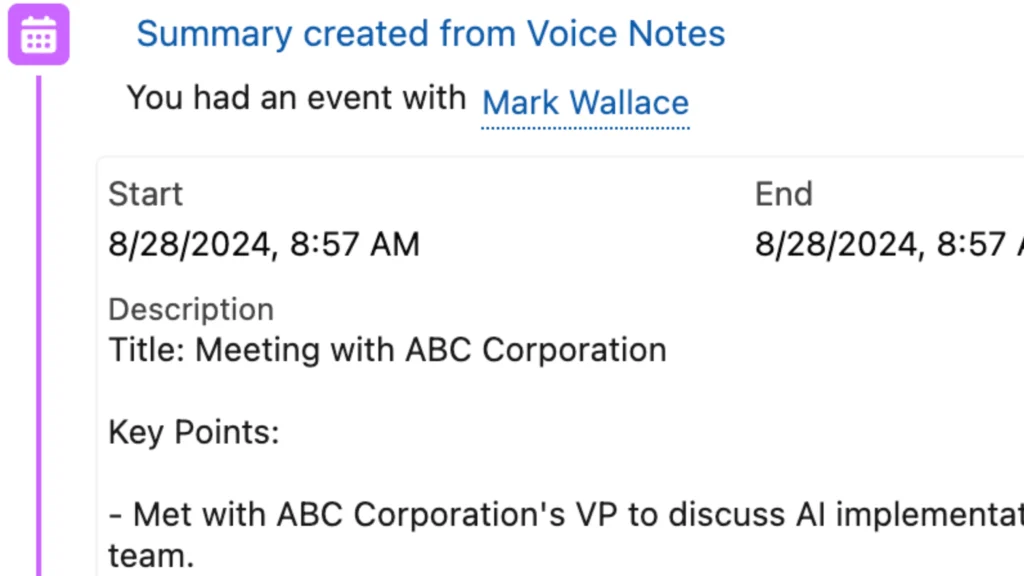
Convert calls into Salesforce-ready notes. Watch automatic call logging eliminate manual data entry.
Keep security and governance intact
Mask sensitive values before any callout. CRM outcomes stay in Salesforce with standard access controls.
Why Choose ElevenLabs Integration
Voice that people stay on the line for
Use ElevenLabs voices inside Salesforce calling flows so your automation sounds natural and consistent across teams.
Faster path from pilot to production
Move past custom glue code. Configure scripts and call logic declaratively so teams can iterate quickly without long dev cycles.
CRM stays current after every call
<>Write call outcomes back to Salesforce with summaries and follow-ups. See voice CRM updates in action.</>
Powerful Capabilities
Context-aware call setup
Start calls with Salesforce context so the conversation is grounded in the right account, contact, case, or opportunity before the first question.
Automatic summaries and follow-ups
Create call summaries and next steps that attach to the correct Salesforce record and trigger tasks or escalations when a handoff is needed.
Declarative scripts and routing
Adjust scripts, intent handling, and routing logic without rebuilding integrations. Keep your workflows in Salesforce where teams already operate.
Admin-controlled data flow
<>Use GPTfy security controls to mask sensitive fields before callouts. Raw data never leaves your infrastructure - only masked data flows to your AI provider via Named Credentials .</>
See ElevenLabs voice deployed inside Salesforce workflows, live
Natural voice interactions grounded in Salesforce data, call routing, summaries, and task creation. 2-minute demo.
Key Takeaways
- Declarative voice scripts configured in Prompt Builder - no custom Apex or telephony code required
- Call outcomes, summaries, and follow-up tasks write back to Salesforce records via Flow integration
- GPTfy Security Layer masks PII fields before any callout reaches the ElevenLabs voice provider
- Voice data routes through Named Credentials so raw customer data never leaves your infrastructure
- Supports inbound support and outbound follow-up workflows with automatic human handoff escalation
Frequently Asked Questions
No. You can use your existing ElevenLabs account, or set one up as part of your pilot. Either way, GPTfy connects voice workflows to Salesforce so the CRM stays current after each conversation.
Raw data never leaves your infrastructure. GPTfy masks sensitive fields before callouts so only the minimum, masked context flows to your AI provider via Named Credentials based on admin configuration.
Summaries, tasks, and outcomes are written back to the relevant Salesforce records so reps and managers can see what happened without searching across tools.
GPTfy can route to a human handoff by creating a Salesforce task or escalation and capturing the caller request as structured context for follow-up.
No. Teams use the same approach for outbound follow-ups and inbound support workflows. The key is that call outcomes and handoffs are recorded in Salesforce automatically.
GPTfy's Security Layer masks PII fields before any data reaches the ElevenLabs voice provider. Raw customer data stays in your Salesforce org, and only masked context flows through Named Credentials. Every callout is logged in a Security Audit Record with full details of what was sent and returned.
See ElevenLabs voice inside Salesforce
Book a 30-minute demo and walk through a voice workflow from call setup to CRM update: routing, summaries, and Salesforce record writes after the conversation.
Explore More Integrations
GPTfy Voice Notes
59-second voice notes that auto-create structured Salesforce records.
Telephony Integration
AI voice workflows that write back to Salesforce - 100+ languages supported.
Messaging with Salesforce context.
Demo: Voice Call Log
Watch automatic call logging to Salesforce records
Demo: Voice CRM Update
See voice-driven CRM updates in real time