
The AI Credential Security Problem
Every AI integration on Salesforce requires authentication credentials: an API key, OAuth client secret, or bearer token that authorizes your org to call an external AI service. The default approaches developers reach for (Custom Settings, Custom Metadata Types, and hardcoded Apex variables) share a fundamental flaw: credentials stored as plain text and accessible to any code or administrator who knows where to look.
The risk vectors are concrete. A developer queries SELECT Value__c FROM AI_Config__c and the production API key appears in their local SOQL results. A sandbox refresh copies the Custom Setting record verbatim, exposing live credentials to QA engineers and external contractors. A debug log enabled to troubleshoot a Flow captures the Authorization header value. A metadata export for version control includes the full Custom Metadata record with the key in the XML.
For regulated industries (financial services, healthcare, legal), these exposure vectors are not hypothetical. They represent concrete compliance violations under SOC 2, HIPAA, FINRA, and GDPR. An auditor reviewing your Salesforce AI configuration will specifically ask how API credentials are stored and who can access them.
Named Credentials are Salesforce's answer. They remove credentials from code, queries, and logs entirely, storing them encrypted at the platform level and injecting them server-side at callout time.
Credential Storage Options Compared
The table below compares the three common credential storage approaches across the security criteria that matter for enterprise AI deployments.
| Criteria | Custom Settings | Custom Metadata | Named Credentials |
|---|---|---|---|
| Encryption at rest | None | None | Platform encryption |
| Visible in debug logs | Yes | Yes | Never |
| Queryable via SOQL/API | Yes | Yes | No (write-only) |
| Propagates to sandboxes | Yes | Yes | No |
| Permission-based access | Limited | Limited | Full (Permission Sets) |
| Salesforce recommended | No | Partial | Yes |
Salesforce's Official Recommendation
This is not a third-party security opinion. Salesforce's own documentation is explicit on both what Named Credentials do and what the preferred implementation pattern is.
"A named credential specifies the URL of a callout endpoint and its required authentication parameters in one definition. Salesforce manages all authentication for Apex callouts that specify a named credential as the callout endpoint."
"We strongly recommend that you use this preferred credential instead of legacy named credentials, which are slated for deprecation. With external credentials, you can easily manage multiple principals with different authentication settings that share the same named credential."
The direction is clear: External Credentials for the secrets, Named Credentials for the endpoint definition, and Permission Set assignments to control which principals can trigger callouts. Any other approach is an architectural compromise.
How GPTfy Implements Zero-Trust BYOK
GPTfy is designed as a credential-agnostic orchestrator. It never receives, stores, or transmits your AI API keys. The architecture is straightforward:
- 1
You provision your AI service
Obtain your API key directly from the AI provider (OpenAI, Anthropic, Google, Azure, or any compatible endpoint). GPTfy has no involvement in this step and never sees the credential.
- 2
You configure Named Credentials in your Salesforce org
Create an External Credential with your API key, a Named Credential pointing to the AI service URL, and a Permission Set Principal that controls which users can trigger callouts. This all happens in Salesforce Setup. No GPTfy screens involved.
- 3
You reference the Named Credential in GPTfy by name only
In GPTfy's AI Model configuration record, you enter the Named Credential's developer name (e.g., OpenAI_Production). GPTfy stores a string reference, not the key itself.
- 4
At runtime, Salesforce injects credentials server-side
When GPTfy's Apex executes a callout using the callout: prefix, Salesforce's platform resolves the Named Credential, injects the encrypted key into the HTTP Authorization header, and sends the request. The key value never appears in GPTfy's code path, debug logs, or response data.
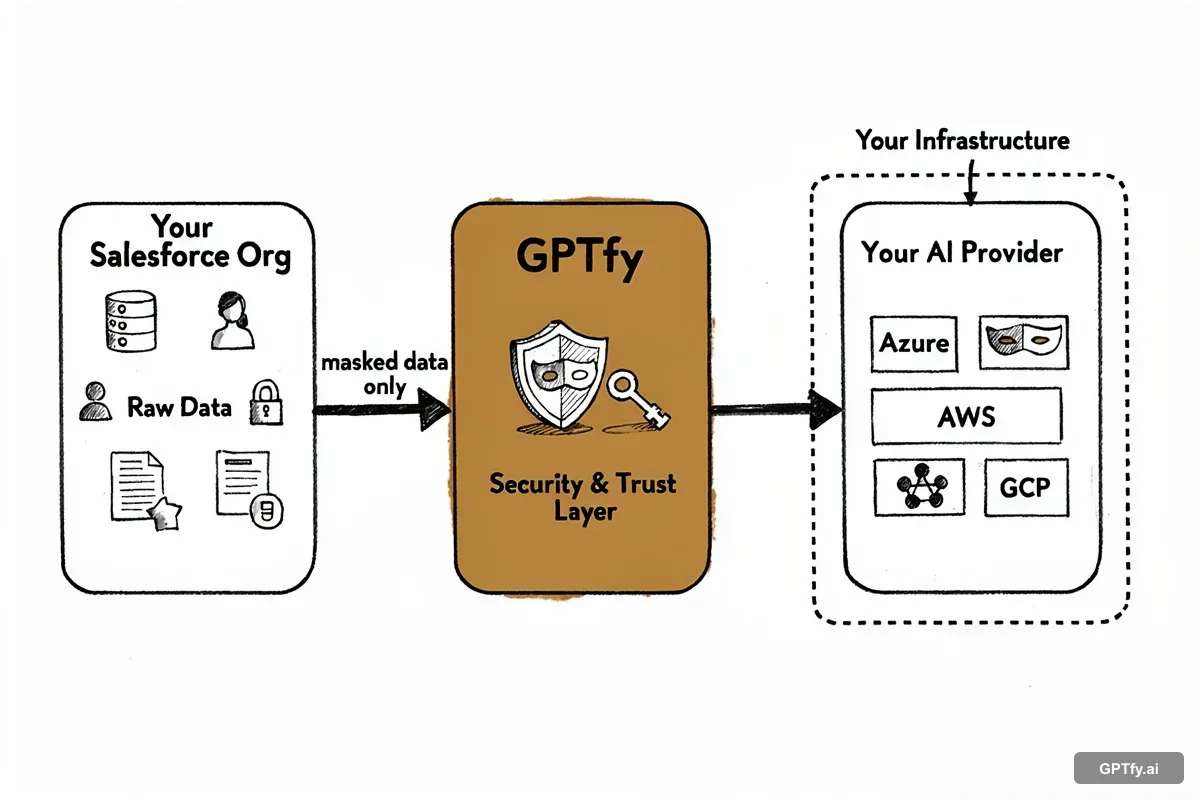
Namespace isolation
Named Credentials are scoped to your org. GPTfy's managed package cannot read or enumerate credentials defined in your namespace.
Permission Set gating
Callouts only execute for users with the correct Permission Set Principal assignment. Misconfigured or unauthorized users receive an error before the callout is attempted.
Key rotation without code changes
Update your External Credential value in Salesforce Setup. GPTfy's AI Model record requires no changes; the string reference remains valid.
Complete audit trail
Every Named Credential modification is captured in the Setup Audit Trail with timestamp, user, and change details. AI callout execution is logged in AI_Response__c records.
Authentication Protocols Supported
Named Credentials support multiple authentication protocols, making them suitable for virtually every enterprise AI provider available today.
OAuth 2.0 Client Credentials
The machine-to-machine OAuth flow, suitable for server-side AI integrations where no user context is required. Salesforce handles token acquisition, caching, and refresh automatically. Used by Azure OpenAI and enterprise AI gateways that enforce OAuth at the API layer.
OAuth 2.0 JWT Bearer
JWT-signed assertions for services that require strong client authentication. Salesforce generates and signs the JWT using a certificate stored in Certificate and Key Management. The private key never appears in Apex code. Appropriate for high-compliance environments where client secrets are insufficient.
AWS Signature Version 4
Native support for AWS-hosted AI services including Amazon Bedrock. Named Credentials handle the SigV4 signing process using your AWS Access Key ID and Secret Access Key, including canonical request construction and region-scoped signing. No custom Apex required for AWS authentication.
Custom (API Key / Bearer Token)
For AI providers using static API key authentication (OpenAI, Anthropic, Google Gemini, Cohere, and others), the Custom authentication type stores the key in an External Credential and injects it as an Authorization: Bearer header at callout time. This is the most commonly used protocol for commercial LLM APIs.
Legacy Named Credentials (Deprecated)
The original Named Credentials implementation (pre-Spring '23) stored credentials directly on the Named Credential record rather than in a separate External Credential. Salesforce has deprecated this pattern and recommends migration to the External Credentials model. Existing GPTfy configurations using legacy Named Credentials will continue to function but should be migrated before the deprecation deadline.
Compliance and Regulatory Alignment
Named Credentials address the specific credential management controls required by major regulatory frameworks. Each compliance program asks a version of the same question: how do you ensure that AI service credentials are encrypted, access-controlled, and auditable?
SOC 2 Type II
SOC 2's Common Criteria for logical access require that credentials used to access external systems be encrypted at rest, subject to access controls, and covered by change management procedures. Named Credentials satisfy CC6.1 (logical and physical access controls), CC6.3 (access provisioning and de-provisioning via Permission Sets), and CC7.2 (monitoring via Setup Audit Trail).
HIPAA
HIPAA's Technical Safeguards (45 CFR 164.312) require access controls, audit controls, and transmission security for systems that handle protected health information. When GPTfy processes clinical data through AI models, Named Credentials ensure that access to the AI endpoint is encrypted and permission-controlled -- satisfying the Technical Safeguard requirements for the API authentication layer.
GDPR and Data Sovereignty
GDPR Article 32 requires appropriate technical measures to ensure data security, including encrypted storage of credentials that access personal data processing systems. Named Credentials store endpoint URLs and authentication parameters in Salesforce's encrypted storage layer, within your org's data residency region. The sandbox isolation feature also prevents EU production credentials from leaking into development environments that may have weaker controls.
Financial Services (FINRA, SEC, OCC)
Financial services regulators increasingly scrutinize AI system configurations as part of technology risk examinations. FINRA Rule 4370 (business continuity), SEC Regulation S-P (safeguarding customer information), and OCC guidance on third-party risk management all require demonstrable controls over how credentials to external AI services are managed. Named Credentials provide the encryption, access control, and audit trail documentation needed to satisfy examiner inquiries.
Enterprise Best Practices
The following practices are drawn from GPTfy deployments across Fortune 500 accounts in financial services, healthcare, and manufacturing. They represent the operational patterns that distinguish production-grade AI credential management from a basic proof-of-concept configuration.
Separate Credentials by Environment
Create distinct External Credentials for production, staging, and development environments. Use different AI service accounts (or different API key tiers) for each environment. This ensures that sandbox testing never consumes production quota or exposes production traffic patterns to developers.
Use External Credentials for Production
Migrate any legacy Named Credentials to the External Credentials model before Salesforce's deprecation window. External Credentials separate endpoint configuration from secret storage, making it easier to rotate keys, assign multiple principals, and audit access independently.
Apply Principle of Least Privilege
Assign Named Credential Permission Set Principals only to the specific user profiles, roles, or individual users who need to trigger AI callouts. Create separate Permission Sets for read-only users (who see AI output) versus execution users (who trigger callouts). Audit assignments quarterly.
Monitor Setup Audit Trail
Enable real-time alerting on Setup Audit Trail events for Named Credential and External Credential changes. Any modification (endpoint change, key rotation, permission assignment) should trigger a security review notification. This is a SOC 2 and FINRA examiner expectation.
Rotate Credentials Quarterly
Establish a quarterly credential rotation schedule for all AI service API keys. With Named Credentials, rotation requires only a Salesforce Setup change. No code deployments, no Apex modifications, no GPTfy configuration updates. The credential name remains stable; only the underlying value changes.
Document Your Credential Strategy
Maintain a credential inventory document that maps each Named Credential to its AI service, owner, creation date, last rotation date, and associated Permission Sets. This documentation is required for SOC 2 evidence packages and simplifies incident response when a credential must be revoked on short notice.