
Spend Trends. Clear Across Years.
Compare customer revenue periods through live Business Central invoice data inside Salesforce
Last updated:
Spend Trends Miss Account Truth
Customer Operations Intelligence connects invoice history to account context so teams can understand revenue movement as part of the full customer relationship.
Lost to spreadsheet matching
Revenue trends can look positive in isolation while invoice history shows contraction, volatility, or concentration risk. Teams miss the account truth behind changing customer value.
“Found the deployment to be easy. Just took me 10 minutes. Pre-configured prompts and the complimentary Open AI connection helped me test this App quick.”
- Salman Khan, Release Manager, IBM
See how GPTfy connects external dataSpent searching weekly
A customer may appear stable in CRM, but year-over-year invoice patterns can reveal weakening demand or expansion momentum. Strategy suffers when teams cannot see both together.
“The implementation was smooth and the results exceeded expectations.”
- Rishi Golyan, SF Consultant, Algocirrus
See how GPTfy maps ERP dataAverage annual bad-data cost
Leadership decisions weaken when customer spend trends are interpreted without the broader account context. The risk is not manual analysis. It is acting on incomplete truth.
“Saw this Freemium App and thought to give it a try. I am not disappointed. I find it better compared to SFDC AI cloud.”
- Amar Rawal, Business Analyst, Origin
See how GPTfy automates workflowsFinance Analysts, Spot Revenue Truth Across Time
See Revenue Shifts Faster
Compare invoice totals across periods using invoice dates and amounts to identify customer growth, decline, and unusual revenue movement faster.
Reduce Manual Period Matching
GPTfy helps analysts review year-over-year customer spend inside Salesforce without exporting invoices and rebuilding comparisons in spreadsheets.
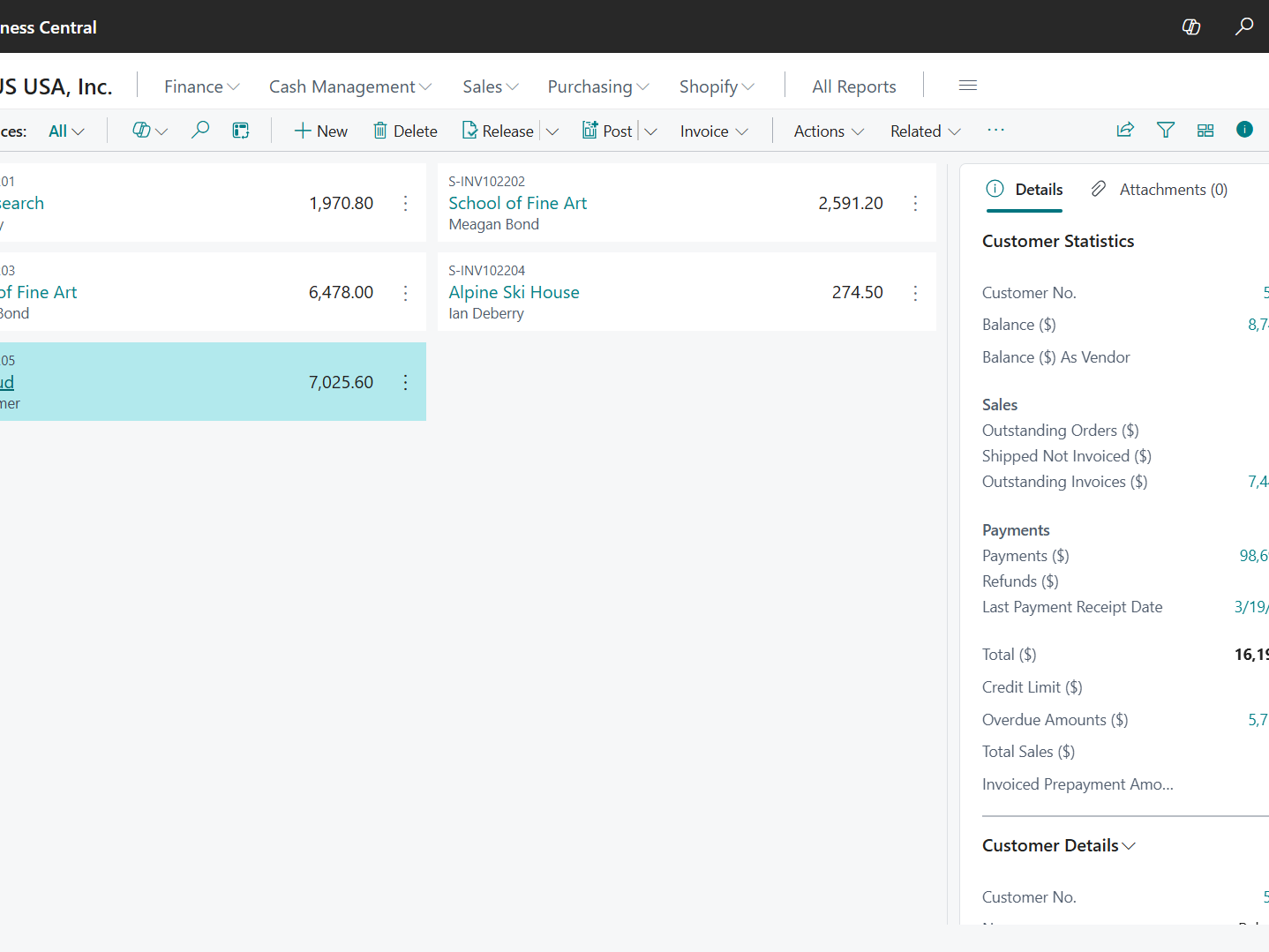
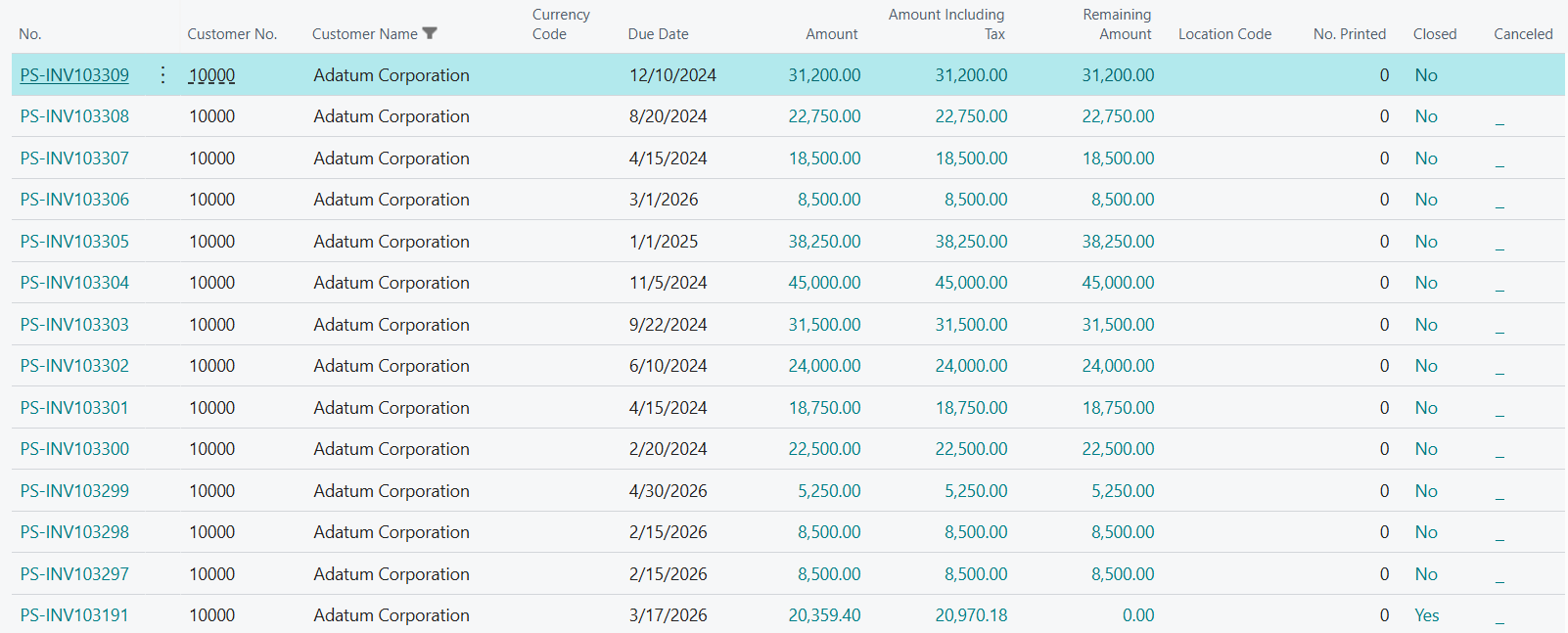
Account Managers, Understand Spend Signals Better
Use Spend Trends Better
Account managers can use year-over-year spend changes to identify expansion opportunities and prepare more relevant customer conversations.
Add Commercial Context
GPTfy gives sales and finance one shared view so growth discussions start with actual customer revenue patterns, not assumptions.
CFOs, Trust Revenue Trajectory More
Track Revenue Trajectory
Get clearer visibility into customer revenue trajectory so board reporting reflects trend movement, not isolated snapshots from separate systems.
Reduce Reporting Friction
GPTfy helps leaders review period-over-period customer spend inside Salesforce without another spreadsheet model, copied data set, or manual rollup.
Why Choose Year-over-Year Customer Spend
Faster Trend Analysis
Compare customer spend across periods without rebuilding invoice reports in spreadsheets.
Clearer Expansion Signals
Help account teams spot growth and contraction patterns that shape better customer planning.
Stronger Board Reporting
Give finance leaders cleaner customer revenue trend context for reporting and executive reviews.
Powerful Capabilities
Prompt Builder
Create spend analysis prompts that compare Salesforce account context with Business Central invoice totals across time periods.
Data Context Mapping
Map Account fields so prompts use the right customer, segment, and ownership context for spend comparisons.
AI Data Sources
Pull live Invoices from Dynamics 365 Business Central at runtime using invoiceDate and totalAmount across periods.
Security Layer
Support reviewability for the finance-facing invoice data used in spend summaries and period comparisons.
Key Takeaways
- Customer Operations Intelligence helps finance compare customer spend across periods as part of the full account truth inside Salesforce
- Analysts can review invoice trends without exporting and matching rows manually
- Account managers get clearer spend context for expansion and retention planning
- CFOs gain better visibility into customer revenue trajectory for board reporting
- Business Central invoice data is queried at runtime through Salesforce
Frequently Asked Questions
No. GPTfy helps teams review Salesforce account context with Dynamics 365 Business Central invoice data together inside Salesforce. It does not replace ERP reporting or accounting controls.
This use case can compare Business Central invoiceDate and totalAmount across periods alongside Salesforce account context to highlight customer revenue changes over time.
No. GPTfy is designed to use mapped Salesforce context and live Business Central data at runtime, so the comparison can happen inside the workflow.
GPTfy operates within Salesforce controls and uses configured credentials for external data access. Teams can manage who can run prompts and review outputs through their existing setup.
Yes. GPTfy is designed to support reviewability of the data used in prompt outputs, helping teams understand what information informed each spend comparison.
No. Teams can use it quarterly, monthly, or for custom periods to monitor customer revenue movement and prepare expansion or risk reviews earlier.
See Account Truth in Spend Trends
Book a 30-minute demo to compare customer spend across periods with live Business Central invoice data. No spreadsheet prep required.