
Sync Outlook Activity Into Salesforce
GPTfy Connect is an AI-native email sync adapter for Salesforce. It applies AI to determine business relevance before any email touches the CRM, with server-side sync, prompt-configurable content intelligence, and admin-controlled governance.
Last updated:
The CRM Activity Gap
Customer work happens in email and meetings. CRM activity history is chronically incomplete. The consequences are predictable:
- Account and opportunity reviews miss key context from recent email threads and meeting cadence.
- Stakeholders sitting in CC/BCC lists never make it into Contacts.
- Forecasts and next-step decisions are built on partial activity history.
The answer is not asking reps to log more manually. It is syncing activity automatically, matched to the right records, with the right access controls.
What Outlook-to-Salesforce Sync Actually Means
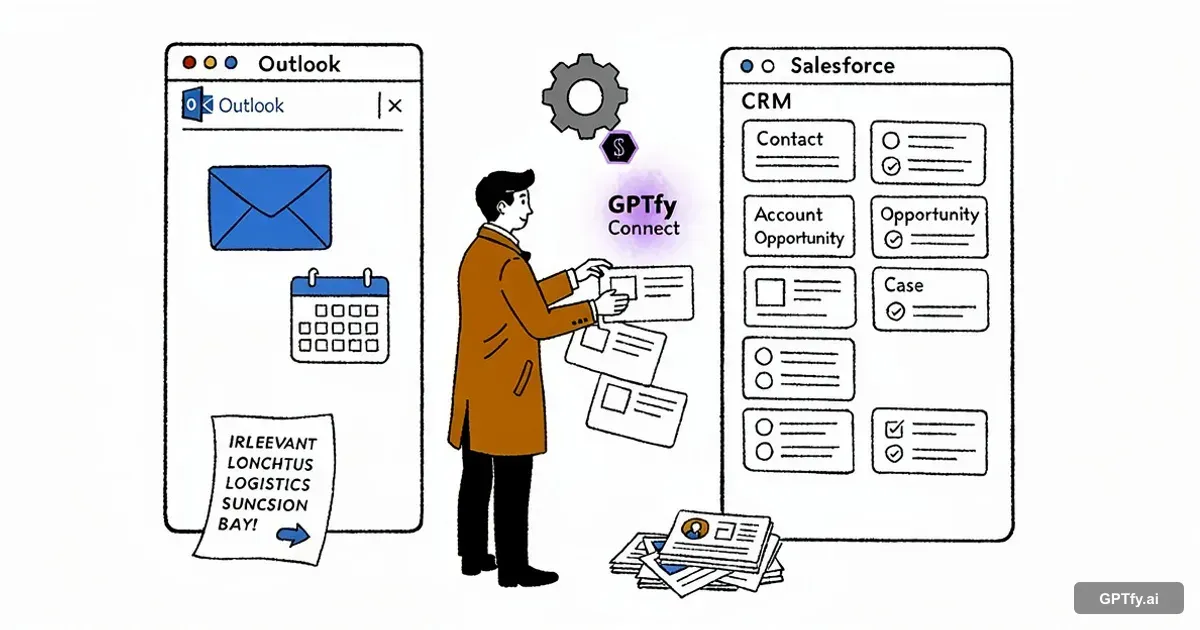
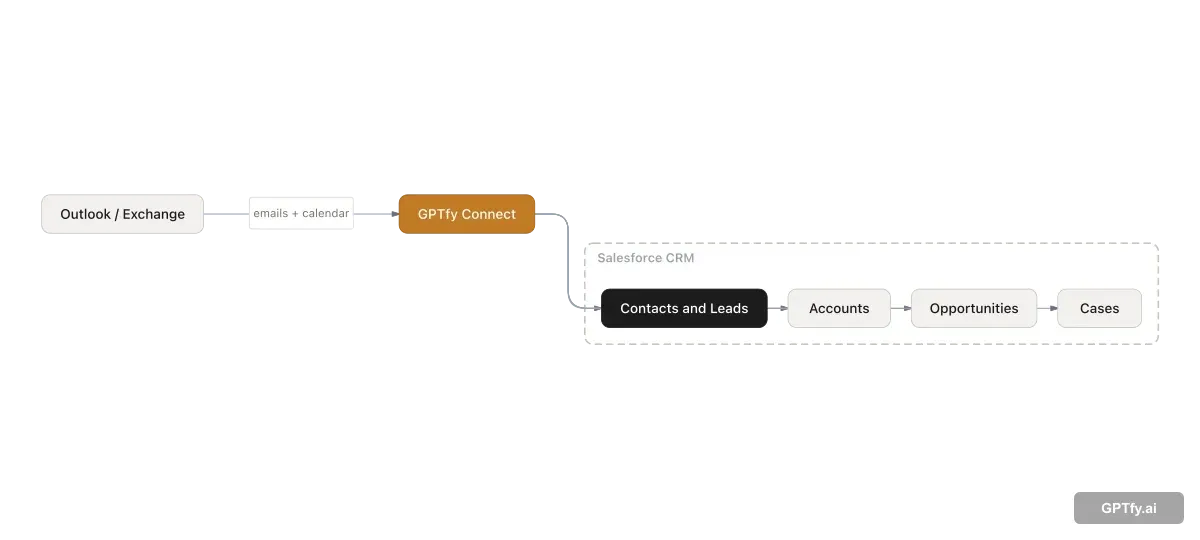
Outlook-to-Salesforce sync captures emails, calendar events, and tasks from Outlook/Exchange and associates them to Salesforce records so teams see the real customer timeline inside Salesforce, not a manually maintained subset of it.
The core challenge is not whether you can sync email. It is whether you can sync the right activity to the right record, governed by the right security controls. Bulk email dumping into a CRM creates noise and compliance risk. Governed sync creates a complete, usable activity layer.
What GPTfy Connect Does
GPTfy Connect is a Salesforce-native, server-side sync capability that connects to Outlook/Exchange using Microsoft Graph APIs and syncs emails (inbound and outbound), calendar events, and tasks into Salesforce.
Because GPTfy Connect runs server-side inside Salesforce, there is no browser plugin to install, no client-side configuration to maintain, and no reliance on reps remembering to click a button.
Two Sync Modes
GPTfy Connect runs in two modes, which can be used independently or together depending on how the team wants to work:
- Manual sync - The rep opens GPTfy Connect, reviews unsynced emails, calendar events, and tasks, and selects what to import. Each item shows its AI-suggested Salesforce association - Contact, Account, and Opportunity - which the rep can confirm, adjust, or skip before importing. This mode gives reps direct oversight of what enters the CRM and is useful for logging specific conversations on demand.
- Automated sync - An admin configures sync in Salesforce, setting the run frequency, a lookback period (how far back in the mailbox to retrieve), and a maximum number of emails per run. Once active, sync runs in the background on schedule without rep involvement. GPTfy writes clear matches to Salesforce automatically; low-confidence matches queue for human review without blocking the rest of the run.
AI-Native Sync: Content Intelligence Before Association
Most email sync tools use rules to decide what not to sync - domain exclusions, category filters, keyword blocklists. GPTfy takes a different approach: before any email is associated with a Salesforce record, AI reads the email content and determines whether it is business relevant at all.
This is what makes GPTfy Connect an AI-native email sync adapter, not a sync adapter with AI features added on top. The intelligence is in the pipeline.
The Problem Rules Cannot Solve
Deterministic filters catch known patterns - internal domains, HR categories, newsletter subscriptions. They cannot catch emails that look legitimate but are not CRM-worthy. A prospect you are actively working with might send ten emails about logistics for an in-person meeting: where to park, what time lunch is, which conference room to use. Those emails pass every domain filter and every category rule. They are from a real contact on an active deal. But they do not belong in your CRM, and no rule-based system can reliably exclude them without also excluding emails that should be there.
What AI Content Intelligence Does
After initial deterministic filtering, GPTfy applies AI to each email. The AI reads the content and answers the question: is this communication business relevant? Does it represent a customer interaction that belongs in the Salesforce activity timeline?
GPTfy excludes emails that are social, logistical, or personal in nature - even with legitimate business contacts - before they ever touch a Salesforce record. The AI reasons about content and intent, not just metadata.
Prompt-Configurable - You Define “Business Relevant”
This content intelligence runs through GPTfy's prompt system. The definition of business relevance is not hard-coded; it is a prompt that admins can fully configure. Want to flag logistics emails when they involve a meeting with a specific Account tier? Configure the prompt. Want to exclude any email under a certain length? Configure the prompt. Want different relevance criteria for different stages of a deal cycle? Configure the prompt.
GPTfy does not make presumptions about what belongs in your CRM. You define what “business relevant” means for your organization. The AI applies that judgment consistently, at scale, on every email in every sync run.
100% control. Always. For a single governance surface for these prompt rules, pair Connect with Prompt Builder .
How GPTfy Connect Matches Activity to the Right Records
Associating an email to the right Salesforce record is the hardest part of email sync. GPTfy Connect uses layered signals:
- Participant matching: From/to addresses map to Salesforce Contacts and their parent Accounts. Straightforward cases resolve automatically.
- Content analysis: When a sender maps to multiple Accounts, GPTfy Connect scans the email subject and body for account and contact names. The system surfaces the best-matched record at the top of the review queue with a confidence score and a plain-English explanation - for example, “Subject contains ‘Jula’ - matches Jula Stores account.” Reps confirm with one click rather than guessing.
- Recency and frequency: Accounts that the rep has recently associated with the same contact rank higher - reflecting the pattern that sales conversations cluster around active deals.
- Priority rules: Admin-configured rules resolve conflicts when multiple candidate records exist - for example, preferring the open Opportunity over the parent Account.
- New contact detection: When an email arrives from a sender who doesn't exist as a Salesforce Contact, GPTfy Connect flags it and offers to create the Contact directly - extracting name, email address, phone number, and title from email headers and the sender's signature. This closes the gap where reps log emails against the wrong contact because creating the right one takes too long.
Association is flexible by design. Not every email relates to a specific Opportunity. GPTfy Connect supports associating at different levels - Contact only, Contact and Account, or Contact, Account, and Opportunity - with an explicit “None” option at each level so reps are never forced into an association that does not reflect reality.
When a match is uncertain, GPTfy Connect routes the activity to a review queue with ranked suggestions and AI reasoning shown. Reps or admins confirm the association before the record is written, keeping CRM data clean without losing valuable context to ambiguity.
Filtering Controls - What Never Gets Logged
Effective sync requires a clear “never log” policy. GPTfy Connect supports admin-configured filtering to exclude:
- Internal-only messages
- Confidential and HR/legal categories
- Newsletters and marketing mail
- Domain exclusions (for example, your own company domain)
The goal is a Salesforce activity timeline focused on customer work, not a mirror of every inbox item. Admins define exclusion rules once; sync respects them automatically. For organizations that need deeper controls around PII masking or audit trails , GPTfy's security layer provides additional governance controls.
What GPTfy Connect Enables - Five Common Applications
Once Outlook activity is reliably synced and correctly associated, the CRM becomes a real-time record of customer relationships. Teams use that foundation to power workflows not possible on incomplete data: each tied to specific roles in the revenue org.
| Application | Persona | Function | What It Does |
|---|---|---|---|
| Commitment Tracking | AE, CSM | Sales, Customer Success | GPTfy detects rep and prospect commitments in email threads (“I'll send the proposal by Thursday”) and creates Salesforce Tasks automatically. Deadlines that pass without closure surface as alerts. No manual logging; the email thread is the source of truth. See: Deal Coach. |
| Gone-Dark Alerts | AE, Sales Manager, RevOps | Sales, Revenue Operations | When an active Opportunity has had no email response for a configurable number of days, GPTfy surfaces manager alerts or rep notifications. Because Outlook sync is the activity source of record, the signal is reliable, not an inference from incomplete data. Central to sales pipeline management. |
| Meeting Prep Packages | AE, BDR, CSM | Sales, Business Development, Customer Success | Before each scheduled customer meeting, GPTfy compiles a briefing from synced email and calendar history: thread summaries, open commitments, stakeholder engagement trends. Grounded in what actually happened, not what was manually logged. See: Pre-Meeting Preparation. |
| Stakeholder Discovery | AE, BDR, RevOps | Business Development, Revenue Operations | Every CC/BCC participant in a customer thread is a potential Contact. GPTfy Connect auto-creates records for unknown participants linked to known Accounts, and flags when C-level or VP participants join a thread; a meaningful deal progression signal. Feeds directly into Account 360 and service case resolution. |
| Sentiment & Engagement Signals | CSM, Sales Manager, RevOps | Customer Success, Revenue Operations | GPTfy tags email sentiment (positive, neutral, negative, urgent) and calculates engagement scores per Contact and Account. These signals feed deal health assessment and customer success workflows without manual tagging. See: Sentiment Journey. |
All five depend on the same underlying condition: Outlook activity is complete, current, and correctly associated to the right records. That's what GPTfy Connect provides.
What Complete Activity History Unlocks for AI
GPTfy prompts - Account 360, opportunity summaries, meeting briefs - draw from Salesforce activity history. When Outlook sync is active and complete, that history includes email thread cadence, meeting frequency, stakeholder engagement patterns, and follow-up gaps.
AI outputs become more specific and accurate because the underlying data is complete. An Account 360 that includes three months of email context is fundamentally more useful than one built only on Opportunity records. See this in action on the Account 360 use case page and the Prompt Builder documentation.
Activity History as the Foundation for Agentic AI
Agentic AI workflows that act on customer data - identifying at-risk accounts, planning next steps, drafting pre-call briefs, generating QBR content - are only as accurate as the activity history they reason over. Gaps in that history produce gaps in agent reasoning.
GPTfy Connect ensures the activity layer is complete, current, and correctly associated before any agent operates on it. An agent asked to summarize account engagement or surface follow-up gaps has the full relationship timeline to work from, not a manually maintained subset.
This makes GPTfy Connect a foundational data layer for agentic AI deployments in Salesforce. The prompts and agents are only as good as the data they work with, and Outlook sync is how that data stays complete.
Key takeaways
Server-side sync - no plugin required
GPTfy Connect runs in the background using Microsoft Graph APIs. Reps stay in Outlook; activity lands in Salesforce automatically.
AI-assisted record association
Participant signals, priority rules, and content-aware matching associate activity to the right Accounts, Opportunities, and Cases.
Security-aware sharing
A single email can link to multiple Contacts across Accounts. Salesforce shared activity patterns ensure access follows your security configuration.
Admin-controlled filtering
Exclude internal, confidential, HR/legal, and newsletter mail from sync. Only customer-relevant activity lands in the CRM.
AI determines business relevance - not rules
Before any email touches a Salesforce record, AI reads the content and determines if it belongs in the CRM. Prompt-configurable: you define what 'business relevant' means, GPTfy applies it at scale.
Richer context for AI prompts
Complete Outlook activity history makes GPTfy prompts - Account 360, opportunity summaries, meeting briefs - more accurate and complete.
FAQ
No. GPTfy Connect is a server-side sync running in the background when configured. Users keep working in Outlook while activity syncs into Salesforce automatically under admin controls - no plugin, no client-side configuration.
Emails (inbound and outbound), calendar events, and tasks. GPTfy Connect uses Microsoft Graph APIs to capture activity server-side and associate it to Salesforce records using participant signals, priority rules, and content-aware matching.
Admins configure automated sync directly in Salesforce - setting the run frequency, a lookback period that controls how far back in the mailbox to retrieve, and a maximum number of emails per sync run. Once active, sync runs on schedule in the background. Clear matches write to Salesforce automatically; low-confidence matches queue for human review without blocking the rest of the run.
After initial deterministic filtering, GPTfy applies AI to each email to assess business relevance before any Salesforce association is made. The AI reads content and intent - not just metadata - so logistical or personal emails from real contacts can be excluded even when they pass standard domain and category filters. This intelligence runs through GPTfy's prompt system: admins configure what 'business relevant' means for their org, and the AI applies that definition consistently at scale. GPTfy makes no presumptions about what belongs in your CRM - that definition is entirely yours.
Emails and calendar events can be associated to Contacts, Accounts, Opportunities, and Cases. A single email can link to multiple Contacts across multiple Accounts using Salesforce's shared activity model, so access follows your existing security configuration.
Layered matching signals (participant addresses, priority rules, content signals) reduce incorrect associations. For uncertain matches, admins can route activity to a review queue where users confirm before the record is written. Domain exclusions and category filters prevent noise from reaching Salesforce at all.
GPTfy Connect supports admin-configured filtering rules - by email category, domain, or keyword - so internal, confidential, HR/legal, and newsletter mail never reaches Salesforce. Admins define exclusion rules once; sync respects them automatically.
GPTfy prompts (Account 360, opportunity summaries, meeting briefs) draw from Salesforce activity history. With Outlook sync active, that history includes email thread cadence, meeting frequency, and stakeholder engagement patterns. Prompts become richer and more specific because the underlying data is complete rather than manually maintained.
Agentic AI workflows that act on customer data - planning next steps, identifying at-risk accounts, drafting pre-call briefs - are only as accurate as the activity history they reason over. GPTfy Connect ensures that history is complete and correctly associated before any agent operates on it, making it the foundational data layer for agentic AI in Salesforce.
See GPTfy Connect in your org
Book a demo and we'll walk through how GPTfy Connect matches Outlook activity to Salesforce records, how filtering keeps noise out, and how synced context improves AI prompt accuracy.
Explore More
GPTfy Connect
Sync email activity into Salesforce with AI-assisted matching, enrichment, and stakeholder mapping.
Microsoft Outlook for Salesforce
How GPTfy surfaces Salesforce context and AI prompts directly inside Outlook.
Account 360
See how complete Outlook activity history enriches AI-generated Account 360 outputs.
Prompt Builder
Define prompt commands that draw from the complete Salesforce activity layer Outlook sync provides.
Copilot-to-Salesforce Integration
Bring governed Salesforce context - including email activity - into Microsoft 365 Copilot workflows.
AI for Sales
How complete email activity history powers sales workflows - pipeline reviews, forecasting, and rep coaching.
Data Masking Guide
How GPTfy masks sensitive data before it reaches AI providers - relevant when syncing emails that contain PII.
Named Credentials Guide
How GPTfy uses Named Credentials to secure Outlook API connections and AI provider calls.