
What Is Copilot-to-Salesforce Integration?
Microsoft 365 Copilot can request governed Salesforce context and use it across Word, Excel, PowerPoint, Teams, and Outlook - without manual exports or context switching. Here's how it works, and how GPTfy implements it using Salesforce-native prompts and user-level security.
Last updated:
The Workflow Problem This Integration Solves
In many enterprises, customer context is split across two places:
- Microsoft 365 content: email threads, meeting context, documents, spreadsheets, and slides.
- Salesforce system-of-record data: accounts, opportunities, contracts, orders, activities, and team execution history.
Copilot excels at working across Microsoft 365 content. The missing piece is governed, user-level Salesforce context that Copilot can pull in and use safely for account planning, forecasting, and customer reviews.
Copilot-to-Salesforce Integration, Defined
Copilot-to-Salesforce integration is a pattern where Copilot can request Salesforce context for a specific user and use that context to answer questions or generate Microsoft 365 artifacts (Word, Excel, and PowerPoint) without requiring end users to manually export, copy, paste, and reformat data.
In the GPTfy workflow, users invoke GPTfy from within Copilot (for example, by mentioning GPTfy) to pull the right Salesforce context for the task at hand.
In GPTfy's implementation, the output returned to Copilot is typically JSON. Copilot then decides how to present or transform that information for the end user.
How GPTfy Connects Microsoft 365 Copilot to Salesforce
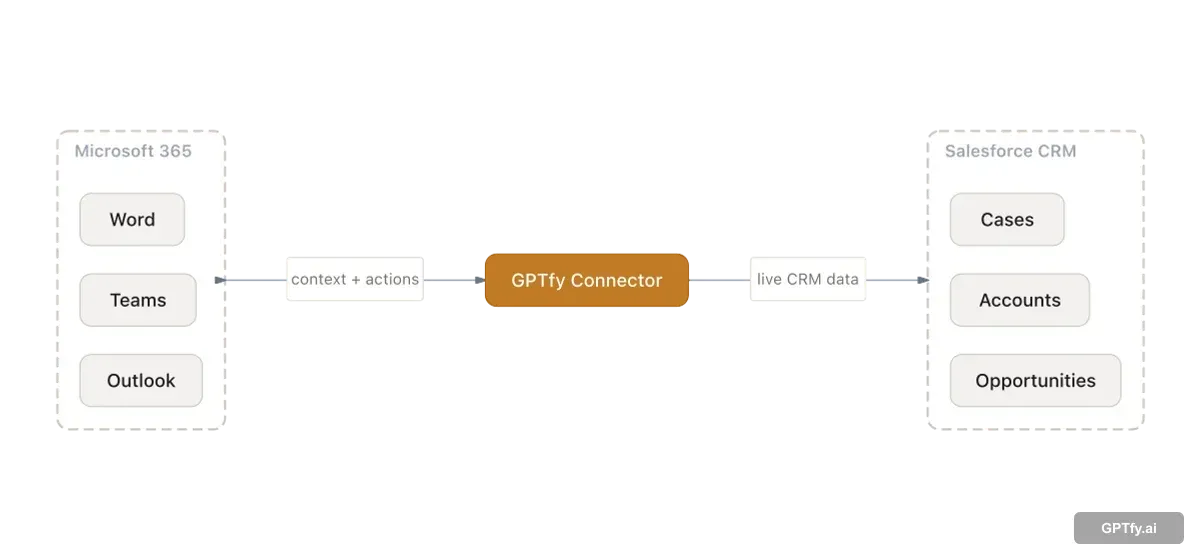
GPTfy provides a Microsoft 365 Copilot extension available from Microsoft AppSource. Customers configure a customer-hosted Azure layer (an Azure registration app) that maintains the mapping between the Salesforce org and Microsoft 365 identity/email systems (for example, Exchange and Microsoft Entra ID). That Azure layer calls into GPTfy running inside Salesforce and returns processed context to Copilot. The Named Credentials architecture secures every callout without exposing credentials to end users.
The integration answers not "how do we dump CRM data into Copilot" but "how do we return the right governed context for the user's workflow".
GPTfy's Copilot integration works across Excel, PowerPoint, Word, Teams, and Outlook - a single agent install from Microsoft AppSource covers all five.
How Salesforce Context Is Defined (Prompt + Data Context Mapping)
In GPTfy, what Copilot receives is driven by Salesforce-native configuration:
- Data Context Mapping: defines which object is the "main" record and which related objects (child and grandchild) GPTfy includes as context.
- Prompt Builder: defines the prompt command (what the model should produce) and which context elements to include.
This is why Copilot can ask GPTfy for "Account 360" or "Opportunity summary" and receive a consistent JSON payload suitable for downstream computation (for example, a sum of opportunities expected to close next quarter).
Configure retrieval in Prompt Builder, then see it applied in the Account 360 and Copilot Excel demo.
Read vs Read/Write Workflows
Teams typically start with read workflows (retrieve governed Salesforce context into Copilot) and then expand into read/write workflows where Copilot writes back outcomes such as:
- Email summaries
- Follow-up tasks
- Open cases
- Account planning notes and structured updates
Write-back is configuration-driven. Admins control which actions Copilot can trigger and which prompts can initiate them.
Agentic AI Across Salesforce and Microsoft 365
The most impactful Copilot workflows are not one-shot queries - they are agentic: retrieve Salesforce context, reason over it in Copilot, generate a Microsoft 365 artifact, write the outcome back to Salesforce, and trigger the next step. GPTfy Agents are built specifically for this pattern.
Because GPTfy runs inside Salesforce with native permissions, four-layer masking, and admin-configured write-back governance, it powers agentic AI workflows spanning the full Salesforce-Microsoft boundary - raw records stay in your Salesforce org. A rep preparing for a QBR can have Copilot retrieve an Account 360, generate the PowerPoint presentation, and log the meeting prep task back in Salesforce in a single governed workflow.
Each step is permission-enforced and auditable. This is what separates an agentic Copilot integration from a simple search index: the ability to act on Salesforce data, not just retrieve it. See how the approaches compare in Copilot + Salesforce: Three Integration Approaches Compared .
Data Flow and Controls (What Goes Out, What Stays)
In GPTfy, raw Salesforce records stay in Salesforce. GPTfy applies your masking and governance configuration and sends only the masked payload to your AI provider based on how your org is configured.
For teams evaluating the Copilot integration for security review, start with:
Data Masking and Audit Trails and Governance. For full technical evaluation, download the GPTfy Copilot integration datasheet.
Key takeaways
Copilot requests Salesforce context
GPTfy returns structured JSON (Account 360, opportunity analysis, summaries) that Copilot formats and extends.
Prompts define what Copilot gets
GPTfy Prompt Builder and Data Context Mapping control which records and related data GPTfy retrieves for each workflow.
Runs in the user's Salesforce security context
Responses respect the user's Salesforce permissions and sharing rules as configured in the org.
Read-only or read/write workflows
Configure Copilot + GPTfy to compute on retrieved context and optionally write back summaries and follow-ups.
See Copilot answer questions using your live Salesforce data
Account context, opportunity details, case history, surfaced inside Copilot through GPTfy. 2-minute demo.
FAQ
The GPTfy agent is a Microsoft 365 Copilot extension available from Microsoft AppSource. Install it into the customer's Microsoft 365 environment and configure it alongside a customer-hosted Azure layer that connects to GPTfy in Salesforce.
Copilot typically receives structured JSON containing the governed Salesforce context requested (for example, Account 360 and related opportunity data). Copilot decides how to format, present, and further analyze that JSON.
The dataset is controlled by Data Context Mapping (which objects and relationships are included) and Prompt Builder (which prompt command runs and which context elements are included).
Yes. A common workflow is: Copilot requests Salesforce context through GPTfy, then uses that context to generate documents, spreadsheets, or decks in Microsoft 365.
The GPTfy Copilot extension works across all five M365 apps: Word, Excel, PowerPoint, Teams, and Outlook. A single install from Microsoft AppSource enables GPTfy context retrieval in all of them. Common workflows include generating Word proposals, Excel forecasts, and PowerPoint QBRs from live Salesforce data.
GPTfy uses a customer-hosted Azure layer (Azure registration app) that maps the Microsoft 365 identity (Microsoft Entra ID / Exchange email) to the corresponding Salesforce user. This ensures that when a rep requests Salesforce context in Copilot, GPTfy retrieves only what that user's Salesforce profile and sharing rules allow - not a service account view of all data.
No. GPTfy runs as a managed package inside your existing Salesforce org. No Data 360 (formerly Data Cloud) license, no additional Salesforce AI add-on, and no Dataverse or Power Platform setup is required. The Copilot integration works with Sales Cloud, Service Cloud, Health Cloud, and Financial Services Cloud on standard org licensing.
GPTfy's Security Layer applies your configured data masking rules before any Salesforce data is returned to Copilot. Field-level masking, pattern detection (SSN, DOB, email), and blocklists all run inside Salesforce before the JSON payload is sent. Raw Salesforce records never leave your org - Copilot receives only the masked, governed output.
GPTfy enables full agentic loops spanning Salesforce and Microsoft 365: retrieve governed Salesforce context, reason over it in Copilot, generate a Word or Excel artifact, and write the outcome back to Salesforce - all in a single governed workflow. Because GPTfy runs inside Salesforce with native permissions and admin-configured write-back controls, each step is permission-enforced and auditable. This is what separates an agentic integration from a simple read-only search index.
See Copilot + Salesforce running end-to-end
Book a demo and we will walk through the Copilot extension flow: GPTfy prompt selection, data context mapping, the JSON payload returned to Copilot, and an example read/write workflow.
Explore More
Microsoft Copilot
Use the GPTfy Microsoft 365 Copilot extension to bring governed Salesforce context into Copilot workflows.
Prompt Builder
Define prompt commands and governance in Salesforce and reuse them across Copilot and in-Salesforce workflows.
Account 360
Generate a complete account view using Salesforce records and related context.
Demo: Copilot in Excel
Watch Salesforce pipeline data flow into Excel through the GPTfy Copilot extension.
Demo: Copilot Documents
See real-time Word document generation from Salesforce account data via Copilot.
Copilot PowerPoint Demo
Watch GPTfy generate QBR presentations from Salesforce data in PowerPoint.
GPTfy Agents
Full agentic AI workflows across Salesforce and Microsoft 365.
Named Credentials Guide
How GPTfy secures AI API authentication with Salesforce Named Credentials.
Copilot integration approaches
The trade-offs across each way to wire Copilot into Salesforce.