
RAG in Salesforce: Complete Implementation Guide
Ground your Salesforce AI in verified knowledge. RAG retrieves the right articles, documents, and records before the AI generates a response — eliminating hallucinations and replacing manual copy-paste with automated, context-aware AI.
Last updated:
What Is Retrieval-Augmented Generation (RAG)?
Retrieval-Augmented Generation (RAG) is an AI architecture pattern that improves the quality and accuracy of large language model (LLM) outputs by retrieving relevant information from an external knowledge source before the model generates a response. Instead of relying solely on what the model learned during training, RAG dynamically fetches the most relevant content and provides it as context in the prompt — a process called "grounding."
Why RAG Exists: The Hallucination Problem
Large language models are trained on vast general datasets. They know a great deal about the world in general, but they know nothing specific about your organization's products, policies, internal processes, or proprietary knowledge — unless you tell them. Without grounding, LLMs often respond confidently but inaccurately to domain-specific questions, generating plausible-sounding but factually wrong answers. This phenomenon is called hallucination.
RAG solves this by inserting a retrieval step between the user's question and the model's response. The retrieval system searches a curated knowledge store for content relevant to the question, then passes the retrieved passages to the LLM as context. The LLM can then reason from accurate, organization-specific information rather than inventing an answer.
How RAG Works: The Three-Step Process
- Indexing: Documents, articles, or records are processed, split into chunks, converted into vector embeddings (mathematical representations of meaning), and stored in a vector database. This happens in advance, on a schedule.
- Retrieval: When a user submits a query, it is also converted into a vector embedding. The vector database performs a similarity search, returning the knowledge chunks most semantically similar to the query.
- Generation: The retrieved chunks are injected into the LLM prompt as context. The model generates a response grounded in that retrieved content, citing the specific information it was given rather than relying on general training.
RAG vs Fine-Tuning
Organizations often ask whether they should use RAG or fine-tune a model on their data. These approaches serve different purposes:
- Fine-tuning bakes knowledge into the model's weights during training. It is expensive, requires large datasets, and produces a static model that becomes outdated as your knowledge evolves. Fine-tuning excels at teaching the model a specific style or format, not at keeping knowledge current.
- RAG retrieves fresh knowledge at query time. It requires no retraining, can be updated instantly by changing the knowledge store, and scales easily across different domains. RAG excels at knowledge-dependent tasks where accuracy and currency matter.
For Salesforce use cases — support agents answering product questions, sales reps querying deal intelligence, or compliance teams verifying policy — RAG is almost always the right choice.
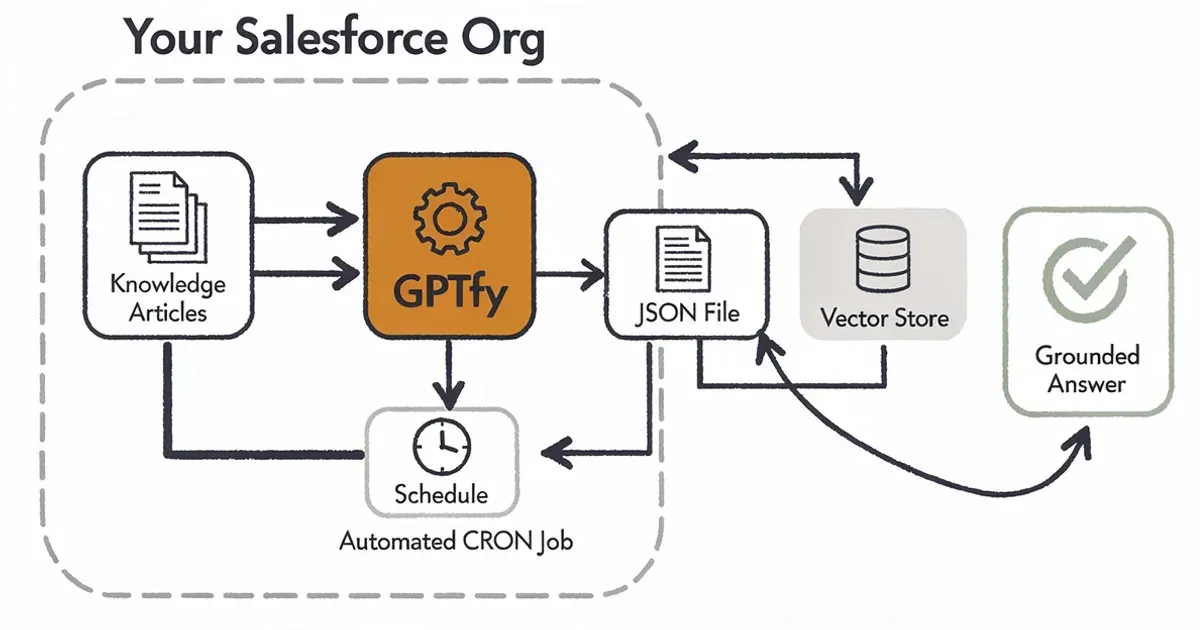
GPTfy RAG Sync pipeline: documents are chunked, embedded, and retrieved at prompt time
GPTfy RAG Sync: How It Works
GPTfy RAG Sync is the component within GPTfy's managed package that automates the full RAG pipeline for Salesforce. It handles every step from knowledge extraction to vector indexing to retrieval at prompt time — without requiring Data 360 or custom Apex development.
The Problem RAG Sync Solves
Implementing RAG manually in Salesforce is a significant engineering project. Without a tool like RAG Sync, an organization would need to:
- Manually export Salesforce Knowledge articles or records as CSV or JSON files.
- Upload those files to a storage bucket (Azure Blob, S3, Google Cloud Storage).
- Trigger a vector embedding job to process the files into the vector database.
- Repeat this entire process every time knowledge content changes.
- Build custom integration logic to query the vector store at prompt time and inject retrieved content.
RAG Sync automates every step. Once configured, it runs on a schedule, keeping the vector store current with your Salesforce knowledge without any manual intervention.
RAG Sync Architecture
- AI_RAG_Sync__c: The configuration object that defines what to sync. Contains the source object, field selections, where clause for filtering, file format (JSON), cron schedule, and the AI model connections for file upload and datastore import.
- AI_RAG_Sync_Job__c: The job execution record. Created each time RAG Sync runs (scheduled or manually triggered). Tracks the status, timestamps, and any errors from the sync run.
- External ID field: Stores the vector store ID returned by the vector database provider after successful indexing. Used to reference the datastore for retrieval operations.
Supported Knowledge Sources
- Salesforce Knowledge: The primary use case. Knowledge articles across all article types can be indexed. Where clause filtering allows you to sync only published, active articles in specific categories.
- Custom Objects: Product catalogs, FAQ records, policy documents stored as Salesforce custom objects, or any object with text content that should inform AI responses.
- Standard Objects: Case records (solved cases as knowledge), Account records (for account intelligence), or any other Salesforce standard object with relevant text fields.
Vector Store Providers
GPTfy RAG Sync integrates with major vector database providers. The AI Model (File Upload) field determines where files are stored, and the AI Model (Datastore Import) field specifies the vector embedding and indexing model. Supported providers include Azure AI Search, AWS Bedrock Knowledge Bases, and Google Vertex AI Vector Search. The connection uses Named Credentials for secure, credential-free API calls from Salesforce.
RAG Implementation: Step-by-Step
Implementing RAG in Salesforce with GPTfy RAG Sync is a seven-step process that can typically be completed in a few hours for the initial configuration, with automated ongoing maintenance.
Step 1: Install GPTfy from AppExchange
Install the GPTfy managed package in your Salesforce org. No Data 360 purchase is required. GPTfy includes pre-configured Named Credentials for common AI providers and pre-built metadata for the RAG Sync custom objects.
Step 2: Configure AI Model Connections
In the GPTfy Cockpit, set up two AI Model connections:
- An AI Model for file upload (the endpoint where extracted knowledge files are stored in a vector-ready format — typically Azure Blob, S3, or equivalent).
- An AI Model for datastore import (the vector database that will index and store embeddings — Azure AI Search, AWS Bedrock Knowledge Base, or Google Vertex AI Vector Search).
Both connections use Salesforce Named Credentials to authenticate securely without exposing API keys.
Step 3: Create the RAG Sync Record
Navigate to RAG Syncs in the App Launcher and create a new record:
- Name and description identifying the knowledge domain (e.g., "Product Knowledge Base RAG Sync").
- File Format: JSON (currently the supported format).
- File Name: the output filename with .json extension.
- AI Model (File Upload): select the file storage model from Step 2.
- AI Model (Datastore Import): select the vector database model from Step 2.
- Select Object: choose the Salesforce object to index (e.g., Knowledge__kav for Salesforce Knowledge).
- Fields: select the fields to include in the exported JSON (e.g., Title, Summary, Body_Text__c, Categories).
- Where Clause: filter to index only the records you want (e.g., PublishStatus = 'Online' AND Language = 'en_US').
Step 4: Schedule the Sync
Enter a Salesforce-compliant CRON expression to schedule automatic sync runs. A common configuration is nightly at 2 AM (0 0 2 * * ?), which keeps the vector store current with any Knowledge article updates made during business hours. For high-change environments, you can schedule more frequently — hourly or even more often.
Step 5: Run an Initial Sync
Click the Run Now button to trigger an immediate sync. This creates the initial vector store with all qualifying records. Monitor the AI_RAG_Sync_Job__c record for completion status. The External ID field will populate with the vector store ID upon successful completion.
Step 6: Connect RAG Sync to an Agent
In the GPTfy Cockpit, open your AI Agent (AI_Agent__c) record and link the RAG Sync record. This tells the agent to query the vector store during conversations. When a user asks a question, the agent automatically retrieves relevant knowledge chunks before generating its response.
Step 7: Test and Validate
Ask the agent questions that should trigger knowledge retrieval. Verify that responses reference the correct Knowledge articles. Use the GPTfy Console to inspect the conversation and confirm that RAG retrieval is occurring. Review the Security Audit records to see the retrieved content in the prompt payload.
GPTfy RAG Sync vs Data 360 RAG
Salesforce offers its own RAG-like grounding capabilities through Data 360 and Agentforce. Understanding the differences helps organizations choose the right approach for their needs.
Data 360 Grounding
Agentforce's grounding layer uses Data 360 to unify customer data from multiple sources into unified customer profiles. During an agent conversation, Agentforce queries Data 360 for relevant customer information and includes it as context. Data 360's grounding is primarily structured data (CRM fields, transaction records, customer attributes) rather than unstructured knowledge (articles, documents, FAQs).
GPTfy RAG Sync
GPTfy RAG Sync is designed for unstructured knowledge retrieval — the kind of semantic search that powers support knowledge bases, FAQ systems, and policy lookups. It converts knowledge articles and text-heavy records into vector embeddings, enabling semantic similarity search that understands intent, not just keyword matching.
Side-by-Side Comparison
- Data source: GPTfy RAG Sync — any Salesforce object including unstructured text fields. Data 360 — unified structured customer profiles from integrated sources.
- Retrieval type: GPTfy RAG Sync — semantic vector similarity search. Data 360 — structured profile queries by customer ID or attribute.
- Knowledge domain: GPTfy RAG Sync — product knowledge, FAQs, policies, case history. Data 360 — customer history, purchase data, behavior signals.
- Licensing: GPTfy RAG Sync — included in GPTfy license, no Data 360 required. Data 360 grounding — requires Data 360 purchase.
- Setup complexity: GPTfy RAG Sync — declarative configuration via custom objects. Data 360 — requires Data 360 provisioning, data stream setup, and identity resolution.
Using Both Together
The approaches are complementary. Organizations with Data 360 can use Agentforce for customer-context grounding (what did this customer buy? what cases have they opened?) while using GPTfy RAG Sync for knowledge grounding (how should we resolve this type of issue? what does our policy say?). Each tool handles the type of grounding it is best suited for.
RAG Use Cases in Salesforce
RAG transforms the effectiveness of AI across several high-value Salesforce use cases. Here are the most impactful applications, organized by department.
Service Cloud: Knowledge-Grounded Case Deflection
Service teams handle significant volumes of repetitive questions that have documented answers in the knowledge base. Without RAG, an AI agent generating responses to these questions risks hallucination — it might invent a product specification or policy that does not exist. With RAG Sync indexing the Knowledge base, the agent retrieves the exact article, confirms the correct answer, and presents it (with the article reference) to the customer.
Case deflection rates improve when customers receive accurate, knowledge-grounded answers. Organizations implementing RAG-enabled knowledge bases frequently report 20-40% improvement in first-contact resolution without human escalation.
Service Cloud: Agent Assist
For service reps handling complex cases, RAG provides real-time knowledge retrieval during conversation. As the customer describes their issue, the AI agent searches the vector store and surfaces relevant articles, troubleshooting guides, and resolution steps — giving the rep verified content to work from rather than relying on memory or manual search.
Sales Cloud: Competitive Intelligence
Sales teams maintain battle cards, competitive analyses, and objection-handling guides. With RAG Sync indexing these documents as custom object records, a sales rep can ask the AI agent "how does our product compare to Competitor X on integration?" and receive a grounded, accurate response drawn from the actual battle card — not a hallucinated comparison.
Sales Cloud: RFP and Proposal Support
Responding to RFPs requires accurate product descriptions, compliance statements, and technical specifications. RAG Sync indexes your product catalog, security documentation, and standard proposal language. The AI agent retrieves the most relevant content for each RFP question, dramatically reducing the time required to assemble accurate responses.
Operations: Policy and Compliance Lookup
Legal, compliance, and HR teams field questions about internal policies, compliance requirements, and regulatory interpretations. RAG-grounded AI agents retrieve the applicable policy text before generating an answer, ensuring responses are traceable to actual policy documents rather than approximations.
Healthcare and Financial Services: Domain-Specific Knowledge
In regulated industries, knowledge accuracy is not just a quality issue — it can be a compliance issue. RAG grounds AI responses in your organization's validated clinical protocols, financial product documentation, or regulatory guidance, reducing the risk of non-compliant AI output and making responses auditable by linking them to source content.
Chunking Strategies and Retrieval Quality
RAG retrieval quality depends significantly on how knowledge content is chunked before indexing. Chunking is the process of splitting a document into smaller segments that can be individually embedded and retrieved. The right chunking strategy depends on your content type and query patterns.
What Is Chunking?
When a 3,000-word Knowledge article is indexed for RAG, the entire article is not stored as a single vector. Instead, it is divided into smaller chunks — typically 200-500 words each — that are individually embedded. This allows the retrieval system to surface the specific section of a document relevant to a query, rather than returning an entire article when only one paragraph is relevant.
Chunking in GPTfy RAG Sync
GPTfy RAG Sync handles chunking as part of the indexing pipeline. The JSON file created from Salesforce records is processed by the vector database provider's embedding model, which applies chunking logic appropriate for the document type. The optimal chunk size depends on the average length of your Knowledge articles and the specificity of queries your agents receive.
Field Selection Impacts Chunking Quality
The fields you include in the RAG Sync record determine the content of each indexed chunk. Best practices for field selection:
- Include the article Title field — this provides context for the retrieval system about what the chunk covers.
- Include the primary content field (e.g., the article body or summary field) where the substantive knowledge lives.
- Include metadata fields (category, product, version) that can help filter retrieval to the relevant domain.
- Exclude fields that do not contribute to semantic meaning (IDs, dates, owner names) to reduce noise.
Retrieval Quality Factors
Several factors affect the quality of RAG retrieval in production:
- Content quality: RAG retrieves what you have indexed. Well-structured Knowledge articles with clear headings, accurate summaries, and consistent terminology retrieve better than informal, inconsistently structured content.
- Index currency: Outdated Knowledge articles degrade response quality. The RAG Sync schedule should keep the vector store current with Knowledge article updates.
- Where clause filtering: Index only published, approved content. Drafts, archived articles, or unverified content in the vector store can surface incorrect or outdated information.
- Query specificity: RAG works best when user queries are specific. General questions ("tell me about our products") retrieve many partially relevant chunks; specific questions ("what are the storage limits for Enterprise plan customers") retrieve precisely the relevant content.
Getting Started with RAG in Salesforce
The fastest path to RAG in Salesforce starts with a focused pilot — one knowledge domain, one agent, one use case — and expands from there.
Recommended Pilot: Service Knowledge Base
The highest-ROI initial RAG implementation is typically a service knowledge base pilot. Service teams have large, well-maintained knowledge bases and high query volumes where RAG accuracy improvements immediately translate to measurable case deflection and resolution time savings.
- Identify the 100-200 most-accessed Knowledge articles in your org (use the Salesforce Knowledge Report or CRM Analytics).
- Create a RAG Sync record targeting these articles using a Where Clause that filters for published, active articles in the relevant categories.
- Configure a nightly sync schedule and run an initial manual sync to populate the vector store.
- Create a GPTfy Agent with a service-oriented system prompt and connect the RAG Sync record.
- Deploy the agent to the Service Cloud Utility Bar for a pilot group of service reps or a self-service customer portal.
- Measure case deflection rates, first-contact resolution, and customer satisfaction against the pre-RAG baseline.
Expanding Beyond the Pilot
Once the pattern is validated, RAG Sync can be extended to additional knowledge domains by creating additional RAG Sync records and either linking them to the same agent (for a broad-knowledge agent) or creating specialized agents for each domain (e.g., a Product Knowledge Agent, a Compliance Policy Agent, a Competitive Intelligence Agent).
Maintenance and Governance
RAG implementations require ongoing governance to remain effective:
- Review and refresh Knowledge articles regularly — stale content produces stale AI responses.
- Monitor RAG retrieval quality by reviewing Security Audit records that show the retrieved chunks included in prompts.
- Expand the Where Clause filtering to exclude newly deprecated or archived articles.
- Adjust the sync schedule if Knowledge is updated frequently during business hours.
Key takeaways
RAG Grounds AI in Your Specific Knowledge
Without RAG, AI responds from general training data. With RAG, it retrieves verified content from your Salesforce Knowledge base, product documentation, or custom objects before generating a response — dramatically improving accuracy for domain-specific queries.
GPTfy RAG Sync Automates the Entire Pipeline
Manual RAG implementation requires extracting, converting, uploading, and indexing knowledge content. GPTfy RAG Sync automates every step on a configurable schedule — keeping your vector store current with zero ongoing manual effort.
Any Salesforce Object Can Be the Knowledge Source
RAG Sync works with Salesforce Knowledge articles, custom objects, Case records, Product catalogs, or any other Salesforce data. You define which object and fields to index, and GPTfy handles the extraction and vector embedding.
Retrieval Happens Automatically at Prompt Time
When a user asks an agent a question, RAG Sync retrieves the most relevant knowledge chunks from the vector store and injects them into the AI prompt as context. The AI then generates a response grounded in your actual data, not hallucinated content.
No Data 360 Required for RAG
GPTfy RAG Sync implements vector-based knowledge retrieval inside your Salesforce org without requiring Data 360. It integrates with Azure, AWS, or Google vector store infrastructure via your own Named Credentials.
RAG Dramatically Reduces AI Hallucinations
Hallucination — AI confidently generating false information — is the primary trust barrier for enterprise AI adoption. RAG constrains the AI to reason from retrieved, verified content, reducing hallucination rates for knowledge-dependent tasks by orders of magnitude.
FAQ
Retrieval-Augmented Generation (RAG) in Salesforce is an AI pattern where relevant knowledge content is automatically retrieved from a vector database and included as context in an AI prompt before the model generates a response. This grounds AI output in your organization's specific knowledge — such as Salesforce Knowledge articles, product documentation, or policy records — rather than relying solely on the model's general training data.
RAG reduces hallucination by providing the AI model with retrieved, verified content at prompt time. Instead of generating an answer from general training, the model reasons from the specific passages retrieved from your knowledge store. The model can only cite and synthesize what it has been given, making hallucination significantly harder. Organizations using RAG for knowledge-dependent tasks report dramatically higher accuracy compared to prompt-only approaches.
GPTfy RAG Sync (AI_RAG_Sync__c) is a feature within the GPTfy managed package that automates the full knowledge synchronization pipeline between Salesforce and a vector database. It extracts records from any Salesforce object (Knowledge articles, custom objects, Cases), converts them to JSON, uploads them to a vector store, and triggers indexing — all on a configurable schedule. Agents connected to a RAG Sync record automatically query the vector store during conversations.
No. GPTfy RAG Sync implements vector-based knowledge retrieval without requiring Data 360 (formerly Data Cloud). It integrates with Azure AI Search, AWS Bedrock Knowledge Bases, or Google Vertex AI Vector Search using Named Credentials for secure authentication. Data 360 provides a different type of grounding — structured customer profile data — which is complementary but not required for knowledge-base RAG.
GPTfy RAG Sync can index any Salesforce object. Common configurations include: Salesforce Knowledge articles (Knowledge__kav), custom FAQ objects, Case records (for solved-case intelligence), Product catalogs, and Account or Opportunity records with rich text descriptions. You specify the object, select the fields to include, and optionally provide a WHERE clause to filter which records are indexed.
GPTfy RAG Sync exports Salesforce data as JSON files for vector indexing. For file-based RAG (documents uploaded as Salesforce Files or via Azure Document Intelligence), GPTfy supports PDF, DOCX (Word), Excel, and HTML formats through the BYOM Azure Document Intelligence integration. Salesforce Knowledge articles (HTML-based) are extracted as text content automatically.
The appropriate sync frequency depends on how often your knowledge content changes. Most organizations find a nightly schedule (2 AM, after business hours) sufficient to keep the vector store current with daily Knowledge article updates. For organizations that publish Knowledge articles frequently during business hours, an hourly schedule may be appropriate. The Run Now button allows on-demand sync after major content updates.
Vector search (also called semantic search) converts text into numerical embeddings that represent meaning, then finds the most semantically similar items in a database. Unlike keyword search (which matches exact words), vector search understands intent and context — so a query like "how do I cancel my subscription?" can retrieve an article titled "Account Termination Process" even though it shares no keywords with the query. This semantic matching makes RAG retrieval far more effective than traditional search for natural-language AI queries.
In GPTfy, every agent conversation creates a Security Audit record. When RAG retrieval occurs, the retrieved knowledge chunks appear in the prompt payload within the Security Audit record. This allows compliance teams to verify exactly what knowledge content was provided to the AI model for each conversation — a critical audit capability for regulated industries where AI responses must be traceable to authoritative sources.
Chunking is the process of splitting large documents into smaller segments before vector indexing. Instead of storing a 3,000-word article as a single vector, it is split into 200-500 word chunks that are individually embedded. This allows RAG retrieval to surface the specific paragraph or section relevant to a query rather than returning an entire irrelevant article. Chunking strategy — chunk size and overlap — significantly affects retrieval precision for long-form knowledge content.
Yes. Sales teams use RAG for competitive intelligence (battle cards, objection handling), RFP response support (product specs, compliance documentation), deal coaching (historical win/loss patterns from Case and Opportunity records), and account research (indexed account notes, meeting summaries). RAG Sync can index any Salesforce object, so sales-relevant knowledge stored in Salesforce is fully available for AI grounding.
See RAG Grounded AI Responses Live in Salesforce
We'll set up a RAG Sync against your Salesforce Knowledge base, run a live sync, and demonstrate a conversation where the agent retrieves and cites specific articles — all in under 30 minutes.
Explore More
BYOM vs Einstein AI
Compare Bring Your Own Model with Einstein AI for Salesforce AI strategy.
Agentic AI in Salesforce
How AI agents use RAG to ground responses in verified Salesforce knowledge.
GPTfy Agents Feature
Deploy knowledge-grounded AI agents in Salesforce with RAG Sync.
AI Data Masking
Protect sensitive data in Salesforce AI pipelines with four-layer masking.
GPTfy Knowledge Base
Documentation, guides, and resources for Salesforce AI with GPTfy.
Case Deflection with AI
Knowledge-grounded AI that resolves cases before they reach your team.