
What Is Agentic AI in Salesforce?
Autonomous AI agents that execute Salesforce actions, not just generate text. Understand the architecture, compare platforms, and choose the right approach for your org.
Last updated:
What Is Agentic AI?
Agentic AI in Salesforce refers to autonomous artificial intelligence systems that can plan, decide, and execute multi-step business processes inside a CRM without constant human direction. Unlike traditional prompt-based AI — where a user asks a question and receives a text response — agentic AI takes action. It can create records, update fields, trigger automation, and orchestrate workflows based on natural-language instructions.
How Agentic AI Differs from Prompt-Based AI
Prompt-based AI (also called "generative AI" or "copilot-style AI") follows a request-response pattern. A user submits a prompt, the model generates text, and the user decides what to do with it. The AI has no ability to act on its output.
Agentic AI breaks this pattern in three fundamental ways:
- Autonomy: Agents decide which actions to take based on conversational context, available skills, and defined guardrails.
- Tool Use: Agents invoke tools — Apex classes, Salesforce Flows, REST APIs — to execute real operations like creating Opportunities, updating Cases, or sending emails.
- Memory and Threading: Agents maintain conversation context across turns via thread IDs or full conversation history, enabling multi-step reasoning within a single session.
In practice, this means a sales rep can say "create a follow-up task for the Acme deal closing next Friday" and the agent will locate the Opportunity, create the Task, link it correctly, and confirm — without the rep ever leaving the chat interface.
Key Takeaway
Agentic AI transforms the CRM from a system of record into a system of action. Instead of logging into Salesforce to perform manual steps, users instruct an agent that handles execution autonomously.
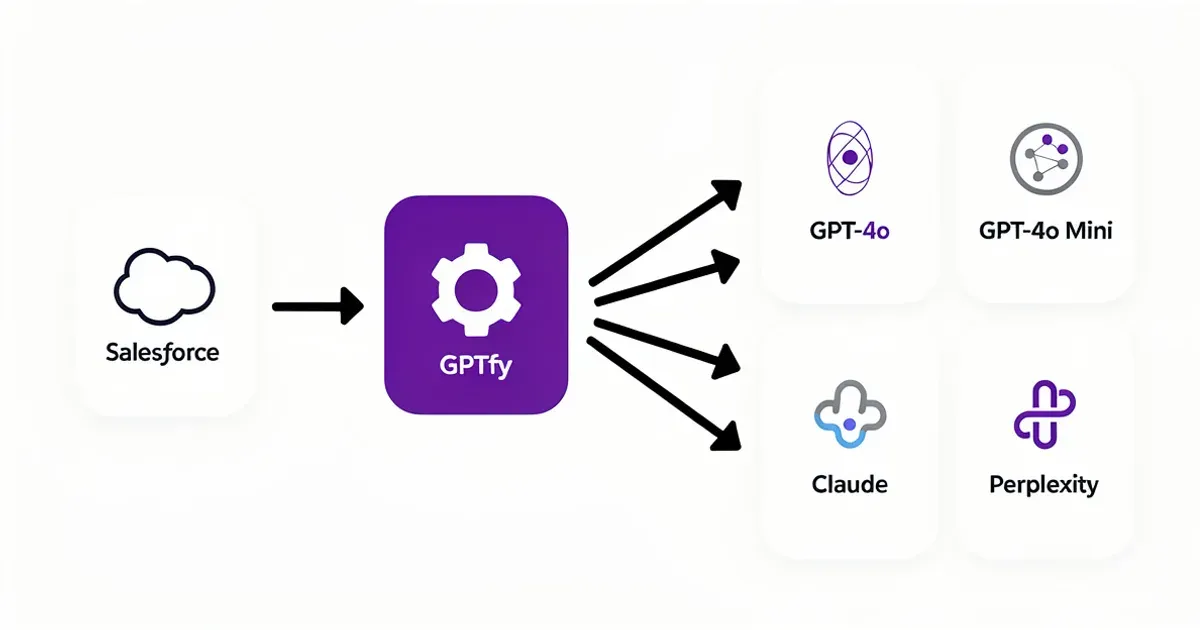
GPTfy agentic routing: dynamic model selection enables multi-step AI workflows in Salesforce
Two Approaches: GPTfy Agents vs Agentforce
Salesforce customers evaluating agentic AI currently have two primary Salesforce-native options: GPTfy Agents (available on AppExchange) and Salesforce Agentforce (formerly Einstein Copilot Actions). Both operate inside Salesforce, but they differ in architecture, dependencies, pricing, and model flexibility.
Architecture Comparison
- GPTfy Agents: Managed package installed from AppExchange. Agents are configured via custom objects (AI_Agent__c, AI_Agent_Skill__c). Skills link Agentic-type prompts with JSON schemas to Apex classes implementing AIAgenticInterface. RAG knowledge is synced via AI_RAG_Sync__c. All data stays inside the Salesforce org.
- Agentforce: Built into the Salesforce platform as a first-party feature. Uses the Atlas reasoning engine to decompose user requests into topics and actions. Topics map to instructions; actions map to Flows, Apex, or prompt templates. Requires Data 360 for grounding and retrieval.
Dependency Comparison
- GPTfy: No additional Salesforce products required. Works with Sales Cloud, Service Cloud, or any Salesforce edition. Connect your own AI model via Named Credentials (Azure OpenAI, AWS Bedrock, Google Vertex AI, DeepSeek, and others).
- Agentforce: Requires Einstein Platform, Data 360 (for grounding and retrieval), and uses Salesforce-provided AI models. Custom model support is limited to models available through the Einstein Trust Layer.
Pricing Model
- GPTfy: Fixed annual license fee. Predictable budgeting regardless of conversation volume or token usage. You pay your own AI provider directly at their rates.
- Agentforce: Per-conversation pricing ($2 per conversation as of 2025). Costs scale with usage volume, which can make budgeting challenging for high-volume teams. Additional costs for Data 360 and Einstein Platform SKUs.
Model Flexibility
- GPTfy (BYOM): Bring Your Own Model. Connect any LLM provider via Named Credentials. Switch between GPT-4o, Claude, Gemini, DeepSeek, Llama, or any model with a REST API. No vendor lock-in.
- Agentforce: Primarily uses Salesforce-hosted models (OpenAI models via Einstein). Limited flexibility to use external models. Model selection is managed by Salesforce, not the customer.
Key Takeaway
GPTfy Agents offer more flexibility and lower total cost of ownership for organizations that want model choice, predictable pricing, and zero dependency on Data 360. Agentforce may appeal to organizations already invested in the Einstein and Data 360 ecosystem who prefer a first-party Salesforce solution.
GPTfy's Agentic Architecture
GPTfy's agentic architecture is built on four pillars: Agent configuration, Agent Skills, RAG Sync, and Security Audit. Each component is represented as a Salesforce custom object within the GPTfy managed package.
Agent Configuration (AI_Agent__c)
The Agent record is the central entity. It defines the system prompt (baseline instructions), the AI model powering the agent, which user profiles and permission sets can access it, session timeout (TTL), and an optional RAG Sync connection for knowledge-grounded responses.
Agent Skills (AI_Agent_Skill__c)
Skills are the building blocks of what an agent can do. Each skill links an Agentic-type prompt — which includes a JSON schema defining required inputs and expected structure — to an Apex class implementing the AIAgenticInterface. When a user makes a request, the agent determines which skill matches, validates the input against the schema, and invokes the Apex class to perform the operation.
Example skills include creating Opportunities, updating Account details, deleting records by name, routing Cases, or triggering multi-step Salesforce Flows.
RAG Sync (AI_RAG_Sync__c)
RAG Sync automates knowledge base synchronization between Salesforce and vector stores. It indexes Salesforce Knowledge articles or custom objects into a vector database so agents can retrieve verified content before generating responses. Without RAG Sync, organizations would need to manually extract, convert, and upload knowledge articles — a process RAG Sync eliminates entirely.
REST API Access
Agents are accessible programmatically via a REST endpoint at /services/apexrest/v1/agentic. The POST request includes the agent name, user message, locale, and context ID. This enables integration with external systems, custom UIs, or automation workflows while maintaining the same security and audit capabilities as the Salesforce UI.
Multi-Channel Deployment
GPTfy Agents can be deployed through the Salesforce Utility Bar (with profile-based visibility), the GPTfy Console (with enhanced capabilities like file attachment and RAG browsing), or the REST API for programmatic access. All channels produce identical Security Audit records.
Key Takeaway
GPTfy's architecture is entirely declarative and Salesforce-native. Agents, skills, and knowledge sync are all configured through point-and-click interfaces and Salesforce custom objects — no external infrastructure required.
Agentforce's Approach
Salesforce Agentforce (launched in late 2024 as the successor to Einstein Copilot) represents Salesforce's first-party approach to agentic AI. It is built directly into the Salesforce platform and uses the Atlas reasoning engine to interpret user requests and orchestrate actions.
Atlas Reasoning Engine
Atlas is Agentforce's core intelligence layer. When a user makes a request, Atlas breaks it into subtasks, maps those to topics and actions, and executes them in sequence. Topics define the domain (e.g., "Sales," "Support"), while actions are the executable operations — typically Salesforce Flows, Apex invocable actions, or prompt templates.
Topics and Actions Model
Agents in Agentforce are configured by defining topics (areas of responsibility) and linking actions to those topics. Each action specifies what the agent can do within that domain. This is structurally similar to GPTfy's skill model, but uses Salesforce-proprietary metadata rather than custom objects.
Data 360 Dependency
Agentforce relies on Data 360 for grounding — the process of providing agents with real-time customer data and context. Data 360 unifies data from multiple sources into a single customer profile, which Agentforce agents query during reasoning. This is a key architectural difference: Data 360 is effectively a prerequisite for Agentforce to function with full capabilities, and it represents an additional licensing cost.
Einstein Trust Layer
Agentforce uses the Einstein Trust Layer for security, which includes prompt defense, toxicity detection, and audit logging. PII masking and data grounding pass through this layer before reaching the underlying AI model.
Key Takeaway
Agentforce is tightly integrated into Salesforce's ecosystem and benefits from native platform features. However, it requires Data 360 and Einstein licensing, limits model choice, and uses per-conversation pricing that can escalate quickly at scale.
When to Use Which
Choosing between GPTfy Agents and Agentforce depends on your organization's existing investments, budget model, AI strategy, and compliance requirements. Here is a decision framework:
Choose GPTfy Agents When
- You want to use your own AI models (Azure OpenAI, AWS Bedrock, Google Vertex, DeepSeek, or custom endpoints)
- You do not have — or do not want to purchase — Data 360
- You need predictable, fixed-price licensing rather than per-conversation billing
- Your compliance team requires comprehensive audit trails with Security Audit records for every conversation
- You operate in regulated industries (financial services, healthcare, government) where data residency and PII masking are mandatory
- You want faster deployment — GPTfy is a managed package that can be configured in days, not months
- You need REST API access for programmatic agent integration with external systems
Choose Agentforce When
- You are already licensed for Data 360 and Einstein Platform
- You prefer a first-party Salesforce solution managed entirely within the Salesforce ecosystem
- Your use cases align closely with Salesforce's pre-built agent templates
- You want the Atlas reasoning engine for complex multi-step task decomposition
- Your organization has standardized on Salesforce-provided AI models
Key Takeaway
There is no one-size-fits-all answer. Organizations already invested in Data 360 may find Agentforce natural. Organizations seeking model flexibility, predictable costs, and faster time-to-value typically choose GPTfy Agents.
Agentic AI Use Cases in Salesforce
Agentic AI unlocks use cases that were previously impossible with prompt-based AI alone. Here are the most impactful applications for sales, service, and operations teams:
Sales: Deal Coaching and Pipeline Management
An agent monitors Opportunity records, identifies deals with stalled close dates or missing next steps, and proactively alerts reps with coaching suggestions. It can create Tasks, update stage fields, and draft follow-up emails — all from a single conversational instruction.
Sales: Account Research and Summarization
Sales reps ask the agent to summarize an account's recent activity, open Opportunities, support Cases, and stakeholder map. The agent queries across objects, synthesizes information, and returns a briefing — replacing 40 minutes of manual copy-paste work.
Service: Intelligent Case Routing
When a new Case is created, an agent evaluates the case description, checks account entitlements and history, and routes the case to the appropriate queue or specialist. It can also create related Tasks, update priority fields, and send notifications — reducing the 23 clicks typically required for manual escalation.
Service: Knowledge-Grounded Support
Using RAG Sync, an agent retrieves relevant Knowledge articles before responding to customer questions. This grounds responses in verified, organization-specific content rather than the LLM's general training data — critical for accuracy in technical support scenarios.
Operations: CRM Data Hygiene
An agent runs scheduled reviews of Accounts, Contacts, and Opportunities to identify missing fields, duplicate records, and stale data. It can flag records for review or, when configured with appropriate skills, automatically clean and update them.
Compliance: Audit and Monitoring
Every agent interaction creates Security Audit records that compliance teams can query via Salesforce reports. This provides a complete audit trail of what was asked, what was executed, which data was accessed, and how PII was masked — meeting HIPAA, GDPR, and SOX requirements.
Key Takeaway
The common thread across use cases is action, not just information. Agentic AI agents do not merely tell users what to do — they do it, within the guardrails defined by the organization.
Security and Governance for AI Agents
Deploying AI agents in enterprise Salesforce environments requires rigorous security controls. Both GPTfy and Agentforce address this, but their approaches differ.
GPTfy Security Architecture
- Four-Layer Data Masking: GPTfy applies record-level masking, regex detection, blocklists, and custom Apex enforcement before any data reaches the AI model. Originals stay in Salesforce; only masked data leaves the org.
- Security Audit Records: Every agent conversation creates an audit record capturing the client source (Utility Bar, Console, REST API, file), thread ID, session status, user context ID, and full masked payload.
- Session TTL: Configurable time-to-live settings automatically expire inactive sessions, limiting data exposure windows.
- Profile-Based Access: Agent visibility is controlled by Salesforce profiles and permission sets. Sales reps see the Opportunity agent; support reps see the Case agent.
- Named Credential Authentication: All AI model connections use Salesforce Named Credentials, ensuring API keys never appear in code or configuration.
Agentforce Security
- Einstein Trust Layer: Provides prompt defense, toxicity detection, and PII masking for all Agentforce interactions.
- Data 360 Grounding: Responses are grounded in unified customer profiles from Data 360, reducing hallucination risk.
- Audit Logging: Agentforce logs interactions through Einstein's built-in monitoring, though the granularity differs from GPTfy's dedicated Security Audit records.
Compliance Considerations
For regulated industries, the key question is: can you query, export, and report on every AI interaction? GPTfy's Security Audit records are standard Salesforce custom objects that work with Reports, Dashboards, and SOQL queries. This makes compliance reporting straightforward — no additional analytics tools required.
GPTfy is Salesforce AppExchange Security Reviewed and masks 16 of 18 HIPAA PHI identifiers natively (biometric identifiers and full-face photographs cannot be masked through text processing).
Key Takeaway
Security is not an add-on — it is built into the architecture. GPTfy's four-layer masking and dedicated Security Audit records provide the granular control and auditability that compliance teams in regulated industries require.
Getting Started with Agentic AI in Salesforce
Implementing agentic AI in Salesforce follows a structured process. Here is the recommended path for GPTfy Agents:
- Install the GPTfy managed package from Salesforce AppExchange. No Data 360 or Einstein purchase required.
- Connect your AI model. Create a Named Credential for your preferred provider (Azure OpenAI, AWS Bedrock, Google Vertex AI, DeepSeek, or any REST-compatible endpoint). GPTfy includes a pre-configured OpenAI connection for immediate testing.
- Create your first Agent. Define the system prompt, select the AI model, configure profile-based access, and set the session TTL.
- Add Agent Skills. Create Agentic-type prompts with JSON schemas defining inputs and outputs. Implement the AIAgenticInterface in Apex classes for each skill (e.g., create_Opportunity, update_Account_by_Name).
- Configure RAG Sync (optional). If your agents need knowledge-grounded responses, create a RAG Sync record pointing to Salesforce Knowledge or custom objects.
- Deploy to Utility Bar. Add the GPTfy Agent component to your Salesforce app's utility bar. Configure profile visibility so the right teams see the right agents.
- Test and validate. Use the agent in conversation, verify skill execution, check Security Audit records, and confirm data masking is working correctly.
- Roll out and monitor. Expand access to additional teams, review audit logs, and iterate on skills based on user feedback.
Time to Value
Most organizations deploy their first GPTfy Agent within days, not months. The managed package installs in minutes, and pre-configured prompts allow immediate testing. Custom skills require Apex development, but the AIAgenticInterface is lightweight — typically under 100 lines of code per skill.
Key Takeaway
Start small with a single agent and two or three skills. Validate the pattern, prove value to stakeholders, then expand. The modular architecture makes incremental rollout straightforward.
Key takeaways
Agents Act, They Don't Just Answer
Agentic AI goes beyond generating text. Agents autonomously execute CRUD operations, trigger Flows, and update records inside Salesforce based on conversational context.
Two Native Platforms Exist Today
GPTfy Agents and Salesforce Agentforce both offer Salesforce-native agentic capabilities, but they differ fundamentally in architecture, pricing, and AI model flexibility.
No Data 360 Required with GPTfy
GPTfy Agents operate as a managed package on AppExchange. You do not need to purchase Data 360, Einstein, or any additional Salesforce SKU.
Bring Your Own Model (BYOM)
GPTfy lets you connect Azure OpenAI, AWS Bedrock, Google Vertex AI, DeepSeek, or any LLM endpoint via Named Credentials. Switch models anytime without re-architecting.
Built-In Audit Trails for Compliance
Every agent conversation creates a Security Audit record capturing client source, thread ID, session status, and masked payloads — critical for HIPAA, GDPR, and SOX.
Fixed-Price Licensing
GPTfy uses transparent, fixed-price licensing instead of per-conversation or per-token billing, making budgeting predictable for enterprise teams.
FAQ
Agentic AI in Salesforce refers to autonomous AI systems that can plan, decide, and execute multi-step business processes inside the CRM. Unlike prompt-based AI that only generates text responses, agentic AI takes action — creating records, updating fields, triggering Flows, and orchestrating workflows based on natural-language instructions.
AI agents in Salesforce receive user instructions in natural language, determine which skills (actions) to invoke, validate inputs against defined schemas, and execute operations via Apex classes or Flows. The agent maintains conversation context through thread IDs and session management, enabling multi-step interactions within a single session.
GPTfy Agents is an AppExchange managed package that requires no Data 360 (formerly Data Cloud) or Einstein licensing, supports any AI model via BYOM (Bring Your Own Model), and uses fixed-price licensing. Agentforce is Salesforce's first-party solution that uses the Atlas reasoning engine, requires Data 360 for grounding, and charges per conversation ($2/conversation as of 2025). GPTfy offers more model flexibility and predictable costs; Agentforce offers tighter platform integration.
Not with GPTfy. GPTfy Agents operate entirely within the Salesforce org as a managed package — no Data 360, Einstein, or additional Salesforce SKUs required. Agentforce does require Data 360 for its grounding and retrieval capabilities.
GPTfy supports Bring Your Own Model (BYOM), allowing you to connect Azure OpenAI (GPT-4o, GPT-4), AWS Bedrock (Claude), Google Vertex AI (Gemini), DeepSeek, Llama, or any AI model with a REST API endpoint. Connections are secured via Salesforce Named Credentials. Agentforce primarily uses Salesforce-hosted models with limited external model options.
GPTfy creates a Security Audit record for every agent conversation. Each record captures the client source (Utility Bar, Console, REST API), thread ID, session status, user context ID, and the full masked payload. These records are standard Salesforce custom objects queryable via SOQL, Reports, and Dashboards — meeting HIPAA, GDPR, and SOX compliance requirements.
An Agent Skill links an Agentic-type prompt (which includes a JSON schema defining required inputs) to an Apex class implementing the AIAgenticInterface. When a user makes a request matching a skill, the agent validates the input against the schema and invokes the Apex class to perform the business operation — such as creating an Opportunity, updating an Account, or routing a Case.
RAG (Retrieval-Augmented Generation) Sync in GPTfy indexes Salesforce Knowledge articles or custom objects into a vector store. When a user asks a question, the agent queries the vector store to retrieve relevant, verified content and includes it in the AI prompt. This grounds responses in your organization's actual data rather than the LLM's general training, improving accuracy for domain-specific queries.
GPTfy uses fixed annual licensing — a predictable cost regardless of conversation volume. You also pay your AI provider directly at their rates. Agentforce charges $2 per conversation (as of 2025) plus additional licensing for Data 360 and Einstein Platform. For high-volume teams, GPTfy's fixed pricing typically results in significantly lower total cost of ownership.
No. GPTfy Agents respect Salesforce profile and permission set restrictions. Agent visibility is controlled by profile assignment, and agent skills execute within the security context of the implementing Apex classes. Additionally, GPTfy's four-layer data masking (field-level security, regex detection, blocklists, and Apex enforcement) ensures PII is masked before any data reaches the AI model.
See AI Agents Execute Live in Your Salesforce Org
We'll configure an agent with skills, show it executing CRUD operations via the Apex interface, and demonstrate RAG-grounded responses — all in 30 minutes with your org.
Explore More
GPTfy Agents Feature
Deploy AI agents natively in Salesforce with skills, RAG, and full audit trails.
Security Layer
Four-layer PII masking and audit trail governance for enterprise AI.
BYOM in Salesforce
Connect Azure OpenAI, Bedrock, Vertex AI, or any model to Salesforce.
RAG in Salesforce
Ground AI responses in Salesforce Knowledge with retrieval-augmented generation.
Flow Integration
Execute agent skills through Salesforce Flows for no-code automation.
Audit Trails & Governance
Complete audit logging for HIPAA, GDPR, and SOX compliance.