
AI Data Masking in Salesforce: PII Protection Guide
AI cannot be trusted with raw CRM data. GPTfy's four-layer masking architecture anonymizes PII and PHI before data leaves Salesforce — protecting patient records, financial data, and personal information while maintaining full compliance auditability.
Last updated:
Why AI Data Masking Matters in Salesforce
Salesforce CRM contains some of the most sensitive data in any enterprise: patient records, financial information, personal contact details, social security numbers, health conditions, purchase histories, and private communications. When organizations adopt AI, this data becomes part of AI prompts — sent to external models for processing. Without masking, raw PII and PHI flows out of Salesforce to third-party AI providers, creating regulatory exposure and compliance risk.
The Regulatory Landscape
Organizations handling sensitive Salesforce data face multiple regulatory frameworks that govern how personal and health information can be shared with third parties — including AI providers:
- HIPAA (Health Insurance Portability and Accountability Act): Governs Protected Health Information (PHI) in healthcare settings. The 18 PHI identifiers — including names, dates of service, geographic data, phone numbers, email addresses, Social Security numbers, medical record numbers, and more — must be protected. Sharing identifiable PHI with an AI provider without a Business Associate Agreement (BAA) violates HIPAA.
- GDPR (General Data Protection Regulation): European Union regulation governing personal data of EU residents. Any processing of personal data — including sending it to an AI model — requires a legal basis. AI providers processing EU personal data must meet GDPR transfer requirements, and organizations must be able to demonstrate compliance.
- CCPA/CPRA (California Consumer Privacy Act): California's privacy law grants consumers rights over their personal information. Organizations must track how personal data is used and shared, including AI processing.
- FINRA and PCI DSS: Financial industry regulations impose strict controls on customer financial data, account numbers, and transaction records — all commonly found in Salesforce CRM.
The Risk Without Masking
When an unmasked Salesforce record is sent to an AI model, the full CRM payload — patient name, diagnosis, phone number, email, medical record number — is transmitted to the AI provider's infrastructure. Even if the provider contractually guarantees non-retention, the data has left your control perimeter. If there is a breach at the AI provider, your patient data is exposed. If the provider is not covered by your BAA, you are in HIPAA violation.
Data masking eliminates this risk at the source. Sensitive values are replaced with opaque keys before the callout. The AI model receives anonymized data, processes it, and returns results. GPTfy then reinserts the original values using the PII key — restoring the complete, meaningful response inside Salesforce where the data was always meant to stay.
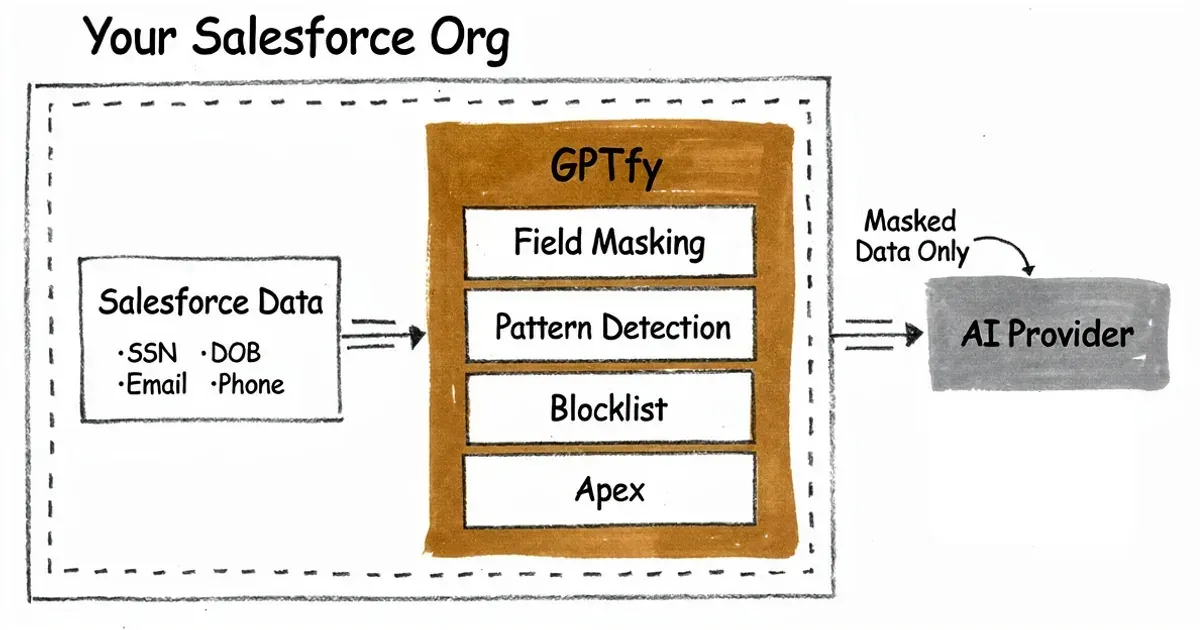
GPTfy data masking pipeline: PII fields are anonymised before leaving Salesforce
GPTfy's Four-Layer Masking Architecture
GPTfy's data masking system uses four distinct layers that operate in sequence, each designed to catch a different type of sensitive data pattern. The layers are configured declaratively in the Data Context Mapping settings and execute automatically before every AI callout.
Layer 1: Field Value-Based Masking
Layer 1 is the broadest layer. It masks the entire value of specified Salesforce fields before they are included in the AI prompt. This is appropriate for structured fields where the entire value is PII: email addresses, phone numbers, names, Social Security numbers, account numbers, and similar fields.
Configuration: In the Data Context Mapping field selection, set the Masking Scope to "Entire Value" for each field that should be fully anonymized. The original value is replaced with an opaque key (e.g., SF-0179-022). The key is stored in the Security Audit's PII Key field, enabling rehydration of the AI response with original values after processing.
- Best for: Email fields, Phone fields, Name fields, SSN fields, Medical Record Number fields, any structured field where the entire value is PII.
Layer 2: Format-Based Regex Masking
Layer 2 operates on long text fields — case notes, email bodies, meeting summaries, freeform descriptions — where PII appears embedded within unstructured content. It uses regular expressions (regex) to identify and mask specific patterns within the text.
Example: A Case Description field contains "Patient called at 555-867-5309 regarding account 490221-B." A regex pattern matching phone number formats masks 555-867-5309 to SF-0132. A separate regex masks the account number pattern.
Layer 2 supports two matching precision controls:
- Match Complete Word: Adds word boundary logic to prevent partial matches. "Cat" would not be masked inside "category" if this is enabled.
- Ignore Special Characters: Allows flexible matching for inconsistently formatted data — phone numbers written as (555) 867-5309 or 555.867.5309 or 5558675309 all match the same pattern.
- Best for: Phone numbers, email addresses, SSNs, account numbers, and other pattern-recognizable PII embedded in freeform text fields.
Layer 3: Blocklist-Based Masking
Layer 3 masks specific known values from long text fields using a manually maintained blocklist. This is useful when you know the exact sensitive terms to block — proprietary product names under NDA, internal code names, specific patient identifiers, or confidential project names.
Example blocklist entries: "Project Thunderbird; ConfidentialProtocol-7; alice.johnson@example.com; Contract-2024-XR7"
When any blocklist value appears in the field content, it is replaced with the configured replacement key. Blocklist matching is exact-string by default, making it precise but requiring the list to be maintained as sensitive terms change.
- Best for: Known sensitive terms, proprietary names, specific identifiers that follow no predictable pattern, and terms that regex cannot reliably match.
Layer 4: Apex-Based Custom Masking
Layer 4 provides maximum flexibility for complex masking scenarios that cannot be handled by field values, regex patterns, or blocklists. Organizations implement the AIApexSecurityLayerInterface in an Apex class to define custom masking logic.
Use cases for Apex-based masking include: composite identifiers that span multiple fields, domain-specific encoding schemes, masking that requires SOQL queries against other records, or formats too complex for regex.
Layer 4 executes after Layers 1, 2, and 3 — it operates on the data that remains after previous layers have run. This allows it to catch sensitive values that prior layers did not mask, without duplicating their work.
- Best for: Complex masking scenarios, custom identifier formats, masking logic that requires Apex business rules, and specialized data patterns unique to your organization.
Layer Execution Order
Layers execute in order: 1, 2, 3, then 4. Larger matching patterns are prioritized before sub-patterns within each layer to prevent partial masking. A value masked by Layer 1 does not re-trigger Layer 2 or 3 processing. Layer 4 receives the output of Layers 1-3 and can further process any remaining unmasked sensitive content.
HIPAA and GDPR Compliance with AI
Healthcare and financial services organizations face the strictest regulatory requirements for AI data handling. GPTfy's masking architecture is designed with these requirements as primary constraints, not afterthoughts.
HIPAA PHI Identifiers: What GPTfy Masks
HIPAA defines 18 categories of Protected Health Information (PHI) that must be de-identified for data to be considered non-PHI. GPTfy's masking layers natively address 16 of these 18 identifiers:
- Names — masked via Layer 1 (field value-based masking on name fields).
- Geographic data (addresses, zip codes) — masked via Layer 1 or Layer 2 (regex for zip codes within text).
- Dates (birth date, admission date, discharge date, death date) — masked via Layer 2 (date regex patterns).
- Phone numbers — masked via Layer 1 or Layer 2.
- Fax numbers — masked via Layer 1 or Layer 2.
- Email addresses — masked via Layer 1 or Layer 2.
- Social Security numbers — masked via Layer 2 (SSN regex pattern).
- Medical record numbers — masked via Layer 1 or custom blocklist.
- Health plan beneficiary numbers — masked via Layer 1 or Layer 2.
- Account numbers — masked via Layer 1 or Layer 2.
- Certificate or license numbers — masked via Layer 2 or Layer 3.
- Vehicle identifiers and serial numbers — masked via Layer 2 or Layer 3.
- Device identifiers and serial numbers — masked via Layer 2 or Layer 3.
- Web URLs — masked via Layer 2 (URL regex pattern).
- IP addresses — masked via Layer 2 (IP address regex pattern).
- Any other unique identifying number, characteristic, or code — masked via Layer 4 (custom Apex) for org-specific patterns.
The two HIPAA PHI identifiers that GPTfy does not address through text masking are: (17) biometric identifiers including finger and voice prints, and (18) full-face photographs and any comparable images. These require image-processing techniques outside the text-based masking pipeline.
GDPR Compliance Considerations
GDPR requires a legal basis for processing EU residents' personal data. When Salesforce data is sent to an AI model, this constitutes "processing" under GDPR. Key GDPR compliance mechanisms with GPTfy:
- Data minimization: GPTfy's Data Context Mapping gives admins explicit control over which fields are included in AI prompts. Fields not selected are not included — enforcing data minimization at the source.
- Pseudonymization: GPTfy's masking replaces personal data with opaque keys — a form of pseudonymization. Pseudonymized data that cannot be re-identified without the key is treated more favorably under GDPR than fully identifiable data.
- Data residency: BYOM via Named Credentials allows organizations to route EU data to AI endpoints located within the EU (e.g., Azure OpenAI in West Europe), satisfying GDPR data transfer restrictions for EU-hosted processing.
- Audit trail: Security Audit records provide documentation of what data was processed, what was masked, and what the AI received — enabling demonstration of GDPR compliance.
Sandbox Data Masking
A frequently overlooked compliance risk is sandbox environments. Salesforce sandboxes are often populated with production data copies for development and testing. If AI tools run in sandboxes against unmasked production data, the same PII exposure risk applies. GPTfy's masking runs identically in sandboxes — ensuring developers and testers working with AI-powered prompts are never exposed to raw production PII.
Named Credentials and API Security
Every AI connection in GPTfy uses Salesforce Named Credentials — the platform's built-in mechanism for securely storing and resolving authentication credentials for external callouts. Understanding how Named Credentials work clarifies why GPTfy's approach to API security is fundamentally safer than alternatives that store API keys in code or custom settings.
What Are Named Credentials?
Named Credentials are Salesforce metadata records that store endpoint URLs and authentication details (API keys, OAuth tokens, certificates) in Salesforce's encrypted platform storage. When Apex code or a Flow makes a callout using a Named Credential, Salesforce automatically resolves and applies the credential — the authentication details never appear in the code, in logs, or in the developer console.
Why Named Credentials Matter for AI Security
- API keys never in code: OpenAI, Azure OpenAI, Anthropic, and other AI provider API keys are stored in Named Credentials. Developers and admins configuring GPTfy never need to know the actual key value. There is no risk of accidental key exposure through code reviews, version control commits, or Salesforce debug logs.
- Centralized rotation: When an AI provider rotates or revokes an API key, the Named Credential is updated in one place. All prompts using that credential automatically use the new key without any code changes.
- No environment variable risk: Unlike solutions that store API keys in custom settings, environment variables, or configuration files, Named Credentials are managed by Salesforce's platform security layer and are not accessible via SOQL queries or Salesforce reports.
- Transport security: All callouts via Named Credentials enforce HTTPS. Salesforce validates SSL certificates, preventing man-in-the-middle attacks on AI provider connections.
Named Credential Types in GPTfy
- Packaged Named Credential: GPTfy includes a pre-configured Named Credential installed with the package. This provides immediate connectivity to the default AI provider without manual setup — useful for initial testing and evaluation.
- Custom Named Credentials: For BYOM configurations, admins create Named Credentials for each AI provider. GPTfy supports both Legacy Named Credentials and the newer External Credential type with Principal assignments.
- External Credentials: The modern Named Credential type used for OAuth 2.0 and other token-based authentication flows. Required for some AI provider integrations. GPTfy's documentation covers the specific External Credential configuration for each major provider.
Profile-Level Access Control
Named Credentials are assigned to AI Model records in GPTfy. AI Model records are used by Prompt records. Prompt records are accessible based on Salesforce profile and permission set assignments. This creates a layered access control chain: the user's profile determines which prompts they can run, prompts use specific AI models, and models use specific Named Credentials. A service rep cannot, by configuration alone, invoke a prompt configured for a different department or accessing a different AI provider.
Security Audit Records and Compliance Reporting
Every AI call processed through GPTfy creates a Security Audit record — a standard Salesforce custom object that captures the complete lifecycle of each AI interaction. Security Audit records are the compliance team's primary tool for verifying that data masking worked correctly, reviewing what data was sent to AI, and auditing AI response quality.
What Security Audit Records Capture
- Data (Original): The raw Salesforce data that was assembled by the Data Context Mapping before masking. This shows exactly what CRM records were used as AI context.
- Data (PII Removed): The masked version of the data payload — what actually reached the AI model. Compliance teams can verify that PII fields were correctly anonymized.
- Data (PII Key): The mapping between original PII values and their anonymized replacement keys. Stored encrypted. Used by GPTfy to rehydrate the AI response with original values after processing.
- AI Processed Data (No PII): The AI model's response using masked placeholders. Shows the raw AI output before PII rehydration.
- AI Processed Data (PII Added): The final AI response after PII values have been reinserted using the PII key. This is the response shown to the end user.
- Client Source: The channel through which the AI call was made — Utility Bar, Console, REST API, file upload. Useful for tracking AI usage patterns and identifying unexpected access channels.
- Token Usage: Input and output token counts for each AI call. Used for cost tracking and optimization — identifying high-token prompts that might benefit from a lighter model.
Querying Audit Records for Compliance
Security Audit records are standard Salesforce custom objects, which means they support the full range of Salesforce reporting tools:
- SOQL queries for programmatic analysis: SELECT Id, ccai__Client_Source__c, ccai__Data_PII_Removed__c FROM ccai__Security_Audit__c WHERE CreatedDate = LAST_N_DAYS:30
- Salesforce Reports for scheduled compliance exports
- Salesforce Dashboards for real-time AI usage monitoring
- CRM Analytics for advanced trend analysis and anomaly detection
Using Audit Records for Masking Validation
During initial GPTfy deployment, compliance teams should review Security Audit records to validate that masking is working correctly. The process:
- Run a prompt on a test record containing known PII (use a sandbox record, not production).
- Open the resulting Security Audit record.
- Compare Data (Original) to Data (PII Removed) — verify that all expected PII fields are replaced with keys.
- Review the PII Key field to confirm all original values are present with their corresponding replacement keys.
- Examine the AI Processed Data fields to confirm the AI response appropriately used masked placeholders.
Retention and Data Management
Security Audit records accumulate over time and should be managed to avoid storage limit issues. GPTfy provides recommendations for audit record retention policies: compliance requirements typically mandate retaining audit records for 6-7 years (HIPAA) to 3-5 years (GDPR data processing records). Salesforce's native archiving tools or custom cleanup logic can manage old audit records according to your retention policy.
Comparing GPTfy Masking to the Einstein Trust Layer
Both GPTfy and Salesforce's Einstein Trust Layer address PII protection for AI in Salesforce, but through different architectures with different levels of customer control and granularity. Understanding these differences is essential for organizations choosing their Salesforce AI security strategy.
Einstein Trust Layer Approach
The Einstein Trust Layer is Salesforce's built-in security layer for generative AI features including Agentforce, Einstein Copilot, and prompt templates in Flow Builder. It provides:
- Automated PII detection using Salesforce's built-in detection models — no customer configuration required.
- Contractual data non-retention: AI providers (OpenAI, Anthropic) contractually agree not to train on data processed through the Trust Layer.
- Prompt defense: heuristic scanning to detect and block prompt injection attacks.
- Toxicity detection: scanning outputs for harmful content before returning responses to users.
- Basic audit logging through Einstein's monitoring infrastructure.
GPTfy Four-Layer Masking Approach
GPTfy's masking operates inside the Salesforce org before any callout, and provides:
- Explicit field-level control: admins specify exactly which fields are masked and by which method.
- Four masking methods (field value, regex, blocklist, custom Apex) covering all PII pattern types.
- 16 of 18 HIPAA PHI identifier coverage with native configuration.
- Complete Security Audit records with original data, masked data, PII keys, and AI responses — queryable via SOQL.
- Works with any AI provider (BYOM) — not limited to providers covered by the Einstein Trust Layer agreement.
- Custom Apex masking for organization-specific complex patterns.
- Sandbox masking: identical masking in development environments.
Key Differences
- Control granularity: GPTfy gives admins explicit, field-by-field masking configuration. The Einstein Trust Layer uses automated PII detection — useful for broad coverage but less precise for org-specific sensitive fields.
- Audit depth: GPTfy's Security Audit records capture the complete data lifecycle (original, masked, AI response, rehydrated response) in SOQL-queryable Salesforce objects. The Einstein Trust Layer provides monitoring logs but with less field-level granularity.
- Provider coverage: The Einstein Trust Layer only applies to AI providers within Salesforce's Trust Layer agreement. GPTfy's masking applies before the callout regardless of which AI provider is used — masking works the same whether data goes to OpenAI, Anthropic, Google, or a self-hosted model.
- Compliance reporting: GPTfy Security Audit records can be included in Salesforce reports and exports for formal compliance documentation. Einstein Trust Layer logs require additional tooling to produce equivalent compliance reports.
- Setup requirement: The Einstein Trust Layer activates automatically for Einstein features — no customer configuration required. GPTfy masking requires explicit configuration in Data Context Mapping — more work upfront but more precise outcomes.
The Bottom Line
The Einstein Trust Layer provides a reasonable baseline of AI data protection for organizations using Salesforce's native AI features. GPTfy's masking architecture provides enterprise-grade, compliance-auditable, configurable PII protection appropriate for regulated industries — healthcare, financial services, legal, and government — where the Einstein Trust Layer's automated approach may not meet the documentation and granularity requirements of HIPAA, GDPR, or SOX audits.
Organizations with compliance obligations in regulated industries should implement GPTfy's masking as the primary AI data protection layer, regardless of whether they also use Einstein features. The two systems are not mutually exclusive.
Key takeaways
Masking Happens Before Data Leaves Salesforce
GPTfy's four masking layers execute inside the Salesforce org before any callout to an AI model. PII-stripped data reaches the AI; original values stay in Salesforce. AI providers never see raw customer data.
Four Layers Cover Every Data Pattern
Layer 1 masks entire field values (names, emails, phones). Layer 2 uses regex patterns for PII within long text. Layer 3 uses blocklists for known sensitive terms. Layer 4 executes custom Apex logic for complex cases. Layers stack — each catches what the previous missed.
HIPAA: 16 of 18 PHI Identifiers Masked Natively
GPTfy natively masks 16 of the 18 HIPAA Protected Health Information (PHI) identifiers. The two exceptions — biometric identifiers and full-face photographs — cannot be masked through text processing, as they require image-level processing outside the text pipeline.
Security Audit Records Provide Complete Audit Trails
Every GPTfy AI call creates a Security Audit record capturing the original data, PII-removed data, PII key (for reverse lookup), AI response without PII, and AI response with PII reinserted. These are standard Salesforce objects queryable via SOQL, Reports, and Dashboards.
Named Credentials Keep API Keys Out of Code
All AI provider connections use Salesforce Named Credentials. API keys are stored encrypted in Salesforce's credential store — never in code, config files, or environment variables. Named Credentials are automatically resolved at callout time by the Salesforce platform.
AppExchange Security Reviewed
GPTfy has completed Salesforce's AppExchange Security Review, which validates that the package follows Salesforce security best practices, handles data responsibly, and does not introduce vulnerabilities into customer orgs.
FAQ
AI data masking in Salesforce is the process of anonymizing personally identifiable information (PII) and protected health information (PHI) in CRM records before that data is sent to an AI model for processing. Instead of transmitting raw customer names, email addresses, phone numbers, or medical record numbers to an external AI provider, a masking layer replaces sensitive values with opaque keys. The AI processes anonymized data; original values remain inside Salesforce.
GPTfy natively masks 16 of the 18 HIPAA Protected Health Information (PHI) identifiers through its four-layer masking architecture. The two identifiers not addressed by text-based masking are biometric identifiers (fingerprints, voice prints) and full-face photographs — these require image-level processing outside the text pipeline. All 16 addressable identifiers (names, dates, geographic data, phone numbers, emails, SSNs, medical record numbers, account numbers, IP addresses, etc.) can be configured for masking.
Layer 1 (Field Value-Based): masks entire field values like email, phone, or name fields. Layer 2 (Format-Based Regex): uses regular expressions to detect and mask PII patterns within long text fields — useful for phone numbers or SSNs embedded in case notes. Layer 3 (Blocklist-Based): masks specific known sensitive terms from long text using a manually maintained list. Layer 4 (Apex-Based): executes custom Apex logic implementing the AIApexSecurityLayerInterface for complex masking scenarios that other layers cannot handle.
Original PII values stay inside Salesforce — they are never sent to the AI model. The masking layer creates a PII key mapping (original value → replacement key) which is stored in the Security Audit record's Data (PII Key) field. After the AI processes the masked data, GPTfy uses the PII key to rehydrate the response — reinserting original values in the appropriate places. Only Salesforce users with access to Security Audit records can see the PII key mapping.
The Einstein Trust Layer provides a solid baseline — automated PII detection, contractual data non-retention, and prompt defense — for organizations using Salesforce-native AI features. However, for regulated industries (healthcare, financial services, legal) requiring HIPAA-level audit trails, explicit field-level masking configuration, and SOQL-queryable compliance records, GPTfy's four-layer masking architecture provides substantially greater depth and auditability.
Security Audit records (ccai__Security_Audit__c) are custom Salesforce objects created automatically for every AI call processed through GPTfy. Each record captures: the original CRM data payload, the PII-masked data that was sent to the AI, the PII key mapping, the AI's response without PII, and the final response after PII rehydration. These records are queryable via SOQL and accessible through Salesforce Reports and Dashboards for compliance verification.
Yes, with GPTfy. GPTfy's masking applies identically in sandboxes as in production. When sandbox environments contain production data copies (as they commonly do after a full sandbox refresh), GPTfy ensures that AI-powered prompts running in the sandbox against that data apply the same PII masking as production. Without masking, sandbox AI use can inadvertently expose production PII to AI providers.
Named Credentials are Salesforce metadata records that store API keys and endpoint URLs in Salesforce's encrypted platform storage. When GPTfy makes a callout to an AI provider (OpenAI, Anthropic, Google), Salesforce resolves the Named Credential automatically — the API key never appears in code, logs, or the developer console. This prevents accidental API key exposure through code reviews, version control, or debug logging.
See GPTfy's Data Masking Work Live on Your Salesforce Records
We'll demonstrate all four masking layers on real CRM data — configuring field masking, regex patterns, and blocklists — and show the Security Audit record proving what the AI received vs what stayed in Salesforce.
Explore More
BYOM vs Einstein AI
Compare Bring Your Own Model with Einstein AI for Salesforce AI strategy.
RAG in Salesforce
Ground AI responses in Salesforce Knowledge with retrieval-augmented generation.
Agentic AI in Salesforce
Security and audit architecture for autonomous AI agents in Salesforce.
GPTfy Security Layer Feature
Enterprise PII masking and audit trails built into the GPTfy platform.
Audit Trails and Governance
HIPAA, GDPR, and SOX compliance via Salesforce-native audit records.
GPTfy AppExchange Listing
AppExchange Security Reviewed — install and start masking in minutes.